







Question: This lab illustrates how minor changes in a query may have a significant impact on the execution plan. The lab consists of a MySQL Workbench
This lab illustrates how minor changes in a query may have a significant impact on the execution plan.
The lab consists of a MySQL Workbench exercise followed by a zyLab exercise. The MySQL Workbench exercise is not graded.
MySQL Workbench exercise
Refer to the film, actor, and filmactor tables of the Sakila database. This exercise is based on the default Sakila installation. If you have altered these tables or their data, your results may be different.
Step Open MySQL Workbench and enter the following statements:
USE sakila; SELECT lastname, firstname, ROUNDAVGlength AS average FROM actor INNER JOIN filmactor ON filmactor.actorid actor.actorid INNER JOIN film ON filmactor.filmid film.filmid WHERE title "ALONE TRIP" GROUP BY lastname, firstname ORDER BY average;
Step Highlight the SELECT statement.
Step In the main menu, select Query Explain Current Statement.
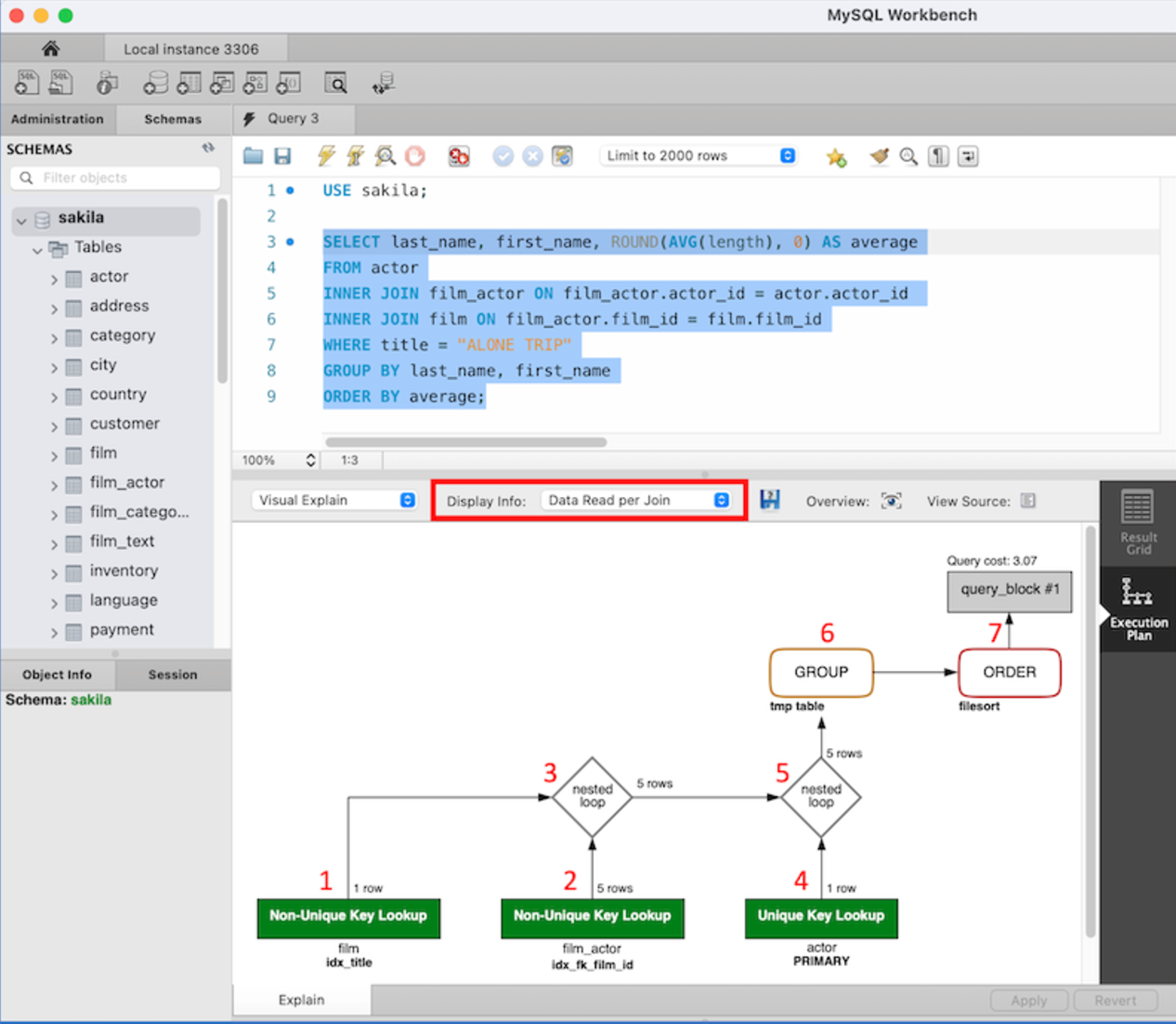
Step In the Display Info box, highlighted in red below, select Data Read per Join. Workbench displays the execution plan for the SELECT statement:
ref the image
The execution plan has seven parts, marked by red numbers on the screenshot:
Access a single film row using the idxtitle index on the title column.
Access matching filmactor rows using the idxfkfilmid index on the filmid foreign key.
Join the results using the nested loop algorithm.
Access actor rows via the index on the primary key.
Join actor rows with the prior join result using the MySQL nested loop algorithm.
Store the result in a temporary table and compute the aggregate function.
Sort and generate the result table.
Step Replace in the WHERE clause with and generate a new execution plan. Part of the execution plan says Index Range Scan. The index scan accesses all films with titles preceding "ALONE TRIP", rather than a single film.
Step Replace in the WHERE clause with and generate a third execution plan. Part of the execution plan says Full Table Scan and accesses actor rather than film.
zyLab exercise
Step In Main.sql write EXPLAIN statements for the three SELECT statements, in the order described above. Run and submit the statements for testing.
Given the same query and data, EXPLAIN generates the same execution plan as Workbench Query Explain Current Statement. However, this lab uses a subset of Sakila data, so the execution plans of step and prior steps do not match exactly.
Initialize database
source Initialize.sql
Your EXPLAIN statements go here
Step by Step Solution
There are 3 Steps involved in it
1 Expert Approved Answer
Step: 1 Unlock

Question Has Been Solved by an Expert!
Get step-by-step solutions from verified subject matter experts
Step: 2 Unlock
Step: 3 Unlock
 Study Help