







Question: This lab is using Cobol Mainframe, I am lost. I do not understand the directions and I need some help interperting what I actually have
This lab is using Cobol Mainframe, I am lost. I do not understand the directions and I need some help interperting what I actually have to do. I know I need an input output file, and I have to set up some kind of field for that but I'm just lost. Any help will be appreciated
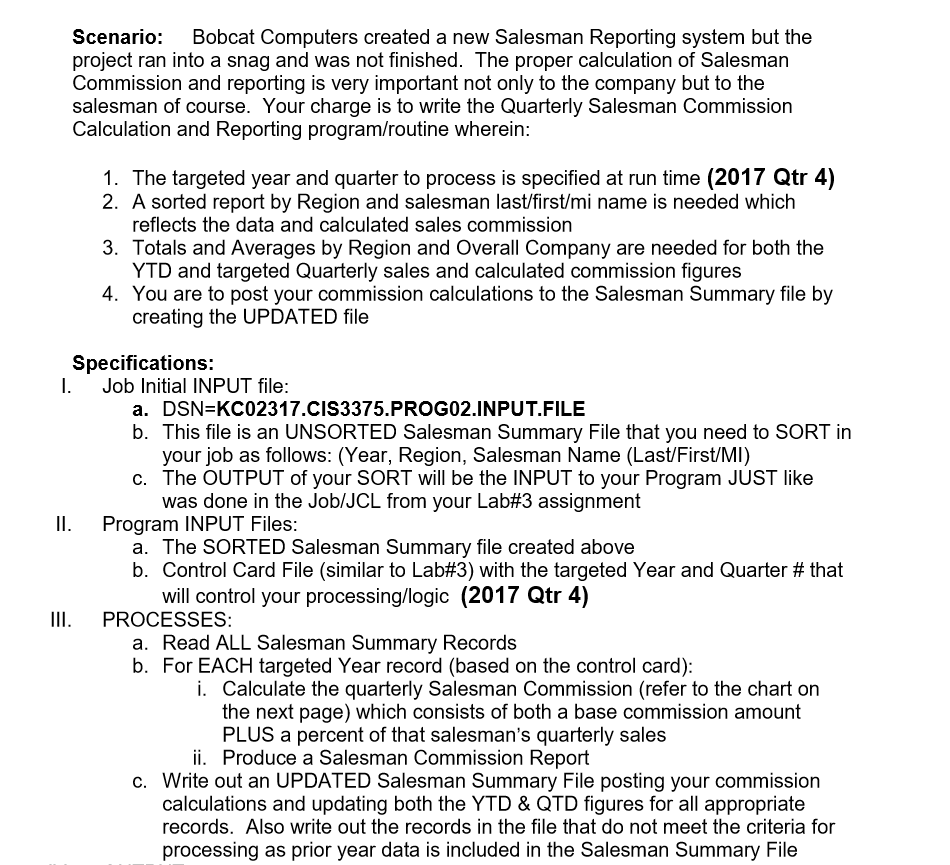
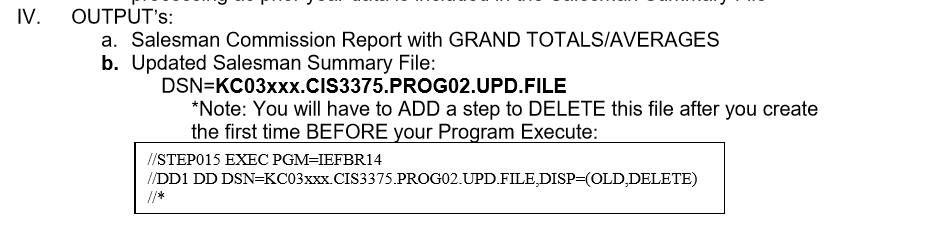
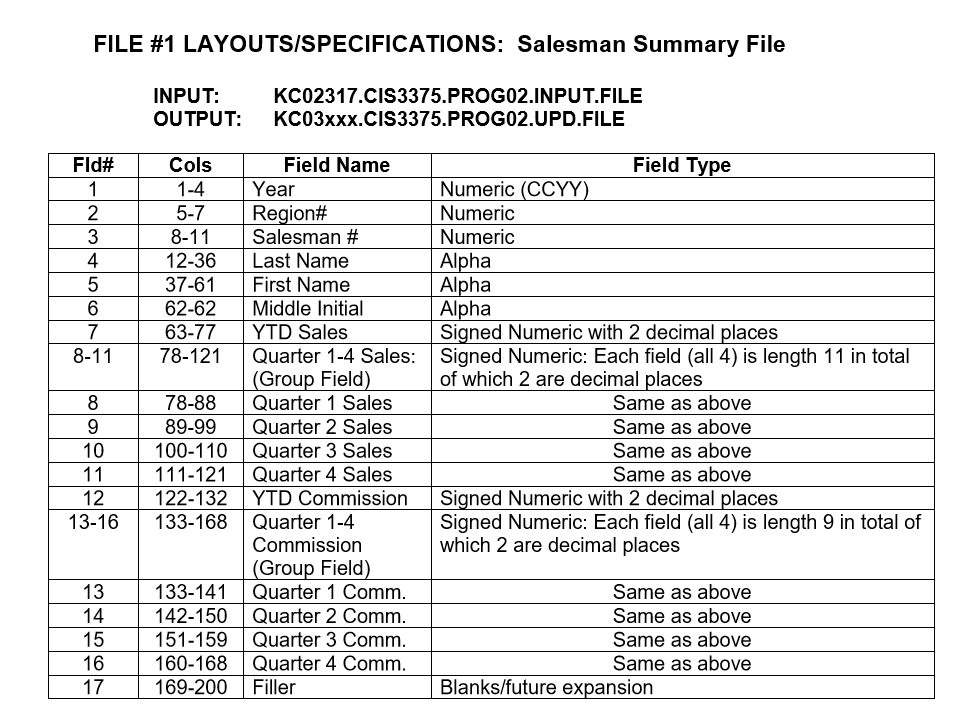
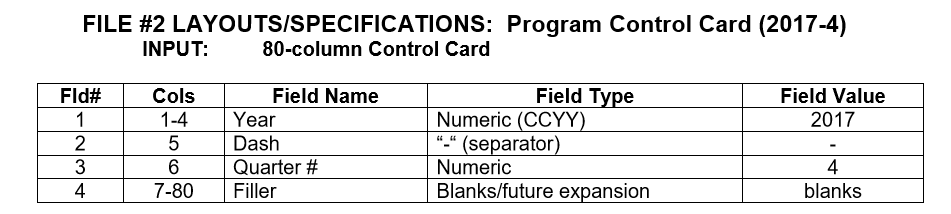
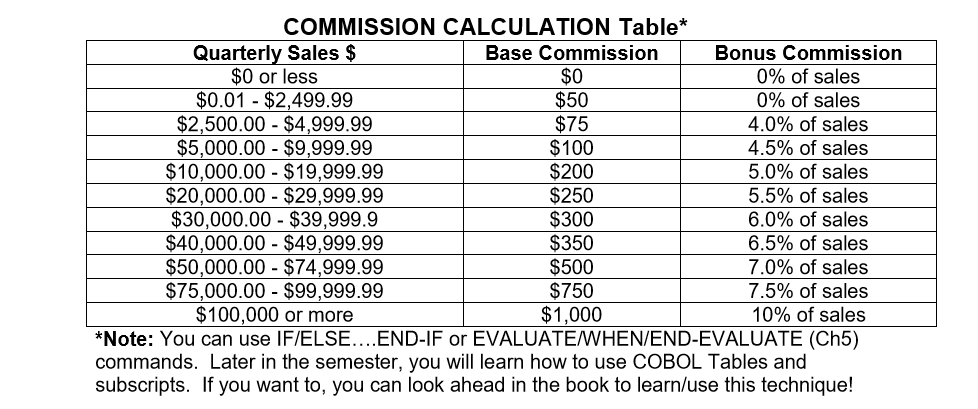
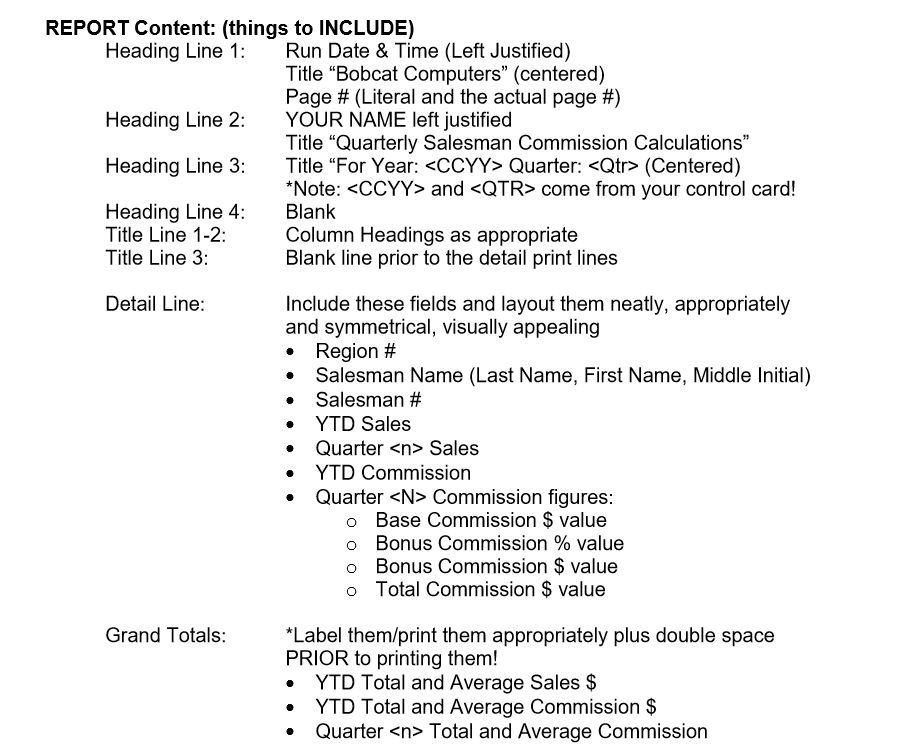
Scenario: Bobcat Computers created a new Salesman Reporting system but the project ran into a snag and was not finished. The proper calculation of Salesman Commission and reporting is very important not only to the company but to the salesman of course. Your charge is to write the Quarterly Salesman Commission Calculation and Reporting program/routine wherein: 1. The targeted year and quarter to process is specified at run time (2017 Qtr 4) 2. A sorted report by Region and salesman last/first/mi name is needed which reflects the data and calculated sales commission YTD and targeted Quarterly sales and calculated commission figures creating the UPDATED file 3. Totals and Averages by Region and Overall Company are needed for both the 4. You are to post your commission calculations to the Salesman Summary file by Specifications. I. Job Initial INPUT file: a. DSN-KC02317.CIS3375.PROG02.INPUT.FILE b. This file is an UNSORTED Salesman Summary File that you need to SORT in your job as follows: (Year, Region, Salesman Name (Last/First/MI) c. The OUTPUT of your SORT will be the INPUT to your Program JUST like was done in the Job/JCL from your Lab#3 assignment II. Program INPUT Files: a. The SORTED Salesman Summary file created above b. Control Card File (similar to La 3) with the targeted Year and Quarter # that will control your processing/logic (2017 Qtr 4) III. PROCESSES: a. Read ALL Salesman Summary Records b. For EACH targeted Year record (based on the control card) i. Calculate the quarterly Salesman Commission (refer to the chart on the next page) which consists of both a base commission amount PLUS a percent of that salesman's quarterly sales ii. Produce a Salesman Commission Report c. Write out an UPDATED Salesman Summary File posting your commission calculations and updating both the YTD & QTD figures for all appropriate records. Also write out the records in the file that do not meet the criteria for processing as prior year data is included in the Salesman Summary File Scenario: Bobcat Computers created a new Salesman Reporting system but the project ran into a snag and was not finished. The proper calculation of Salesman Commission and reporting is very important not only to the company but to the salesman of course. Your charge is to write the Quarterly Salesman Commission Calculation and Reporting program/routine wherein: 1. The targeted year and quarter to process is specified at run time (2017 Qtr 4) 2. A sorted report by Region and salesman last/first/mi name is needed which reflects the data and calculated sales commission YTD and targeted Quarterly sales and calculated commission figures creating the UPDATED file 3. Totals and Averages by Region and Overall Company are needed for both the 4. You are to post your commission calculations to the Salesman Summary file by Specifications. I. Job Initial INPUT file: a. DSN-KC02317.CIS3375.PROG02.INPUT.FILE b. This file is an UNSORTED Salesman Summary File that you need to SORT in your job as follows: (Year, Region, Salesman Name (Last/First/MI) c. The OUTPUT of your SORT will be the INPUT to your Program JUST like was done in the Job/JCL from your Lab#3 assignment II. Program INPUT Files: a. The SORTED Salesman Summary file created above b. Control Card File (similar to La 3) with the targeted Year and Quarter # that will control your processing/logic (2017 Qtr 4) III. PROCESSES: a. Read ALL Salesman Summary Records b. For EACH targeted Year record (based on the control card) i. Calculate the quarterly Salesman Commission (refer to the chart on the next page) which consists of both a base commission amount PLUS a percent of that salesman's quarterly sales ii. Produce a Salesman Commission Report c. Write out an UPDATED Salesman Summary File posting your commission calculations and updating both the YTD & QTD figures for all appropriate records. Also write out the records in the file that do not meet the criteria for processing as prior year data is included in the Salesman Summary File
Step by Step Solution
There are 3 Steps involved in it

Get step-by-step solutions from verified subject matter experts
 Study Help