







Question: //this method is saving the invoices list static void SaveAllInvoices(List invoices) { TextWriter writer = new StreamWriter(FILE); foreach (Invoice o in invoices) { //1 -
//this method is saving the invoices list static void SaveAllInvoices(List
foreach (Invoice o in invoices) { //1 - missing this line
writer.WriteLine(jsonString); }
//2 - missing this line }
//this method is reading the invoices and returning only the incompleted ones static List
// implement your code here. // tips: //- read the file //- loop through the invoices //- select the ones that match your condition //- populate the list //- close the file
return invoices; }
its c# can u fill the code? it does matter right or wrong
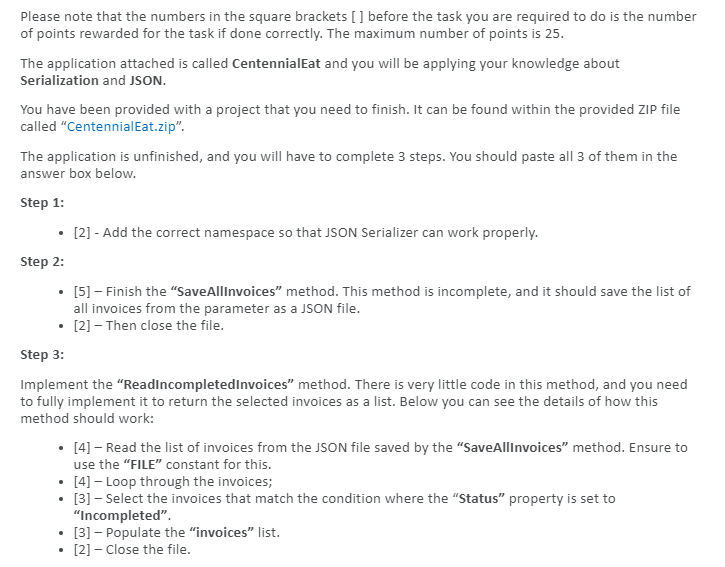
Please note that the numbers in the square brackets [] before the task you are required to do is the number of points rewarded for the task if done correctly. The maximum number of points is 25. The application attached is called CentennialEat and you will be applying your knowledge about Serialization and JSON. You have been provided with a project that you need to finish. It can be found within the provided ZIP file called "CentennialEat.zip". The application is unfinished, and you will have to complete 3 steps. You should paste all 3 of them in the answer box below. Step 1: [2] - Add the correct namespace so that JSON Serializer can work properly. Step 2: . [5] Finish the "SaveAllInvoices" method. This method is incomplete, and it should save the list of all invoices from the parameter as a JSON file. [2] Then close the file. Step 3: Implement the "Readincompletedinvoices" method. There is very little code in this method, and you need to fully implement it to return the selected invoices as a list. Below you can see the details of how this method should work: [4] Read the list of invoices from the JSON file saved by the "SaveAllinvoices method. Ensure to use the "FILE constant for this. . [4] Loop through the invoices; [3] - Select the invoices that match the condition where the "Status property is set to "Incompleted". [3] - Populate the "invoices" list. [2] - Close the file
Step by Step Solution
There are 3 Steps involved in it

Get step-by-step solutions from verified subject matter experts
 Study Help