







Question: This needs to be an Android Studio project using Java. Operation This app maintains the 2 players for a 2-player game. Each player must specify
This needs to be an Android Studio project using Java.
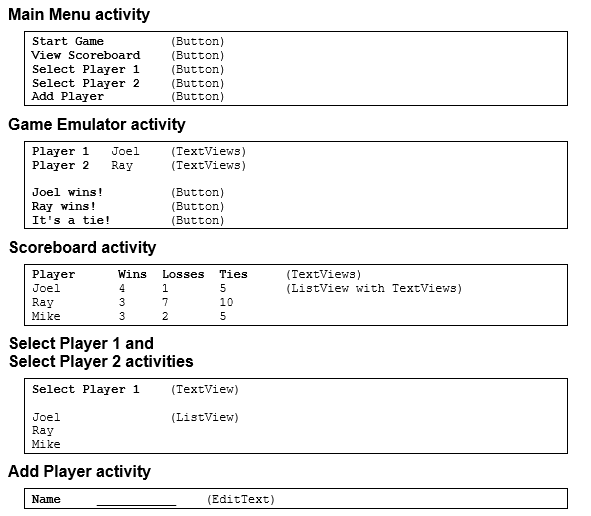
Operation
This app maintains the 2 players for a 2-player game. Each player must specify a name.
The Main Menu activity provides 5 buttons for starting the 5 activities of the app.
The Game Emulator activity displays player 1 and 2 and provides 3 buttons that can be used
to specify who won, lost, or tied the game.
The Scoreboard activity displays all players that are stored in the database as well as their
wins, losses, and ties.
The Select Player activity allows the user to select player 1 or 2 from a list of players thats
stored in the database.
The Add Player activity allows the user to add a new player to the database.
This is an android studio application.
Page 1
Main Menu activity
Start Game
(Button)
View Scoreboard
(Button)
Select Player 1
(Button)
Select Player 2
(Button)
Add Player
(Button)
Game Emulator activity
Player 1
Joel
(TextViews)
Player 2
Ray
(TextViews)
Joel wins!
(Button)
Ray wins!
(Button)
It's a tie!
(Button)
Scoreboard activity
Player Wins Losses Ties
(TextViews)
Joel 4 1 5 (ListView with TextViews)
Ray 3 7 10
Mike 3 2 5
Select Player 1 and
Select Player 2 activities
Select Player 1
(TextView)
Joel
(ListView)
Ray
Mike
Add Player activity
Name
___________ (EditText)
Specifications
When the Game Emulator activity starts, it should check to make sure players 1 and 2 have
been selected. If a player has not been selected, this activity should display the Select Player
activity for the unselected player.
If the user clicks on a button on the Game Emulator activity, the app should display the
Scoreboard activity.
The Scoreboard activity should sort the players by the number of wins in descending order.
Database table
The database should have a single table named player with 5 columns like this:
player
======
_id
name
wins
losses
ties
Enhancements
Anytime:
Modify the app to make it easier to navigate between its activities. For example,
you may want to add menus or buttons to the activities. As a part of that process, you may
want to restructure the app so it uses fewer activities. For example, you may want to remove
the Main Menu activity and display the Game Emulator activity when the app starts.
Anytime:
Add a way to update a players name and/or a way to delete a player.
Anytime:
Convert the activities to fragments and add multi-pane layouts that allow the app to
work better for large screens.
Remember to have the app display your name somehow.
Step by Step Solution
There are 3 Steps involved in it

Get step-by-step solutions from verified subject matter experts
 Study Help