Question: This needs to be done in C#. Please help me out. You have 2 days for solving this question. Step 3: Create a console application
 This needs to be done in C#. Please help me out. You have 2 days for solving this question.
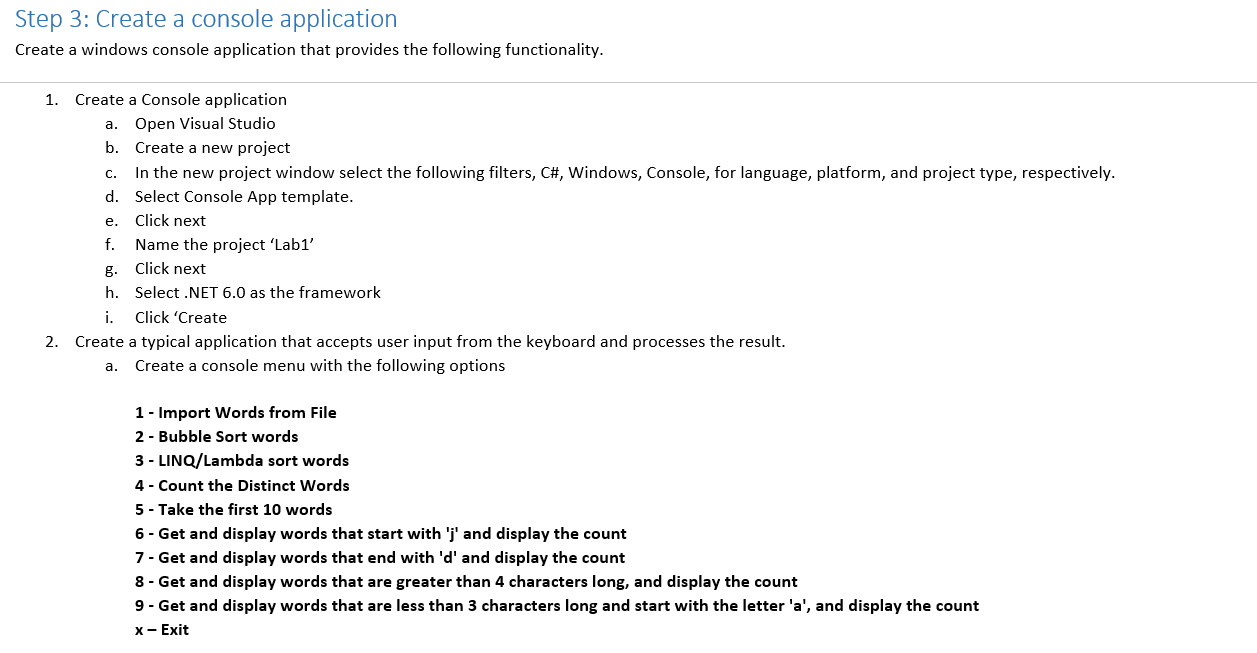
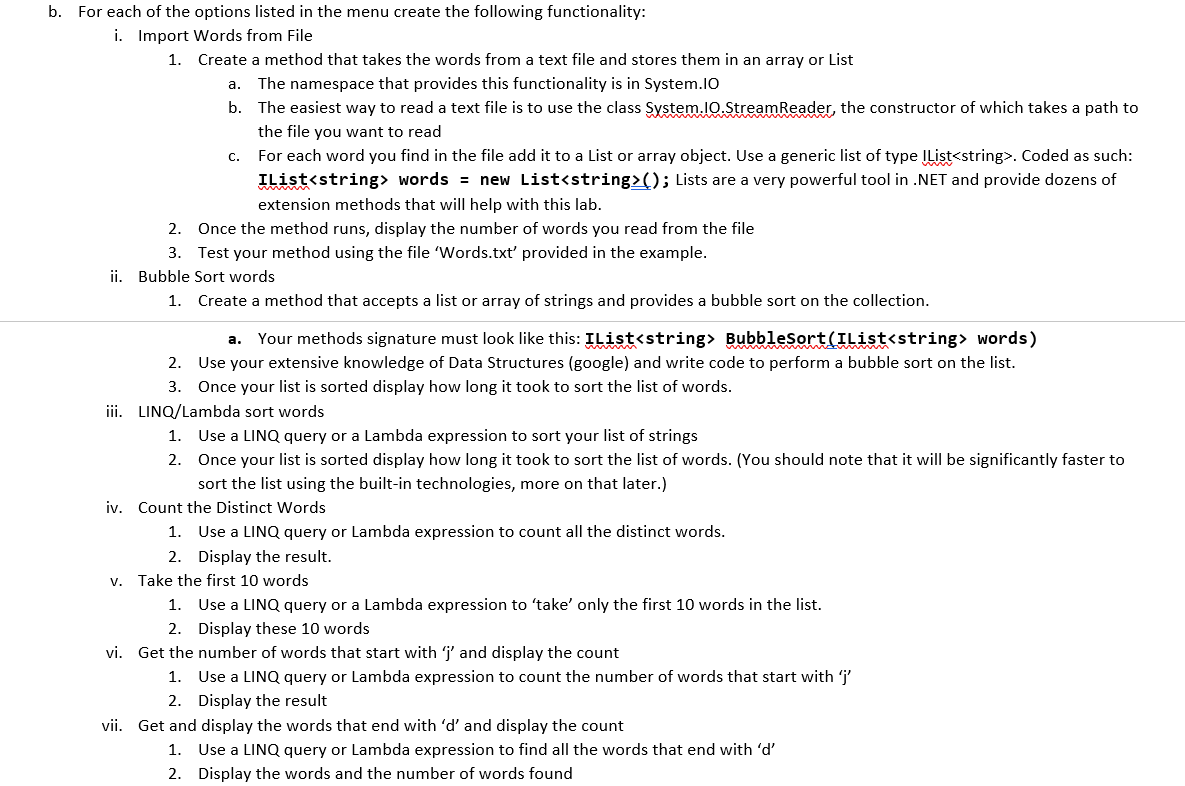
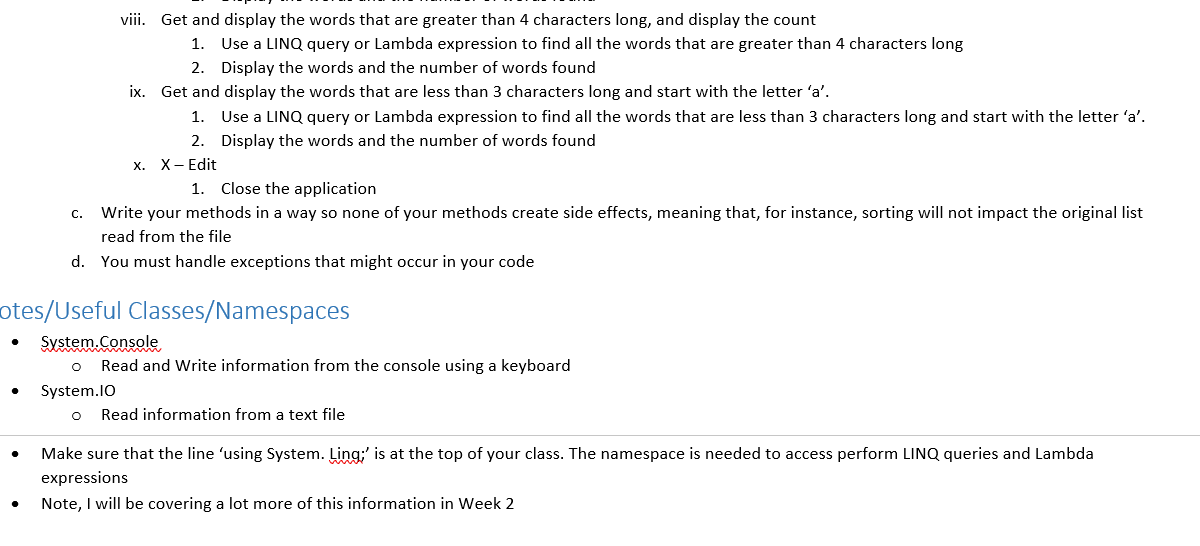
Step 3: Create a console application Create a windows console application that provides the following functionality. C. e. 1. Create a Console application a. Open Visual Studio b. Create a new project In the new project window select the following filters, C#, Windows, Console, for language, platform, and project type, respectively. d. Select Console App template. Click next f. Name the project 'Lab1' Click next h. Select .NET 6.0 as the framework i. Click 'Create 2. Create a typical application that accepts user input from the keyboard and processes the result. Create a console menu with the following options a. 1 - Import Words from File 2 - Bubble Sort words 3 - LINQ/Lambda sort words 4 - Count the Distinct Words 5 - Take the first 10 words 6 - Get and display words that start with 'j' and display the count 7- Get and display words that end with 'd' and display the count 8 - Get and display words that are greater than 4 characters long, and display the count 9 - Get and display words that are less than 3 characters long and start with the letter 'a', and display the count X-Exit b. For each of the options listed in the menu create the following functionality: i. Import Words from File 1. Create a method that takes the words from a text file and stores them in an array or List a. The namespace that provides this functionality is in System.IO b. The easiest way to read a text file is to use the class System.IO.StreamReader, the constructor of which takes a path to the file you want to read For each word you find in the file add it to a List or array object. Use a generic list of type IList. Coded as such: IList words = new List(); Lists are a very powerful tool in .NET and provide dozens of extension methods that will help with this lab. 2. Once the method runs, display the number of words you read from the file 3. Test your method using the file 'Words.txt' provided in the example. ii. Bubble Sort words 1. Create a method that accepts a list or array of strings and provides a bubble sort on the collection. C. a. Your methods signature must look like this: IList BubbleSort(IList words) 2. Use your extensive knowledge of Data Structures (google) and write code to perform a bubble sort on the list. 3. Once your list is sorted display how long it took to sort the list of words. iii. LINQ/Lambda sort words 1. Use a LINQ query or a Lambda expression to sort your list of strings 2. Once your list is sorted display how long it took to sort the list of words. (You should note that it will be significantly faster to sort the list using the built-in technologies, more on that later.) iv. Count the Distinct Words 1. Use a LINQ query or Lambda expression to count all the distinct words. 2. Display the result. v. Take the first 10 words 1. Use a LINQ query or a Lambda expression to 'take' only the first 10 words in the list. 2. Display these 10 words vi. Get the number of words that start with 'j' and display the count 1. Use a LINQ query or Lambda expression to count the number of words that start with 'j' 2. Display the result vii. Get and display the words that end with 'd' and display the count 1. Use a LINQ query or Lambda expression to find all the words that end with 'd' 2. Display the words and the number of words found viii. Get and display the words that are greater than 4 characters long, and display the count 1. Use a LINQ query or Lambda expression to find all the words that are greater than 4 characters long 2. Display the words and the number of words found ix. Get and display the words that are less than 3 characters long and start with the letter 'a'. 1. Use a LINQ query or Lambda expression to find all the words that are less than 3 characters long and start with the letter 'a'. 2. Display the words and the number of words found X. X-Edit 1. Close the application c. Write your methods in a way so none of your methods create side effects, meaning that, for instance, sorting will not impact the original list read from the file d. You must handle exceptions that might occur in your code otes/Useful Classes/Namespaces System.Console Read and write information from the console using a keyboard System.IO Read information from a text file o . o Make sure that the line 'using System. Ling;' is at the top of your class. The namespace is needed to access perform LINQ queries and Lambda expressions Note, I will be covering a lot more of this information in Week 2









 Study Help