







Question: This needs to be written in c# Create an initial GUI for an airline flight reservation system that will have minimal functionality. Please see the
This needs to be written in c#
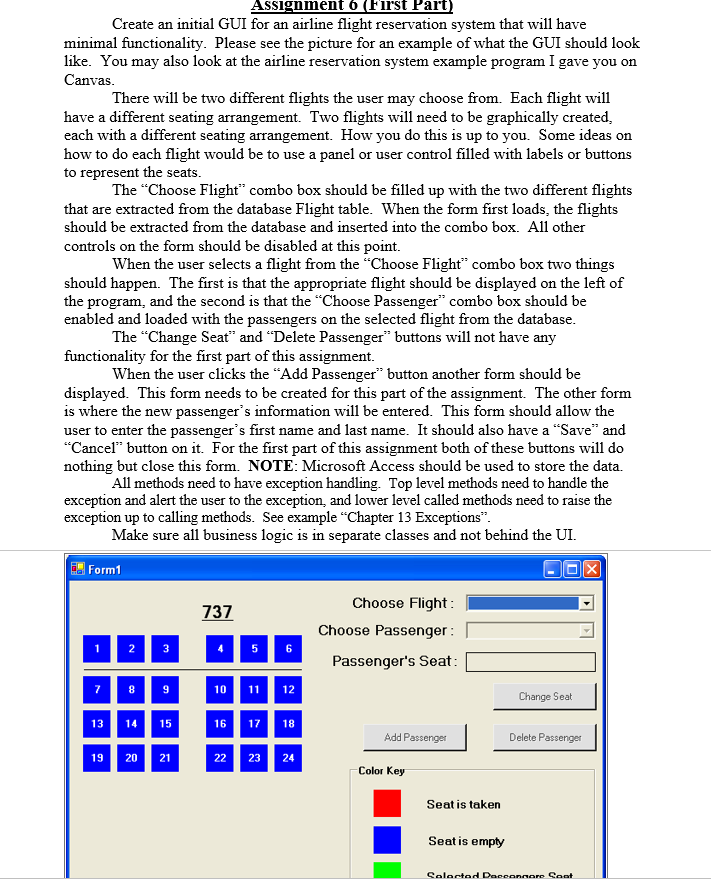
Create an initial GUI for an airline flight reservation system that will have minimal functionality. Please see the picture for an example of what the GUI should look like. You may also look at the airline reservation system example program I gave you on Canvas. There will be two different flights the user may choose from. Each flight will have a different seating arrangement. Two flights will need to be graphically created, each with a different seating arrangement. How you do this is up to you. Some ideas on how to do each flight would be to use a panel or user control filled with labels or buttons to represent the seats. The "Choose Flight" combo box should be filled up with the two different flights that are extracted from the database Flight table. When the form first loads, the flights should be extracted from the database and inserted into the combo box. All other controls on the form should be disabled at this point. When the user selects a flight from the "Choose Flight" combo box two things should happen. The first is that the appropriate flight should be displayed on the left of the program, and the second is that the "Choose Passenger" combo box should be enabled and loaded with the passengers on the selected flight from the database. The "Change Seat" and "Delete Passenger" buttons will not have any functionality for the first part of this assignment. When the user clicks the "Add Passenger" button another form should be displayed. This form needs to be created for this part of the assignment. The other form is where the new passenger's information will be entered. This form should allow the user to enter the passenger's first name and last name. It should also have a "Save" and "Cancel" button on it. For the first part of this assignment both of these buttons will do nothing but close this form. Microsoft Access should be used to store the data. All methods need to have exception handling. Top level methods need to handle the exception and alert the user to the exception, and lower level called methods need to raise the exception up to calling methods. See example "Chapter 13 Exceptions". Make sure all business logic is in separate classes and not behind the UI
Step by Step Solution
There are 3 Steps involved in it

Get step-by-step solutions from verified subject matter experts
 Study Help