







Question: This program contains a text box where a user can enter a birth date and then click a Verify button, which determines whether the user
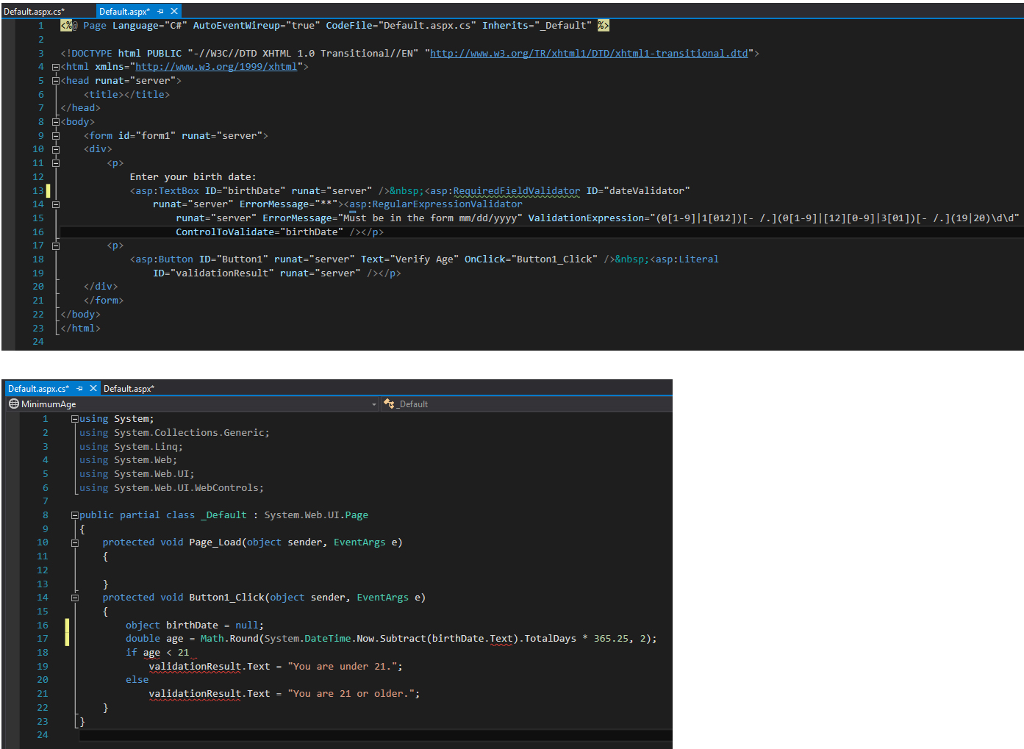
This program contains a text box where a user can enter a birth date and then click a Verify button, which determines whether the user is 21 or older. The program has several problems that prevent it from working successfully. Find and debug the errors.
(file) Default.aspx
Enter your birth date: runat="server" ErrorMessage="**"> runat="server" ErrorMessage="Must be in the form mm/dd/yyyy" ValidationExpression="(0[1-9]|1[012])[- /.](0[1-9]|[12][0-9]|3[01])[- /.](19|20)\d\d" ControlToValidate="birthDate" />
ID="validationResult" runat="server" />
(File) Default.aspx.cs
using System; using System.Collections.Generic; using System.Linq; using System.Web; using System.Web.UI; using System.Web.UI.WebControls;
public partial class _Default : System.Web.UI.Page { protected void Page_Load(object sender, EventArgs e) {
} protected void Button1_Click(object sender, EventArgs e) { double age = Math.Round(System.DateTime.Now.Subtract(birthDate.Text).TotalDays * 365.25, 2); if age
Default.aspx cs Default.aspx" 1 Page Language AutoEventwireup-"true" Code Default.aspx.cs Inherits Default html PUBLIC //W3C//DTD XHTML 1.0 Transitional/ /EN DOCTYPE 4 E 7
21 22 23
Step by Step Solution
There are 3 Steps involved in it

Get step-by-step solutions from verified subject matter experts
 Study Help