







Question: This program has to be coded in Java, implementing JavaFX and ultimately creating the GUI. Design and implement a GUI that converts a length into
This program has to be coded in Java, implementing JavaFX and ultimately creating the GUI.
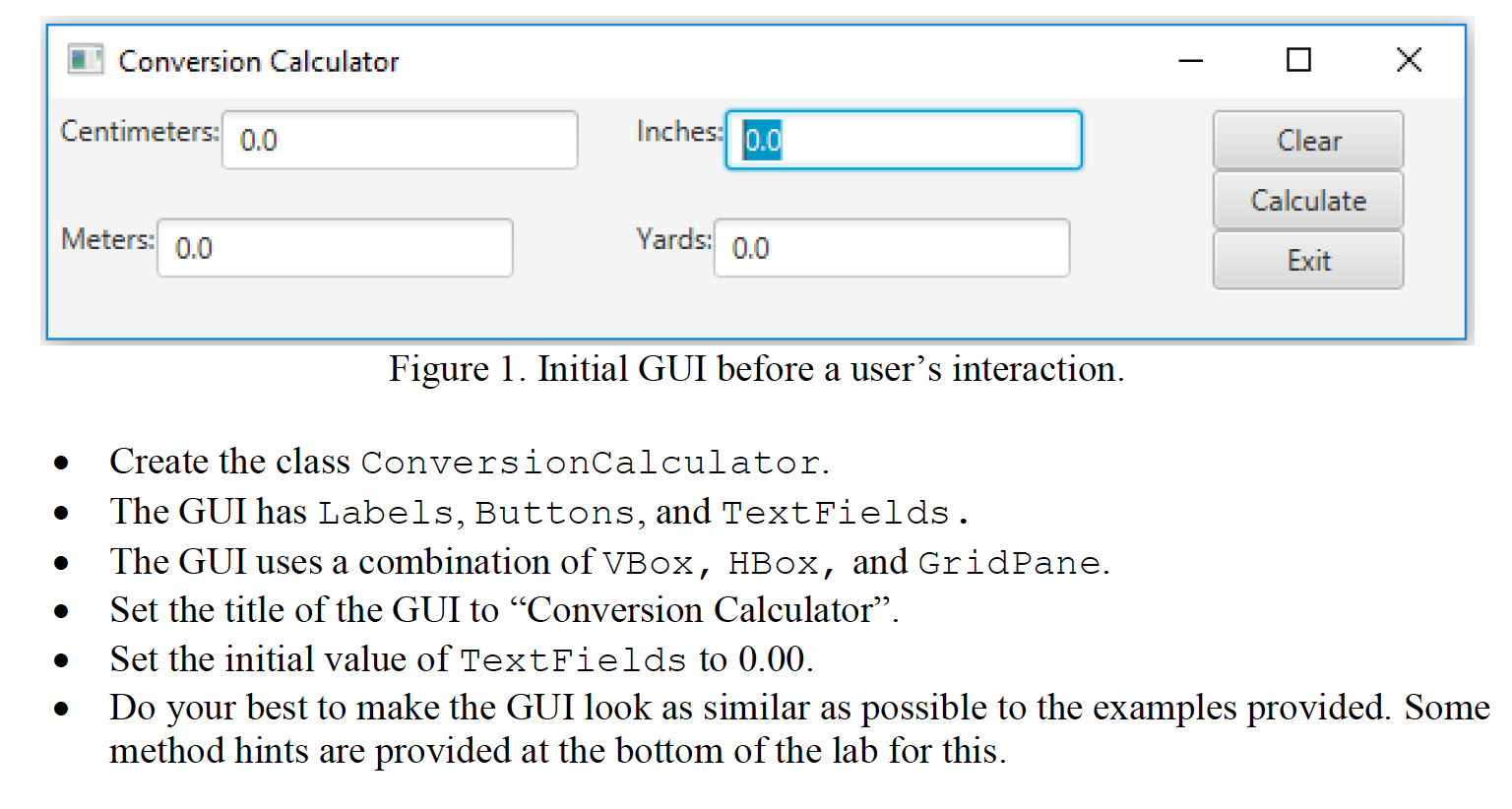
Design and implement a GUI that converts a length into different units. Reference the figure below and construct a GUI similar to Figure 1.
Implement the following event handling routines. For each event handler, you can create a separate class file or write the class inside of the ConversionCalculator class.
Use a combination of HBox, VBox, and GridPane to achieve the layout of the controls.
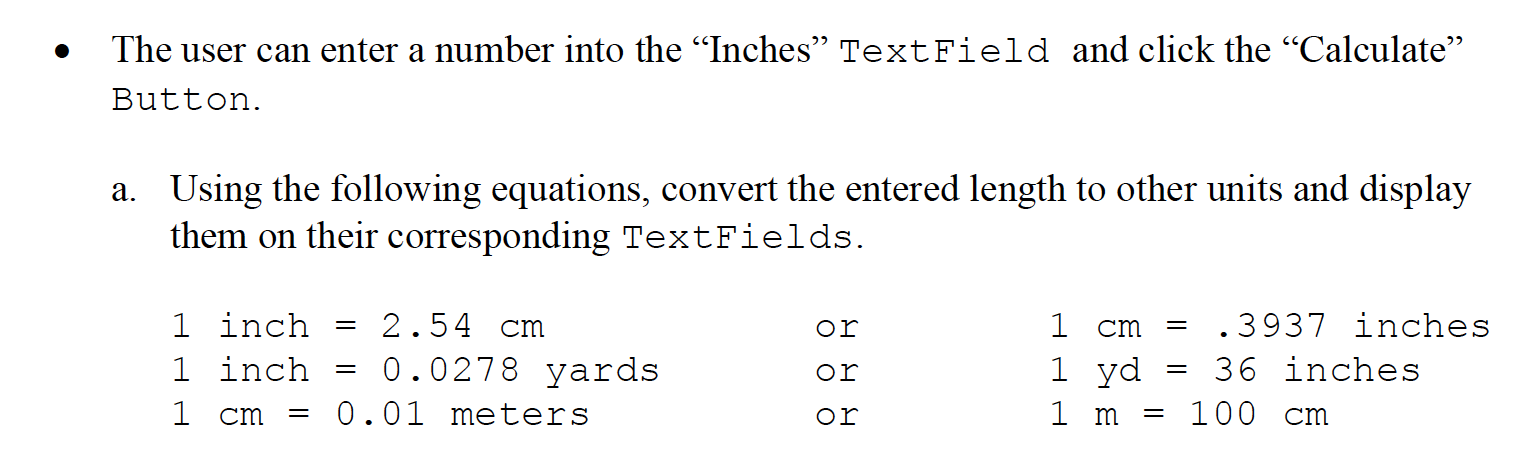
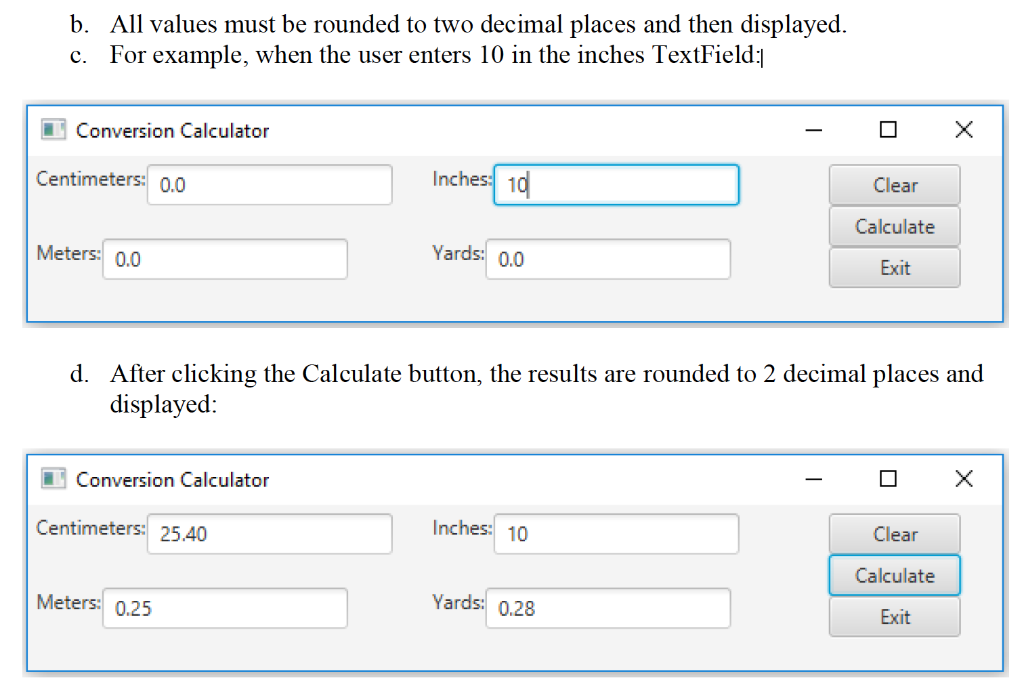
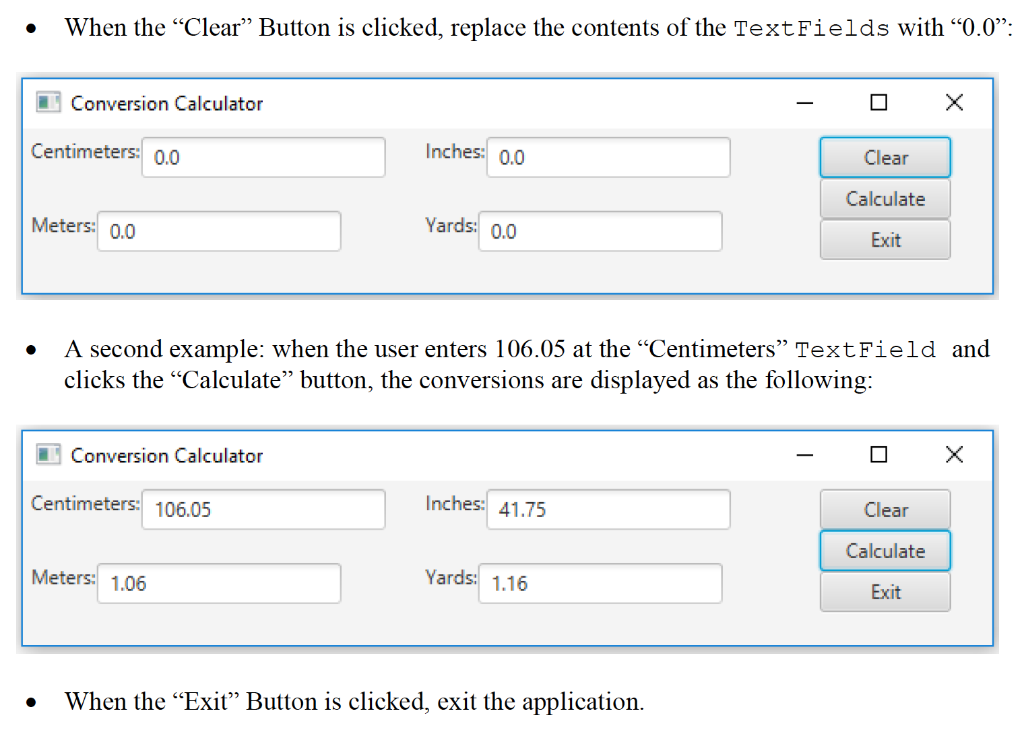
Conversion Calculator Centimeters: 0.0 Inches 0.0 Clear Calculate Meters: 0.0 Yards: 0.0 Exit Figure 1. Initial GUI before a user's interaction. . Create the class ConversionCalculator. The GUI has Labels, Buttons, and TextFields. The GUI uses a combination of VBox, HBox, and GridPane. Set the title of the GUI to Conversion Calculator. Set the initial value of TextFields to 0.00. Do your best to make the GUI look as similar as possible to the examples provided. Some method hints are provided at the bottom of the lab for this. The user can enter a number into the Inches TextField and click the Calculate Button. a. Using the following equations, convert the entered length to other units and display them on their corresponding TextFields. = or = 1 inch 1 inch 2.54 cm 0.0278 yards 0.01 meters or 1 cm .3937 inches 1 yd 36 inches 1 m = 100 cm = 1 cm or b. All values must be rounded to two decimal places and then displayed. c. For example, when the user enters 10 in the inches TextField:) Conversion Calculator x Centimeters: 0.0 Inches 10 Clear Calculate Meters: 0.0 Yards: 0.0 Exit d. After clicking the Calculate button, the results are rounded to 2 decimal places and displayed: Conversion Calculator Centimeters: 25.40 Inches: 10 Clear Calculate Meters: 0.25 Yards: 0.28 Exit When the Clear Button is clicked, replace the contents of the TextFields with 0.0: Conversion Calculator Centimeters: 0.0 Inches: 0.0 Clear Calculate Meters: 0.0 Yards: 0.0 Exit . A second example: when the user enters 106.05 at the Centimeters TextField and clicks the Calculate button, the conversions are displayed as the following: Conversion Calculator Centimeters: 106.05 Inches: 41.75 Clear Calculate Meters: 1.06 Yards: 1.16 Exit . When the Exit Button is clicked, exit the application. Conversion Calculator Centimeters: 0.0 Inches 0.0 Clear Calculate Meters: 0.0 Yards: 0.0 Exit Figure 1. Initial GUI before a user's interaction. . Create the class ConversionCalculator. The GUI has Labels, Buttons, and TextFields. The GUI uses a combination of VBox, HBox, and GridPane. Set the title of the GUI to Conversion Calculator. Set the initial value of TextFields to 0.00. Do your best to make the GUI look as similar as possible to the examples provided. Some method hints are provided at the bottom of the lab for this. The user can enter a number into the Inches TextField and click the Calculate Button. a. Using the following equations, convert the entered length to other units and display them on their corresponding TextFields. = or = 1 inch 1 inch 2.54 cm 0.0278 yards 0.01 meters or 1 cm .3937 inches 1 yd 36 inches 1 m = 100 cm = 1 cm or b. All values must be rounded to two decimal places and then displayed. c. For example, when the user enters 10 in the inches TextField:) Conversion Calculator x Centimeters: 0.0 Inches 10 Clear Calculate Meters: 0.0 Yards: 0.0 Exit d. After clicking the Calculate button, the results are rounded to 2 decimal places and displayed: Conversion Calculator Centimeters: 25.40 Inches: 10 Clear Calculate Meters: 0.25 Yards: 0.28 Exit When the Clear Button is clicked, replace the contents of the TextFields with 0.0: Conversion Calculator Centimeters: 0.0 Inches: 0.0 Clear Calculate Meters: 0.0 Yards: 0.0 Exit . A second example: when the user enters 106.05 at the Centimeters TextField and clicks the Calculate button, the conversions are displayed as the following: Conversion Calculator Centimeters: 106.05 Inches: 41.75 Clear Calculate Meters: 1.06 Yards: 1.16 Exit . When the Exit Button is clicked, exit the application
Step by Step Solution
There are 3 Steps involved in it

Get step-by-step solutions from verified subject matter experts
 Study Help