







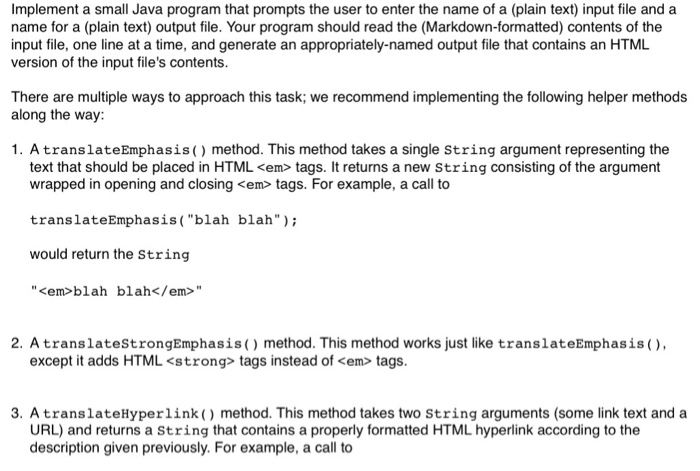
Question: This program is in Java! Included below are some input files for reference! Please include all comments so I can understand the code! Thanks! translateHyperlink(my
This program is in Java!
Included below are some input files for reference!
Please include all comments so I can understand the code!
Thanks!
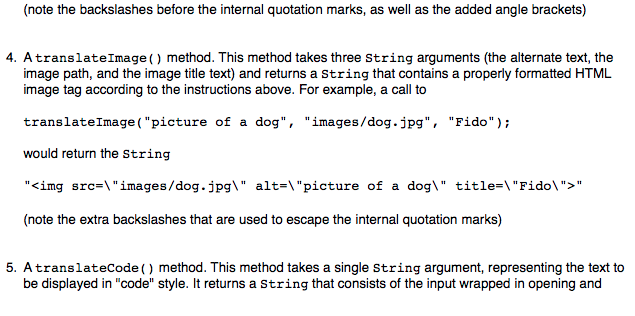
translateHyperlink("my link", "http://www.cs.school.edu");
would return the String "my link"
"my link"
Sample .txt files are shown below (Title in bold):
first.txt
*********************************************************************************************************************************************************
This is my **first** Web page. Go to my [second page.](second.html)  I teach or have taught the following classes: + CSE 101 + CSE/ISE 102 + CSE 114 + CSE/ISE 312
*********************************************************************************************************************************************************
markdownexample.txt
*********************************************************************************************************************************************************
This is a sample `Markdown` file. *Markdown* is a simple notation for translating **plaintext** documents into **HTML**. Instead of using exotic [HTML](http://www.w3.org) tags like ``, Markdown lets you use simple text symbols to indicate how to display different kinds of text. For example, here is some code to display a "smiley-face" image:  If you run this text through your *MarkdownTranslator* program, you should receive a neatly-formatted HTML version of this *file*. + This is a simple unordered list + It contains a total of three list items + and should be surrounded by the correct UL tags in the HTML version This is the *last* line in the test file. ********************************************************************************************************************************************************
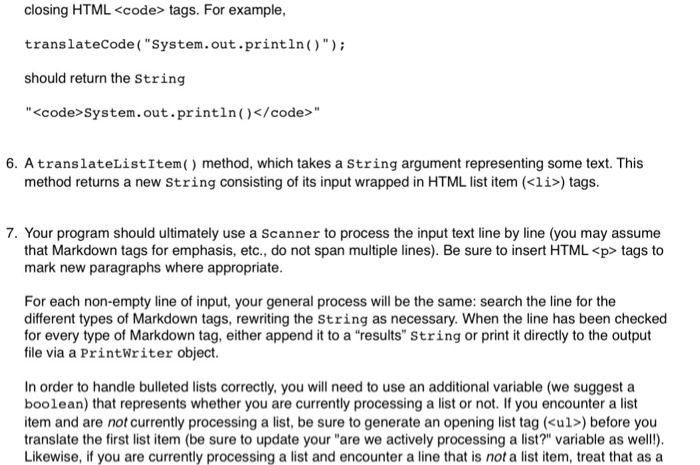
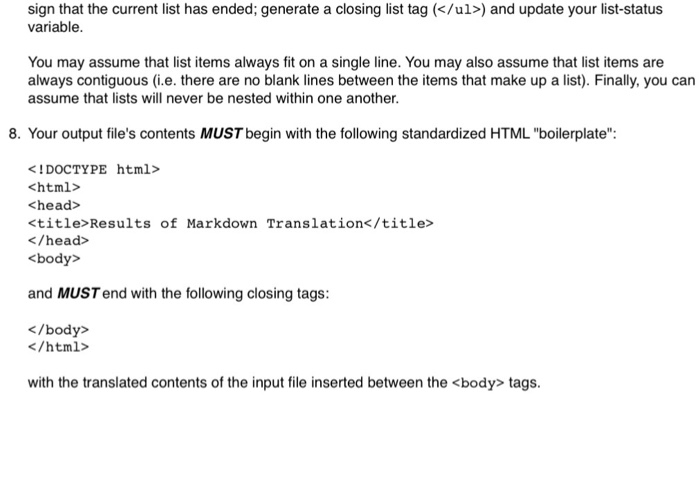
Implement a small Java program that prompts the user to enter the name of a (plain text) input file and a name for a (plain text) output file. Your program should read the (Markdown-formatted) contents of the input file, one line at a time, and generate an appropriately-named output file that contains an HTML version of the input file's contents. There are multiple ways to approach this task; we recommend implementing the following helper methods along the way 1. AtranslateEmphasis) method. This method takes a single string argument representing the text that should be placed in HTML tags. It returns a new String consisting of the argument wrapped in opening and closing tags. For example, a call to translateEmphasis ("blah blah" would return the String "blah blah" 2. AtranslatestrongEmphasis() method. This method works just like translateEmphasis( except it adds HTML tags instead of em> tags. 3. AtranslateHyperlink) method. This method takes two String arguments (some link text and a URL) and returns a String that contains a properly formatted HTML hyperlink according to the description given previously. For example, a call to
Step by Step Solution
There are 3 Steps involved in it

Get step-by-step solutions from verified subject matter experts
 Study Help