







Question: This program will compute an invoice based on values entered by the user. The invoice computes a total ( Gross ) bill amount based on
This program will compute an invoice based on values entered by the user. The invoice computes a
total Gross bill amount based on the number of hours invoiced and the hourly rate the gross amount
is the product of those two values
The user provides a discount code of or is discount, is discount, is discount.
Any other value results in a discount of
An invoice must be printed to the screen. For example. Notice how the invoice amounts line up:
INVOICE
Hours Invoiced: Hourly Rate: $
Gross Invoice: $
Discount: $ Discount Code
Net Invoice: $Pay This Amount
END INVOICE
After printing an invoice, ask the user if they want to continue and enter another set of data or
Your program should loop as long as the response is a or a
Sample Execution
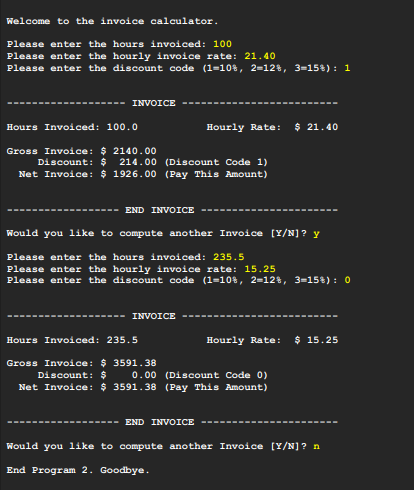
Below is shown a screen capture of what the program would look like if I ran it with two sets of input
data. The values in YELLOW are what were entered by the user in this example execution.Welcome to the invoice calculator.
Please enter the hours invoiced:
Please enter the hourly invoice rate:
Please enter the discount code :
Hours Involced: Hourly Rate: $
Gross Involce: $
Discount: $Discount Code
Net Invoice: $Pay This Amount
Would you like to compute another Invoice
Please enter the hours invoiced:
Please enter the hourly invoice rate:
Please enter the discount code :
Hours Involced: Hourly Rate: $
Gross Involce: $
Discount: $Discount Code
Net Invoice: $Pay This Amount
Would you like to compute another Invoice
Bnd Program Goodbye.
Step by Step Solution
There are 3 Steps involved in it
1 Expert Approved Answer
Step: 1 Unlock

Question Has Been Solved by an Expert!
Get step-by-step solutions from verified subject matter experts
Step: 2 Unlock
Step: 3 Unlock
 Study Help