







Question: This program will take 1 command-line input in the form of an 8-bit number. It will convert that 8-bit BINARY number into a DECIMAL number.
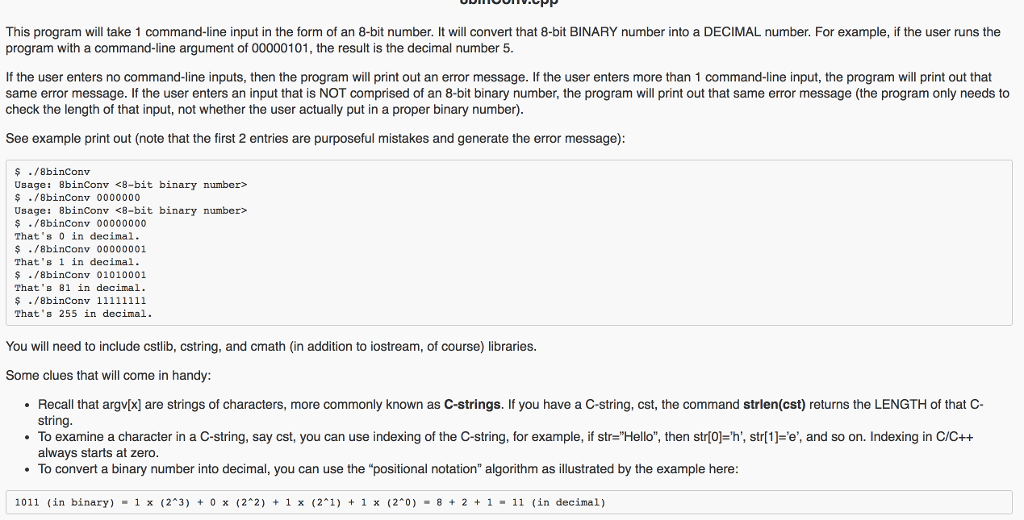 This program will take 1 command-line input in the form of an 8-bit number. It will convert that 8-bit BINARY number into a DECIMAL number. For example, if the user runs the program with a command-line argument of 00000101, the result is the decimal number 5. If the user enters no command-line inputs, then the program will print out an error message. If the user enters more than 1 command-line input, the program will print out that same error message. If the user enters an input that is NOT comprised of an 8-bit binary number, the program will print out that same error message (the program only needs to check the length of that input, not whether the user actually put in a proper binary number). See example print out (note that the first 2 entries are purposeful mistakes and generate the error message):
This program will take 1 command-line input in the form of an 8-bit number. It will convert that 8-bit BINARY number into a DECIMAL number. For example, if the user runs the program with a command-line argument of 00000101, the result is the decimal number 5 If the user enters no command-line inputs, then the program will print out an error message. If the user enters more than 1 command-line input, the program will print out that same error message. If the user enters an input that is NOT comprised of an 8-bit binary number, the program will print out that same error message (the program only needs to check the length of that input, not whether the user actually put in a proper binary number). See example print out (note that the first 2 entries are purposeful mistakes and generate the error message) ./8binconv Usage 8binconv
Step by Step Solution
There are 3 Steps involved in it

Get step-by-step solutions from verified subject matter experts
 Study Help