







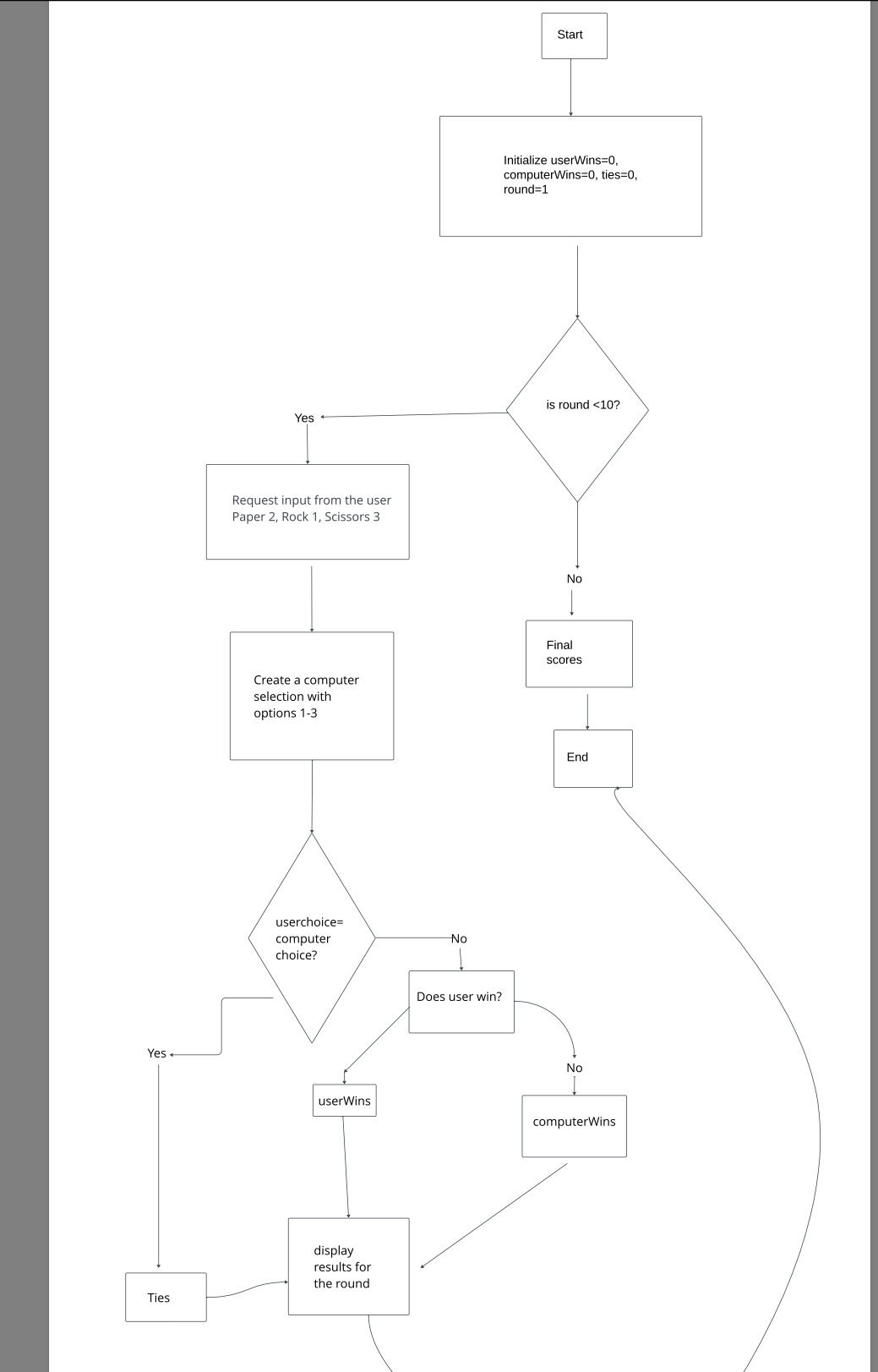
Question: This project will consist of two deliverables: a final flowchart that illustrates the logic of your solution and a pseudocode description of the flowchart logic.
This project will consist of two deliverables: a final flowchart that illustrates the logic of your solution and a pseudocode description of the flowchart logic. The game is rock paper scissors.
Flowchart
Finalize a flowchart that follows the solutions logic and works through a sequence of steps for the game you have selected. As the three programming problems are quite different, the flowcharts will be different as well. But for each flowchart, you should have between approximately and steps.
Illustrate the appropriate inputs and outputs for your selected game. Recall that you will need the following from a user in order to begin the game:
RockPaperScissors: Obtain the users selection of rock, paper, or scissors or
Design conditionals branches to establish the logic of the solution for your selected game. Each path should have an outcome that makes sense with the logic of the solution. The paths should be easily represented and readable. The appropriate branches for each game are as follows:
RockPaperScissors: There will be multiple IF statements determining whether the human user or computer won a game or if it was a tie, based on the rules for rockpaper scissors. For one round, you will use IF statements to account for what happens when a user chooses each option and when the computer chooses each option.
Design appropriate loops to establish the logic of the solution. For each game, the loops you will need are slightly different. The following provides additional guidance for each:
RockPaperScissors: As it is known in advance how many times this is played, a FOR loop will be an appropriate loop for this game.
Apply correct symbols to convey the intent of the logic in the flowchart. Each node in your flowchart will need to be identified with the proper symbol. Focus on the following symbols:
Oval: Indicates the end or beginningRectangle: Indicates a step in the flowchart processDiamond: Indicates a decision or conditionalParallelogram: Indicates input and outputArrows: Indicate directional flow
Based on the logic in your completed flowchart, you will next express the flowchart by writing it as a series of numbered steps in pseudocode. This pseudocode should be written in plain language, not in Coral code.
Apply plain language to design the flow and logic of the game. Be sure you are writing out your pseudocode using simple sentences that are clear to read and understand. The work you do will be completed in a series of numbered statements corresponding to obtaining the required input and output, necessary branches, and loops.
Create pseudocode statements for appropriate inputs and outputs. This should match your flowchart. Make sure you have an appropriate output message at the conclusion of each game.
Develop statements that evaluate user input and execute instructions logically These statements will involve IF statements to provide branching, using appropriate conditionals based on the required logic to play the game. Be sure to reference your flowchart as you work since all the information you need should already be outlined there. Review the following for reminders on the IF statements you will use in your game: RockPaperScissors: Your input would be your choice.
Develop statements that indicate loops to appropriately control program flow. These statements will require using either FOR or WHILE loops. Your flowchart should already outline which to use, so be sure to check your previous work in this area.
For pseudocode. Submit a numbered, stepbystep series of statements written in pseudocode that reflects the logic in your flowchart.
attatched is the flowchart that was created for this project
Step by Step Solution
There are 3 Steps involved in it
1 Expert Approved Answer
Step: 1 Unlock

Question Has Been Solved by an Expert!
Get step-by-step solutions from verified subject matter experts
Step: 2 Unlock
Step: 3 Unlock
 Study Help