







Question: This question is about C programming. please don't answer if you are not familiar with Explanation; The Bitmap file header has information about file type,
This question is about C programming. please don't answer if you are not familiar with
Explanation;
The Bitmap file header has information about file type, file size, etc. The Bitmap Info header, on the other hand, has information about the image such as image dimensions, pixel width, etc. The detailed structure of these headers are shown below and are shared with you in a bitmap.h file in this project. For the purpose of this project, we will only be interested in the bfSize, biWidth and biHeight fields of which descriptions are given below.
typedef struct {
uint16_t bfType;
uint32_t bfSize;
uint16_t bfReserved1;
uint16_t bfReserved2;
uint32_t bfOffBits; }
BITMAPFILEHEADER;
Relevant Members bfSize:
The size, in bytes, of the bitmap file.
typedef struct {
uint32_t biSize;
int32_t biWidth;
int32_t biHeight;
uint16_t biPlanes;
uint16_t biBitCount;
uint32_t biCompression;
uint32_t biSizeImage;
int32_t biXPelsPerMeter;
int32_t biYPelsPerMeter;
uint32_t biClrUsed;
uint32_t biClrImportant; }
BITMAPINFOHEADER; Relevant Members biWidth: Specifies the width of the bitmap, in pixels. biHeight: Specifies the height of the bitmap, in pixels. After the headers, comes the pixel data. This is raw pixel bytes (3-bytes per pixel) in raster scan order. That is, the first line of the image starting from the left-most pixel comes first, followed by the pixels on the right on the same line, followed by the left-most pixel of the second line of the image, followed by the remaining pixels on the right on the second line and so on
Question:
I want you to read a BMP image, and you will scale the image down by a factor of 2x in each dimension (the image size will be halved both horizontally and vertically). In order to scale the image, you are supposed to implement a basic downscaling algorithm described below:
You will take the average of the color component values of neighboring 4 pixels and that average will be the resulting color component of the pixel in the downscaled image. You will repeat this for each color component and for each 4 pixel group.
Finally, you will write the resulting pixel values to an output BMP file. You need to write the bitmap file header as well as bitmap info header before the pixel values. Note that you need to modify the header fields mentioned above to account for the reduced image size.
Important: I want you to read any BMP file according to the explanations that I mentioned above. You can choose any BMP file, I will convert the code to my BMP file.
Important: I uploaded a figure. You can see the process in it.
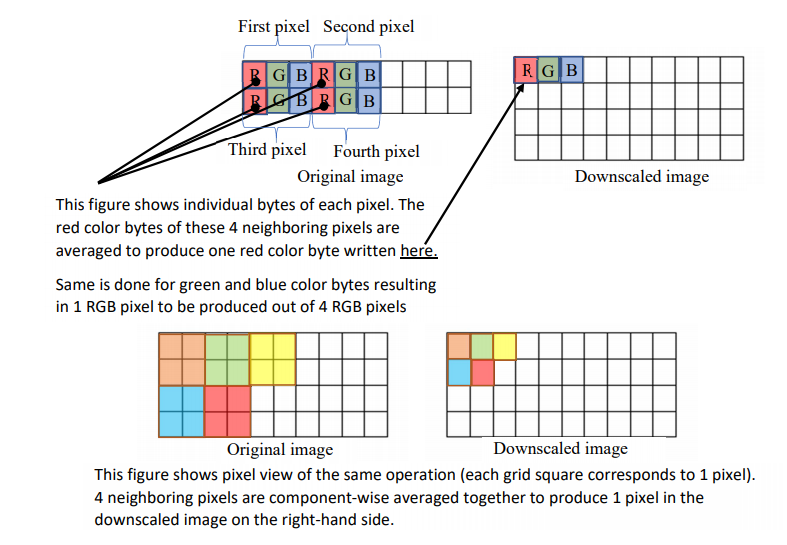
First pixel Second pixel RGB RGBRGB BRGB Downscaled image Third pixel Fourth pixel Original image This figure shows individual bytes of each pixel. The red color bytes of these 4 neighboring pixels are averaged to produce one red color byte written here. Same is done for green and blue color bytes resulting in 1 RGB pixel to be produced out of 4 RGB pixels Original image Downscaled image This figure shows pixel view of the same operation (each grid square corresponds to 1 pixel). 4 neighboring pixels are component-wise averaged together to produce 1 pixel in the downscaled image on the right-hand side. First pixel Second pixel RGB RGBRGB BRGB Downscaled image Third pixel Fourth pixel Original image This figure shows individual bytes of each pixel. The red color bytes of these 4 neighboring pixels are averaged to produce one red color byte written here. Same is done for green and blue color bytes resulting in 1 RGB pixel to be produced out of 4 RGB pixels Original image Downscaled image This figure shows pixel view of the same operation (each grid square corresponds to 1 pixel). 4 neighboring pixels are component-wise averaged together to produce 1 pixel in the downscaled image on the right-hand side
Step by Step Solution
There are 3 Steps involved in it

Get step-by-step solutions from verified subject matter experts
 Study Help