







Question: This question is from The Queen Anne Curiosity from Database Processing: Fundamentals, Design, and Implementation, 16th edition. Assume that the relationship between SALE and SALE_ITEM
This question is from The Queen Anne Curiosity from Database Processing: Fundamentals, Design, and Implementation, 16th edition.
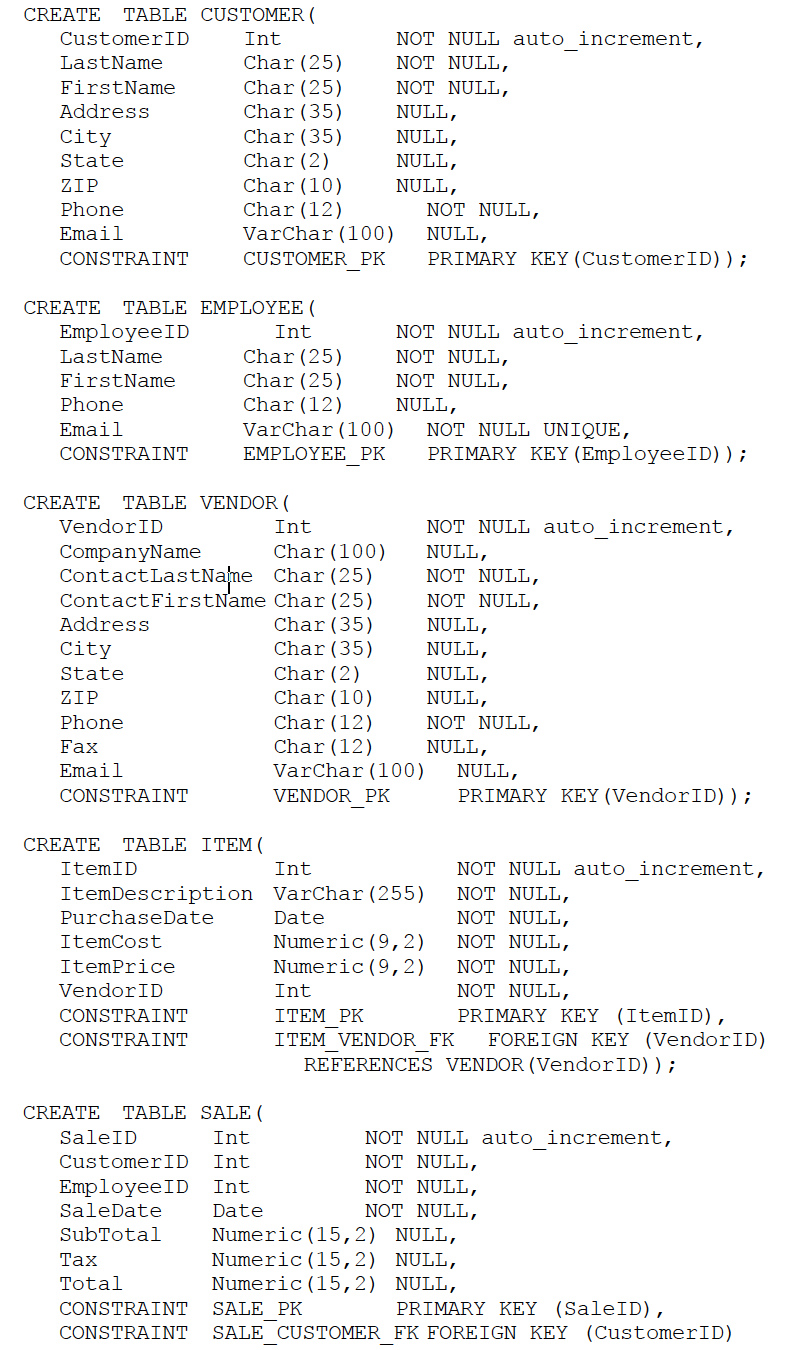
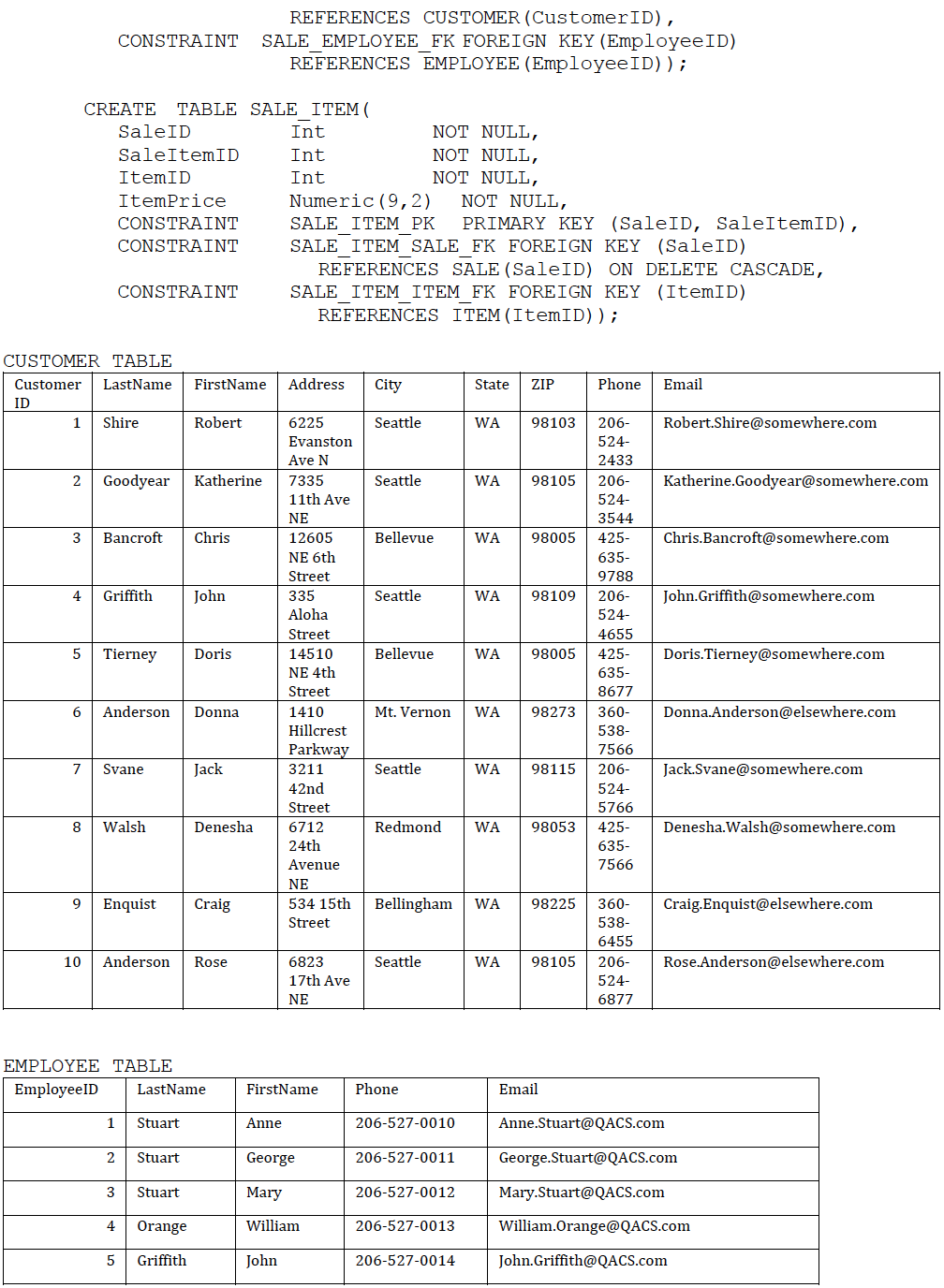
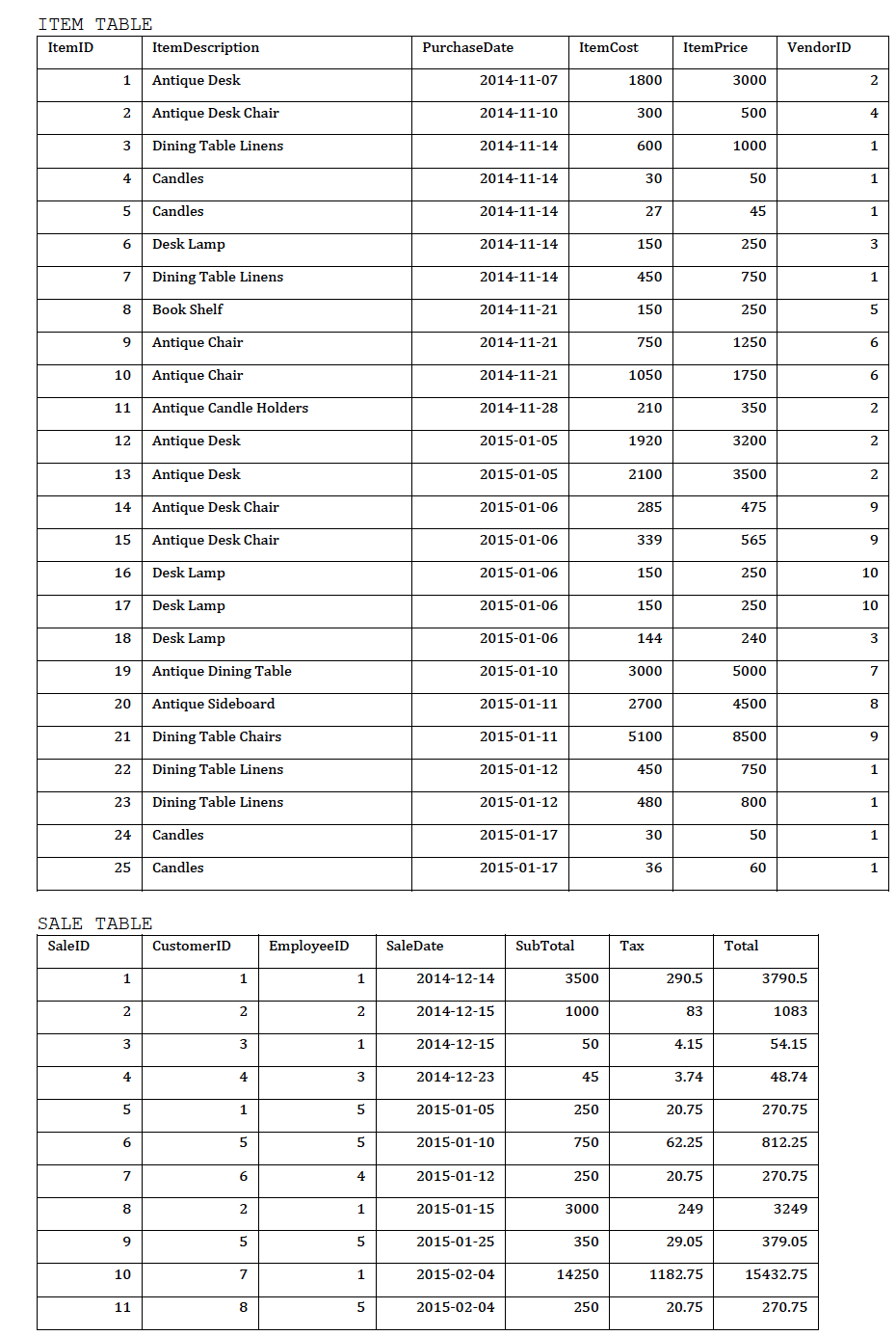
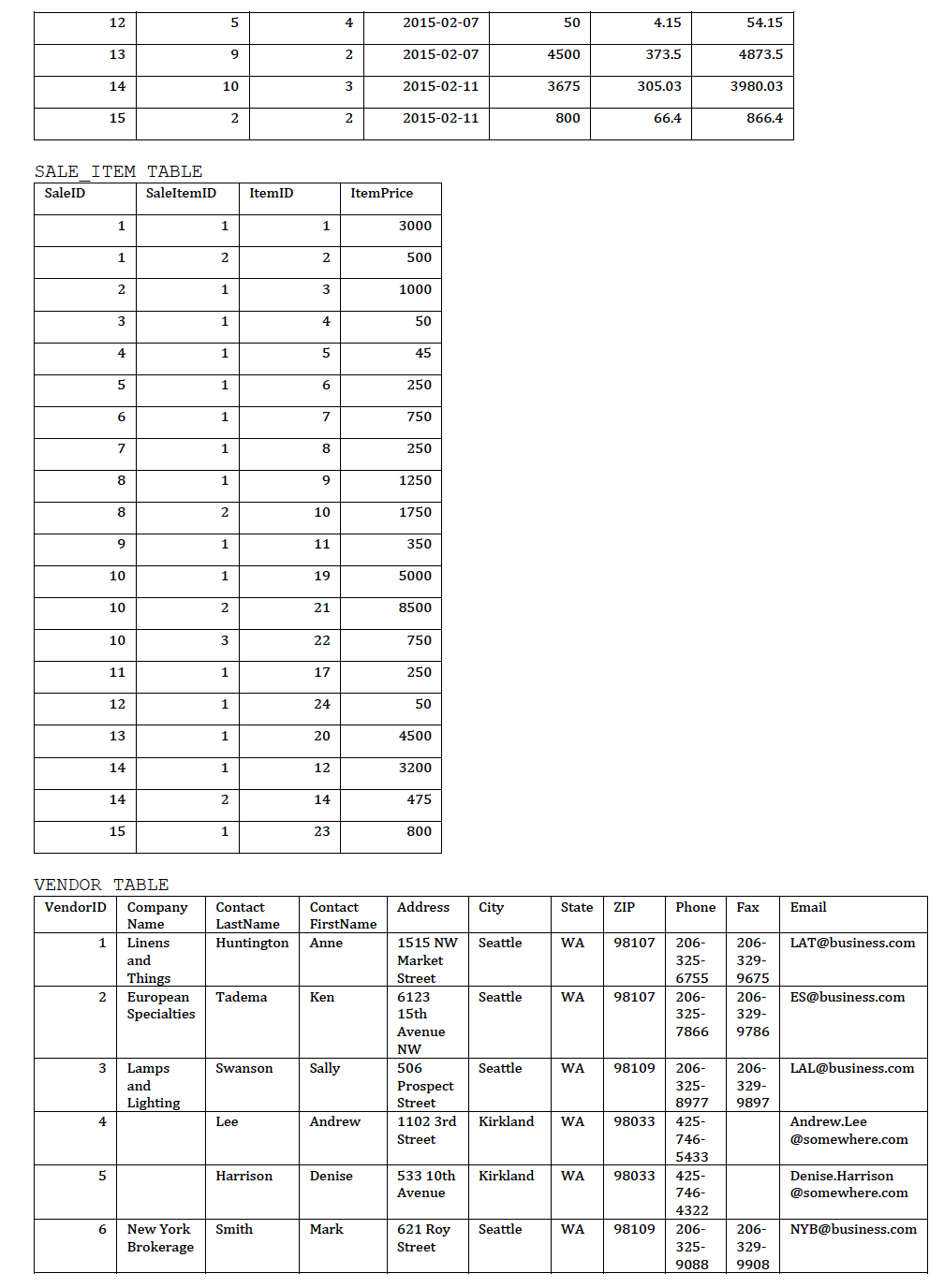
Assume that the relationship between SALE and SALE_ITEM is M-M. Write a procedure for deleting SALE_ITEM instance to enforce this relationship. Name of the procedure should be DeleteSaleItem and its argument(s) is(are) the primary key(s). (Also assume that The Queen Anne Curiosity Shop does allow SALEs and their related SALE_ITEM rows to be deleted. Use the following deletion strategy shown in the table. Use the below code (This code is not an anwer, just refer to it)
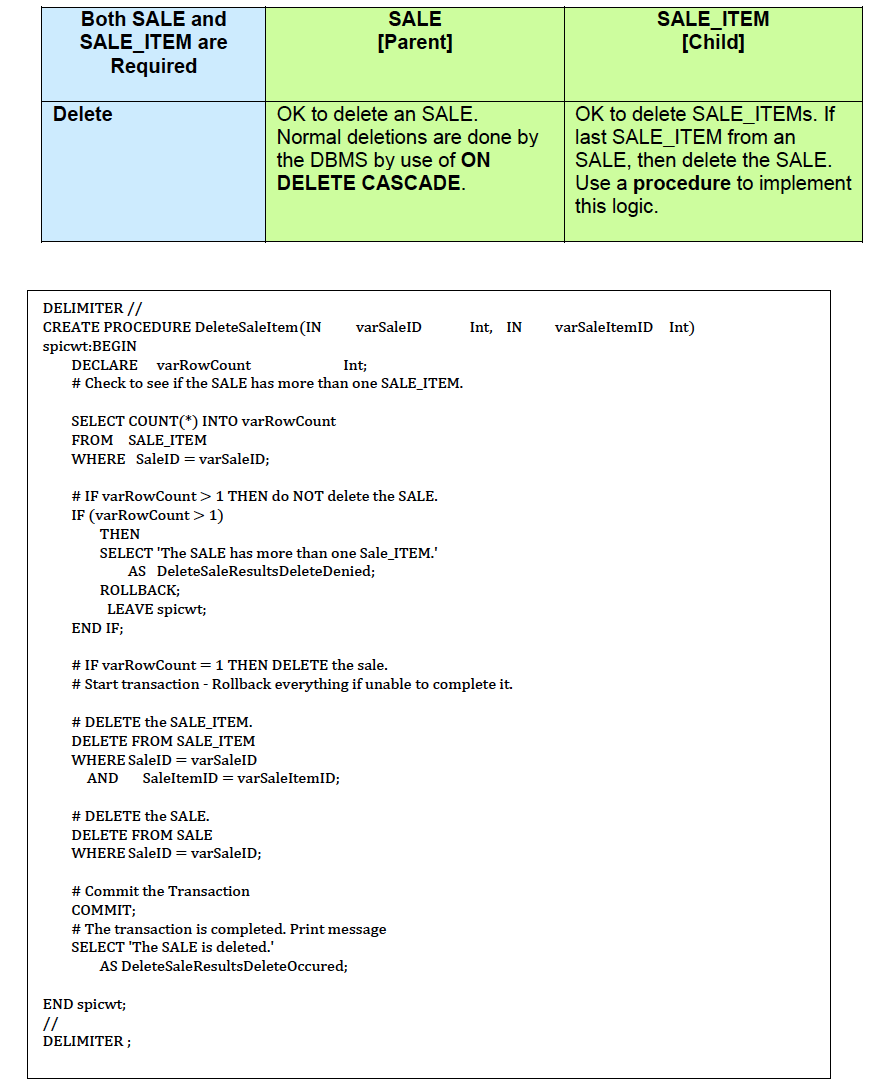
CREATE TABLE SALE_ITEM( SaleID Int NOT NULL, SaleItemID Int NOT NULL, ItemID Int NOT NULL, ItemPrice Numeric (9,2) NOT NULL, CONSTRAINT SALE_ITEM_PK PRIMARY KEY (SaleID, SaleItemID), CONSTRAINT SALE_ITEM_SALE_FK FOREIGN KEY (SaleID) REFERENCES SALE (SaleID) ON DELETE CASCADE, CONSTRAINT SALE_ITEM_ITEM_FK FOREIGN KEY (ItemID) REFERENCES ITEM(ItemID)); 11111 \begin{tabular}{|c|c|c|c|c|c|c|c|c|c|c|} \hline 7 & & Walsh & Denesha & \begin{tabular}{l} 6712 \\ 24 th \\ Avenue \\ NE \end{tabular} & Redmond & WA & 98053 & \begin{tabular}{l} 425 \\ 635 \\ 7566 \end{tabular} & & \begin{tabular}{l} Denesha.Walsh \\ @somewhere.com \end{tabular} \\ \hline 8 & & Bancroft & Chris & \begin{tabular}{l} 12605 \\ NE 6th \\ Street \end{tabular} & Bellevue & WA & 98005 & \begin{tabular}{l} 425 \\ 635 \\ 9788 \\ \end{tabular} & \begin{tabular}{l} 425 \\ 639 \\ 9978 \\ \end{tabular} & \begin{tabular}{l} Chris.Bancroft \\ @somewhere.com \end{tabular} \\ \hline 9 & \begin{tabular}{l} Specialty \\ Antiques \end{tabular} & Nelson & Fred & \begin{tabular}{l} 2512 \\ Lucky \\ Street \end{tabular} & \begin{tabular}{l} San \\ Francisco \end{tabular} & CA & 94110 & \begin{tabular}{l} 415 \\ 422 \\ 2121 \end{tabular} & \begin{tabular}{l} 415 \\ 429 \\ 9212 \end{tabular} & SA@business.com \\ \hline 10 & \begin{tabular}{l} General \\ Antiques \end{tabular} & Garner & Patty & \begin{tabular}{l} 2515 \\ Lucky \\ Street \end{tabular} & \begin{tabular}{l} San \\ Francisco \end{tabular} & CA & 94110 & \begin{tabular}{l} 415 \\ 422 \\ 3232 \end{tabular} & \begin{tabular}{l} 415 \\ 429 \\ 9323 \end{tabular} & GA@business.com \\ \hline \end{tabular} DELIMITER // CREATE PROCEDURE DeleteSaleItem(IN varSaleID Int, IN varSaleItemID Int) spicwt:BEGIN DECLARE varRowCount Int; \# Check to see if the SALE has more than one SALE_ITEM. SELECT COUNT(*) INTO varRowCount FROM SALE_ITEM WHERE SaleID = varSaleID; \# IF varRowCount > 1 THEN do NOT delete the SALE. IF (varRowCount >1 ) THEN SELECT 'The SALE has more than one Sale_ITEM.' AS DeleteSaleResultsDeleteDenied; ROLLBACK; LEAVE spicwt; END IF; \# IF varRowCount = 1 THEN DELETE the sale. \# Start transaction - Rollback everything if unable to complete it. \# DELETE the SALE_ITEM. DELETE FROM SALE_ITEM WHERE SaleID = varSaleID AND SaleItemID = varSaleItemID; \# DELETE the SALE. DELETE FROM SALE WHERE SaleID = varSaleID; \# Commit the Transaction COMMIT; \# The transaction is completed. Print message SELECT 'The SALE is deleted.' AS DeleteSaleResultsDeleteOccured; END spicwt; // DELIMITER
Step by Step Solution
There are 3 Steps involved in it

Get step-by-step solutions from verified subject matter experts
 Study Help