







Question: This Semesters Project will be on Creating A Running Log. The running log can consist of recording/calculating running pace for certain distances over time. It
This Semesters Project will be on Creating A Running Log. The running log can consist of recording/calculating running pace for certain distances over time. It is also possible the project will grow and incorporate other aspects of running- For example, recording the outdoor temperature during a run, calculating how many calories were burned during a run, cumulative running distance, etc.
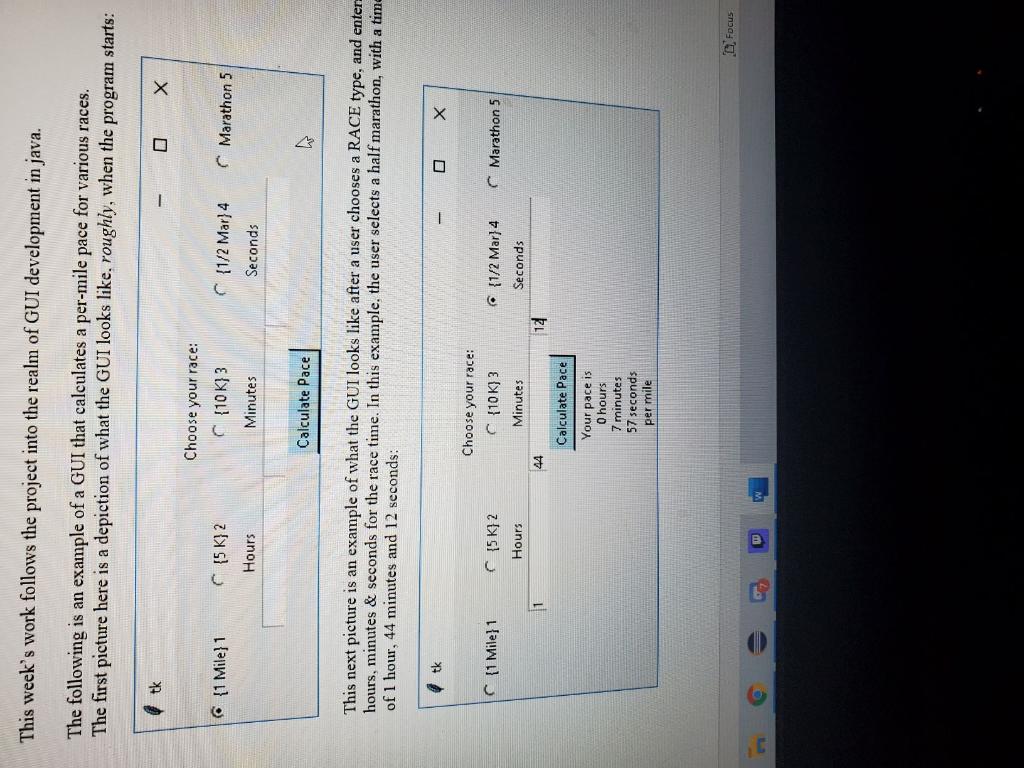
Notes about the functionality of this window:
-Allows the user to select a fixed (running, driving, etc) distance from a radio button:
- {1 Mile}
- {5k}
- {10k}
- {1/2 Mar}
- {Marathon}
-Allows the user to enter time in hours, minutes, seconds (whole numbers only) from three different Text Entry fields.
-Each Text Entry field has a corresponding label (Hours, Minutes, Seconds).
-Includes a Calculate Pace button, which calculates & displays the pace in hours, minutes and seconds per mile below it
Other assumptions:
-No error handling for the entries & calculations are necessary
-Assumes that integers are used as input for the Hours, Minutes & Seconds.
-1 Mile option converts exactly as is (since its a per-mile pace that is calculated)
-5 K option converts to 3.106 miles
-10 K option converts to 6.211 miles
-1/2 Mar option converts to 13.109 miles
-Marathon option converts to 26.219 miles
Your assignment:
Write the java code required to make this, similar to look, and functional as described above.
NOTE: The example above was a screenshot from a window actually written in Python (tkinter specifically)- so ignore the different look of the layout etc. The control functions & event handling are what is important and will be graded.
Please answer accordingly for my Java programming ll class. The picture above is an example of what the code should be able to do! Thank you
This week's work follows the project into the realm of GUI development in java. The following is an example of a GUI that calculates a per-mile pace for various races. The first picture here is a depiction of what the GUI looks like, roughly, when the program starts: tk Choose your race: (10 K} 3 {1 Mile} 1 {5 K} 2 Marathon 5 {1/2 Mar}4 Seconds Hours Minutes Calculate Pace th This next picture is an example of what the GUI looks like after a user chooses a RACE type, and enter hours, minutes & seconds for the race time. In this example, the user selects a half marathon, with a time of 1 hour, 44 minutes and 12 seconds: C{1 Mile} 1 Marathon 5 C 15K] 2 Hours {1/2 Mar} 4 Seconds 1 14 Choose your race: C{10 K} 3 Minutes 44 Calculate Pace Your pace is O hours 7 minutes 57 seconds per mile Focus
Step by Step Solution
There are 3 Steps involved in it

Get step-by-step solutions from verified subject matter experts
 Study Help