







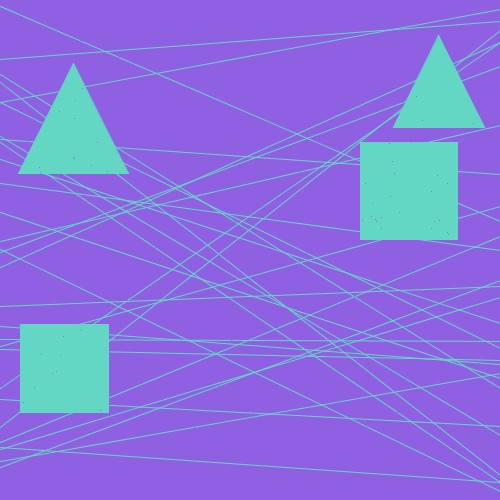
Question: this simple code I wrote does not work on the picture I uploaded. how can I improve the code? It should detect shapes without detecting
this simple code I wrote does not work on the picture I uploaded. how can I improve the code? It should detect shapes without detecting lines.
import cv
import numpy as np
import argparse
def anglept pt pt:
# pt ve pt arasndaki kenarn xi ptx ptx
dx pt pt
# pt ve pt arasndaki kenarn y'si pty pty
dy pt pt
# pt ve pt arasndaki kenarn xi ptx ptx
dx pt pt
# pt ve pt arasndaki kenarn y'si pty pty
dy pt pt
return dx dx dy dy npsqrtdx dx dy dydx dx dy dy
def maininputimage:
inputpath C:UsersburakDesktopShape Recognition & Detectiondatainput
outputpath C:UsersburakDesktopShape Recognition & Detectiondataoutput
image cvimreadinputpath inputimage
if image is None:
printResim alamad ya da yklenemedi
return
# gri
gray cvcvtColorimage cvCOLORBGRGRAY
cvimwriteoutputpath outputgray.png gray
# blurlama
blurred cvGaussianBlurgray
cvimwriteoutputpath outputblurred.png blurred
# kenar alglama
edged cvCannyblurred
cvimwriteoutputpath outputedged.png edged
# kontor bulma
contours, cvfindContoursedged cvRETREXTERNAL, cvCHAINAPPROXSIMPLE
# ekil alglama
for contour in contours:
shape
peri cvarcLengthcontour True
approx cvapproxPolyDPcontour peri, True
if lenapprox:
shape "triangle"
elif lenapprox:
maxcosine
for j in range:
cosine absangleapproxj approxj approxj
maxcosine maxmaxcosine, cosine
if maxcosine :
# kare
edges
for i in range:
pt approxi
pt approxi
edgelength npsqrtpt ptpt pt
edges.appendedgelength
# kenarlar eit mi
if maxedges minedges:
shape "square"
else:
shape "rectangle"
else:
edges
for i in range:
pt approxi
pt approxi
edgelength npsqrtpt ptpt pt
edges.appendedgelength
edges sortededges
if absedges edges and absedges edges:
shape "parallelogram"
elif absedges edges or absedges edges:
shape "trapezoid"
elif lenapprox:
shape "circle"
cvdrawContoursimagecontour
M cvmomentscontour
cX intMm Mm
cY intMm Mm
cvputTextimage shape, cX cY cvFONTHERSHEYSIMPLEX,
# output
cvimwriteoutputpath outputshapes.png image
cvimshowShapes image
cvwaitKey
cvdestroyAllWindows
if namemain:
parser argparse.ArgumentParserdescription"Shape detection in an image."
parser.addargumentinputimage", typestr help"Input'un dosya yolu."
args parser.parseargs
mainargsinputimage
#python sekilalgilama.py shapes.png
Step by Step Solution
There are 3 Steps involved in it
1 Expert Approved Answer
Step: 1 Unlock

Question Has Been Solved by an Expert!
Get step-by-step solutions from verified subject matter experts
Step: 2 Unlock
Step: 3 Unlock
 Study Help