







Question: This skeleton program must be enhanced as follows: Your implementation of actionListener will contain your code that responds to button clicks or text entries on
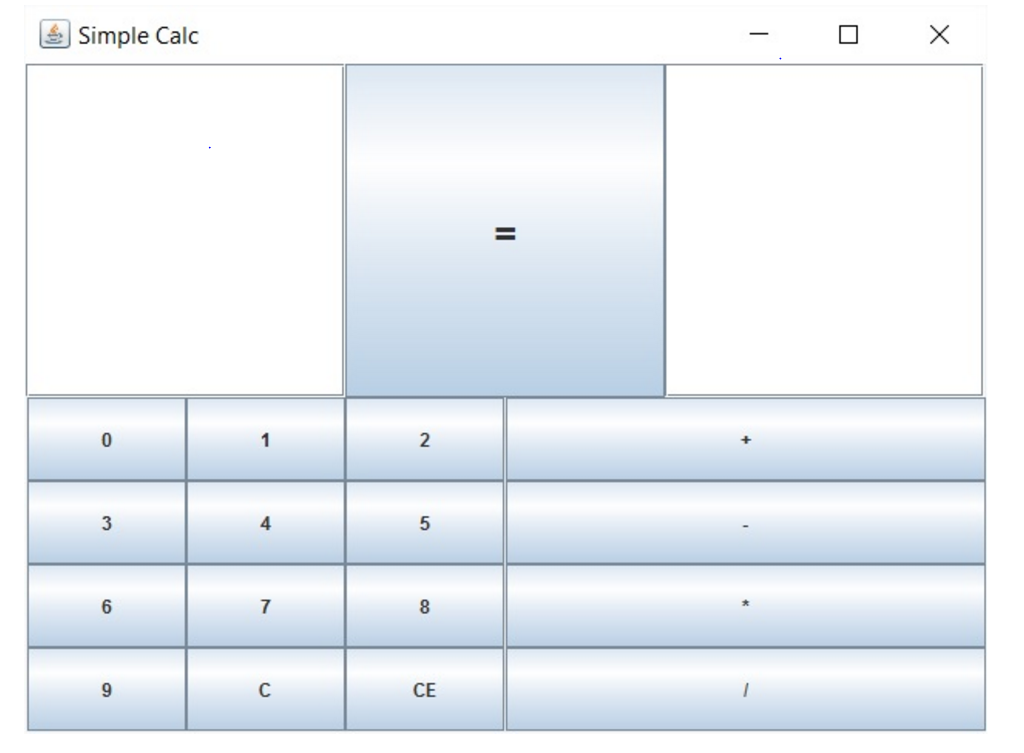
This skeleton program must be enhanced as follows:
Your implementation of actionListener will contain your code that responds to button clicks or text entries on the calculator's surface.
You muat allow entries using either the keys or by typing text into the expression text field.
The CE button must clear the last operand entered while the C button must clear the entire expression textfield
The equals button must calculate the result and write the resulting value into the result textfield. You must write the evaluation function. We will discuss this in class. Your evaluation must evaluate each operator for it's true precedence. This little bit of logic will take some work!
If the user's expression is gibberish or produced an undefined value like divide by zero - you may write #ERROR# or NaN or any other meaningful indication of a bad expression.
import java.awt.*; import java.awt.event.*; import javax.swing.*; public class SimpleCalc { JFrame window; // the main window which contains everything Container content ; JButton[] digits = new JButton[12]; JButton[] ops = new JButton[4]; JTextField expression; JButton equals; JTextField result; public SimpleCalc() { window = new JFrame( "Simple Calc"); content = window.getContentPane(); content.setLayout(new GridLayout(2,1)); // 2 row, 1 col ButtonListener listener = new ButtonListener(); // top panel holds expression field, equals sign and result field // [4+3/2-(5/3.5)+3] = [3.456] JPanel topPanel = new JPanel(); topPanel.setLayout(new GridLayout(1,3)); // 1 row, 3 col expression = new JTextField(); expression.setFont(new Font("verdana", Font.BOLD, 16)); expression.setText(""); equals = new JButton("="); equals.setFont(new Font("verdana", Font.BOLD, 20 )); equals.addActionListener( listener ); result = new JTextField(); result.setFont(new Font("verdana", Font.BOLD, 16)); result.setText(""); topPanel.add(expression); topPanel.add(equals); topPanel.add(result); // bottom panel holds the digit buttons in the left sub panel and the operators in the right sub panel JPanel bottomPanel = new JPanel(); bottomPanel.setLayout(new GridLayout(1,2)); // 1 row, 2 col JPanel digitsPanel = new JPanel(); digitsPanel.setLayout(new GridLayout(4,3)); for (int i=0 ; i Simple Calc CE
Step by Step Solution
There are 3 Steps involved in it

Get step-by-step solutions from verified subject matter experts
 Study Help