







Question: this the questions with the code Name: Student ID: Date of Laboratory: Objective In this lesson, you will learn how to define classes and instantiate
 this the questions with the code
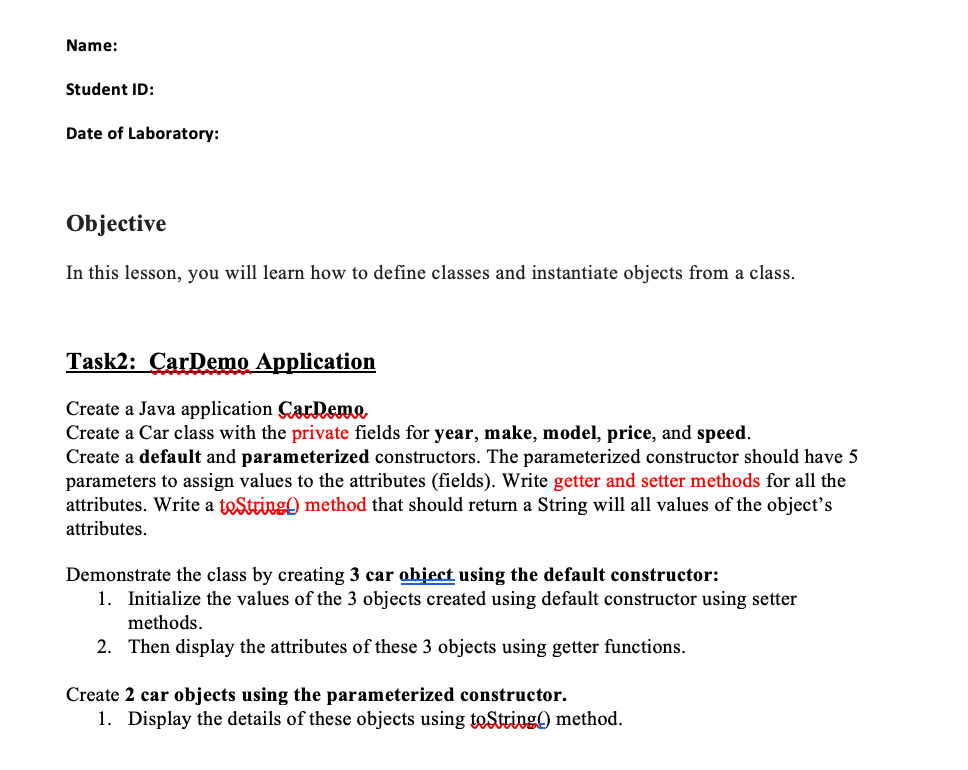
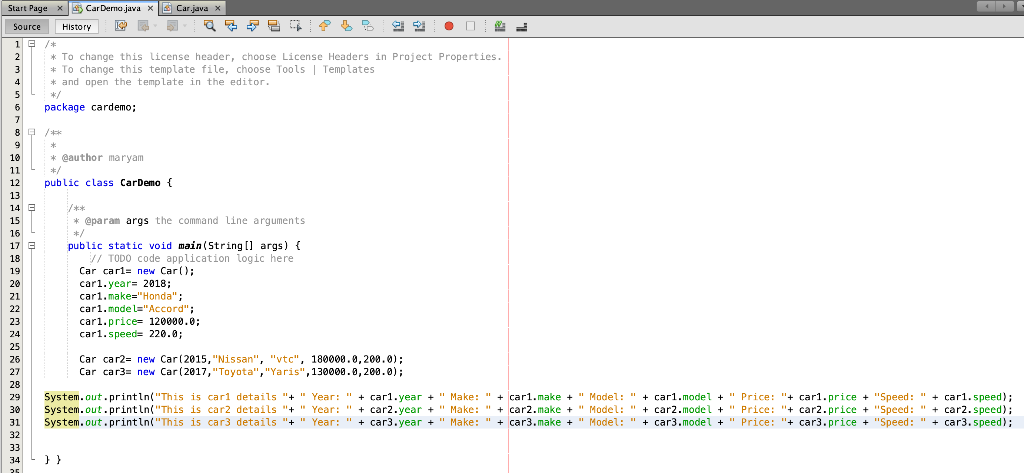
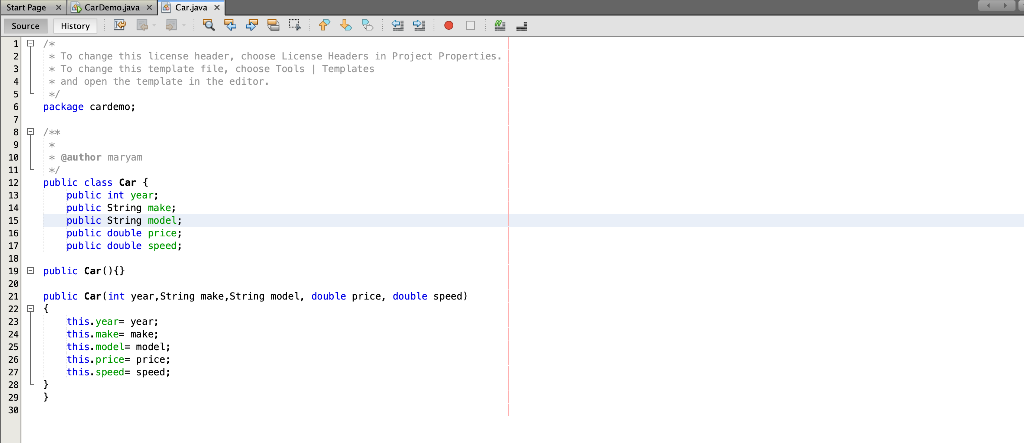
Name: Student ID: Date of Laboratory: Objective In this lesson, you will learn how to define classes and instantiate objects from a class. Task2: CarDemo Application Create a Java application CarDeme Create a Car class with the private fields for year, make, model, price, and speed. Create a default and parameterized constructors. The parameterized constructor should have 5 parameters to assign values to the attributes (fields). Write getter and setter methods for all the attributes. Write a teString method that should return a String will all values of the object's attributes. Demonstrate the class by creating 3 car object using the default constructor: 1. Initialize the values of the 3 objects created using default constructor using setter methods. 2. Then display the attributes of these 3 objects using getter functions. Create 2 car objects using the parameterized constructor. 1. Display the details of these objects using toString) method. Start Page x Car Derno.java x Car.java x Source History IC 1 G /* 2 * To change this license header, choose License Headers in Project Properties. 3 * To change this template file, choose Tools Templates 4 * and open the template in the editor. 5 package cardemo; 7 8 /** 19 * @author maryam */ public class CarDemo { 11 12 13 14 15 16 17 18 19 20 21 22 23 24 25 26 27 28 29 30 31 32 33 34 25 /** * @param args the command line arguments */ public static void main(String[] args) { / TODO code application logic here Car cari= new Car(); cari. year= 2018; cari.make="Honda"; car1.model="Accord"; cari.price= 120000.0; car1.speed= 220.6; Car car2= new Car(2015, "Nissan", "vtc", 180000.0,200.0); Car car3= new Car (2017, "Toyota", "Yaris", 130000.0,200.0); System.out.println("This is carl details " + " Year: " + cari.year + " Make: " + car1.make + " Model: " + car1.model + " Price: "+ car1.price + "Speed: " + car1. speed); System.out.println("This is car2 details "+ " Year: " + carz.year + " Make: " + car2.make + " Model: " + car2.model + " Price: "+ car2.price + "Speed: + car2. speed); System.out.println("This is car3 details "+ " Year: " + car3.year + " Make: " + car3.make + " Model: " + car3.model + Price: "+ car3.price + "Speed: " + car3.speed); }} Start Page x CarDemo.java x Car.java x Source History 1 * To change this license header, choose License Headers in Project Properties. * To change this template file, choose Tools | Templates * and open the template in the editor. package cardemo; 10 * @author maryam 11 12 public class Car { 13 public int year: 14 public String make; 15 public String model; 16 public double price; 17 public double speed; 18 19 public Car(){} 20 21 public Car(int year, String make,String model, double price, double speed) this.year year; this.make= make; this.model= model; this.price- price; this. Speed= speed
Step by Step Solution
There are 3 Steps involved in it

Get step-by-step solutions from verified subject matter experts
 Study Help