







Question: Background This week, the IT team is working on user interface design for the new C3 system. One goal is to reduce input errors
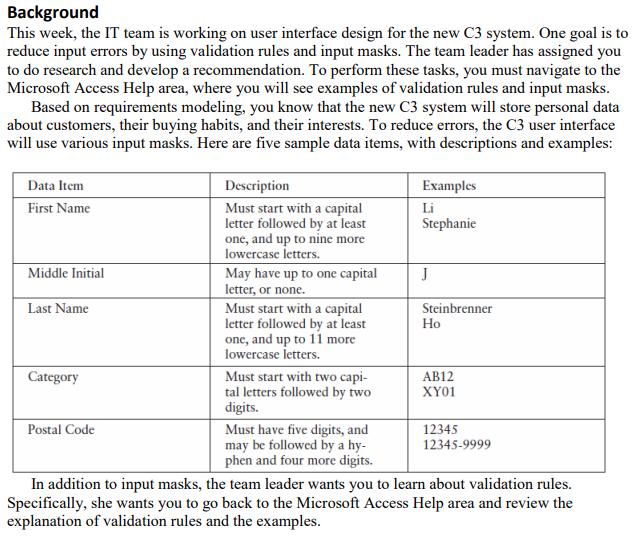

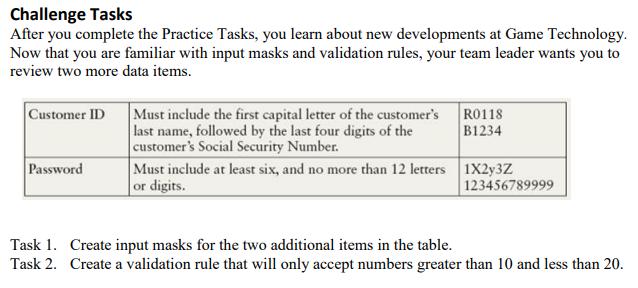
Background This week, the IT team is working on user interface design for the new C3 system. One goal is to reduce input errors by using validation rules and input masks. The team leader has assigned you to do research and develop a recommendation. To perform these tasks, you must navigate to the Microsoft Access Help area, where you will see examples of validation rules and input masks. Based on requirements modeling, you know that the new C3 system will store personal data about customers, their buying habits, and their interests. To reduce errors, the C3 user interface will use various input masks. Here are five sample data items, with descriptions and examples: Data Item Description Examples First Name Must start with a capital letter followed by at least one, and up to nine more lowercase letters. Li Stephanie Middle Initial May have up to one capital letter, or none. Must start with a capital letter followed by at least one, and up to 11 more lowercase letters. Last Name Steinbrenner Must start with two capi- tal letters followed by two digits. Category AB12 XY01 Postal Code Must have five digits, and may be followed by a hy- phen and four more digits. In addition to input masks, the team leader wants you to learn about validation rules. Specifically, she wants you to go back to the Microsoft Access Help area and review the 12345 12345-9999 explanation of validation rules and the examples. Practice Tasks Task 1. Create an input mask for each data item shown in the table. Task 2. Develop a brief handout that explains the concept of validation rules. Include an example of a validation rules that will only accept the letters A or B. Challenge Tasks After you complete the Practice Tasks, you learn about new developments at Game Technology. Now that you are familiar with input masks and validation rules, your team leader wants you to review two more data items. Customer ID Must include the first capital letter of the customer's R0118 last name, followed by the last four digits of the customer's Social Security Number. Must include at least six, and no more than 12 letters 1X2y3Z or digits. B1234 Password 123456789999 Task 1. Create input masks for the two additional items in the table. Task 2. Create a validation rule that will only accept numbers greater than 10 and less than 20.
Step by Step Solution
3.51 Rating (161 Votes )
There are 3 Steps involved in it
Practice task Data item input mask First name L last name L LLO0 Postal code 000009999 HANDOUT VALID... View full answer

Get step-by-step solutions from verified subject matter experts
Document Format (2 attachments)

635d7c07f2383_176063.pdf
180 KBs PDF File

635d7c07f2383_176063.docx
120 KBs Word File
 Study Help