







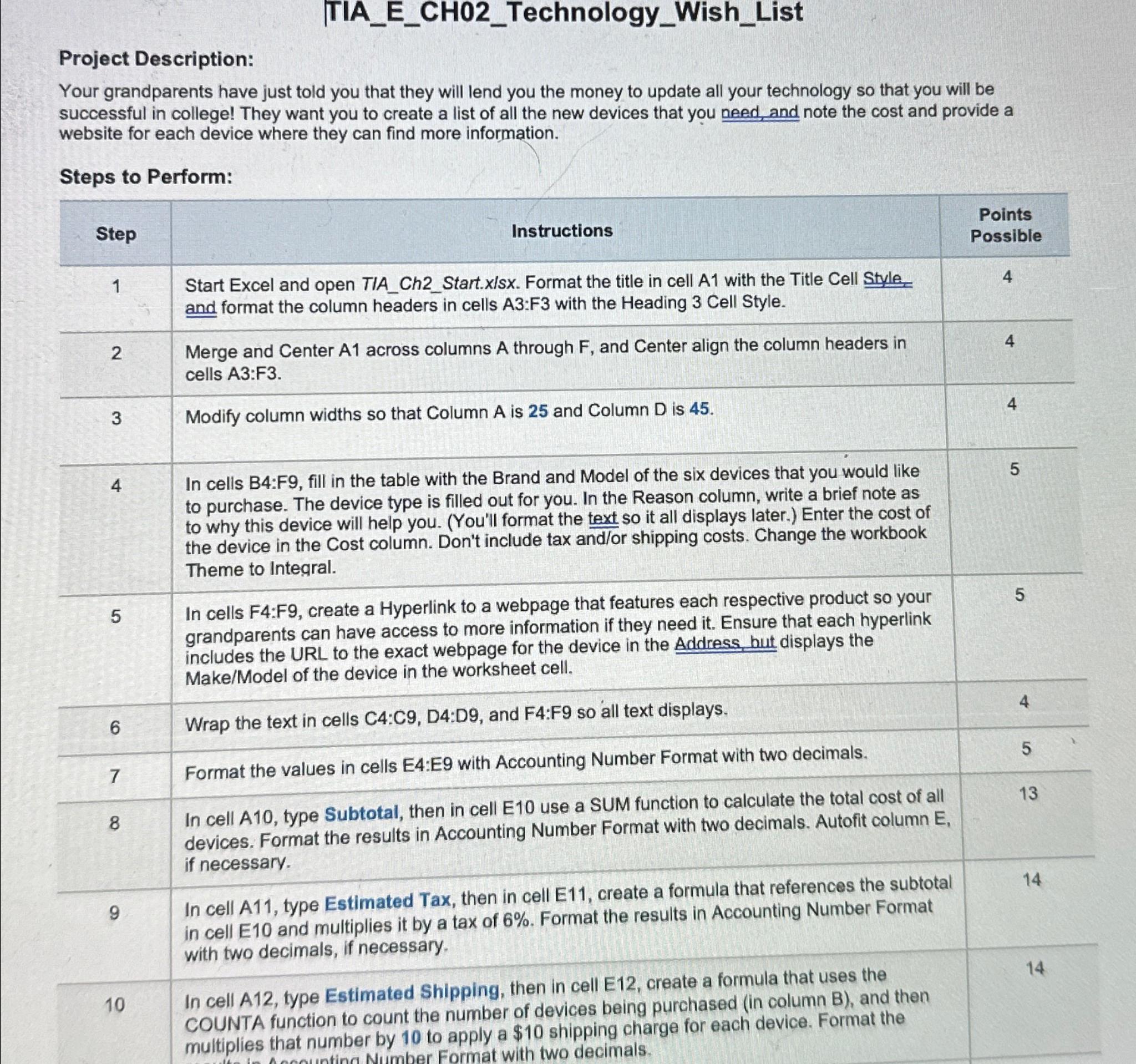
Question: | TIA _ E _ CH 0 2 _ Technology _ Wish _ List Project Description: Your grandparents have just told you that they will
TIAECHTechnologyWishList
Project Description:
Your grandparents have just told you that they will lend you the money to update all your technology so that you will be successful in college! They want you to create a list of all the new devices that you need, and note the cost and provide a website for each device where they can find more information.
Steps to Perform:
tableStepInstructions,tablePointsPossibletableStart Excel and open TIAChStart.xlsx Format the title in cell A with the Title Cell Style.and format the column headers in cells A:F with the Heading Cell Style.tableMerge and Center A across columns A through F and Center align the column headers incells A:FModify column widths so that Column A is and Column D is tableIn cells B:F fill in the table with the Brand and Model of the six devices that you would liketo purchase. The device type is filled out for you. In the Reason column, write a brief note asto why this device will help you. Youll format the text so it all displays later. Enter the cost ofthe device in the Cost column. Don't include tax andor shipping costs. Change the workbookTheme to Integral.tableIn cells F:F create a Hyperlink to a webpage that features each respective product so yourgrandparents can have access to more information if they need it Ensure that each hyperlinkincludes the URL to the exact webpage for the device in the Address, hut displays theMakeModel of the device in the worksheet cell.Wrap the text in cells :: and : so all text displays.,Format the values in cells E:E with Accounting Number Format with two decimals.,tableIn cell A type Subtotal, then in cell E use a SUM function to calculate the total cost of alldevices Format the results in Accounting Number Format with two decimals. Autofit column Eif necessary.tableIn cell A type Estimated Tax, then in cell E create a formula that references the subtotalin cell and multiplies it by a tax of Format the results in Accounting Number Formatwith two decimals, if necessary.tableIn cell A type Estimated Shipping, then in cell E create a formula that uses theCOUNTA function to count the number of devices being purchased in column B and thenmultiplies that number by to apply a $ shipping charge for each device. Format the
Step by Step Solution
There are 3 Steps involved in it
1 Expert Approved Answer
Step: 1 Unlock

Question Has Been Solved by an Expert!
Get step-by-step solutions from verified subject matter experts
Step: 2 Unlock
Step: 3 Unlock
 Study Help