







Question: Timing Searching and Sorting Algorithms Chapter 10 has a brief discussion comparing sorting algorithms and searching algorithms. In this exercise you will use an IntegerList
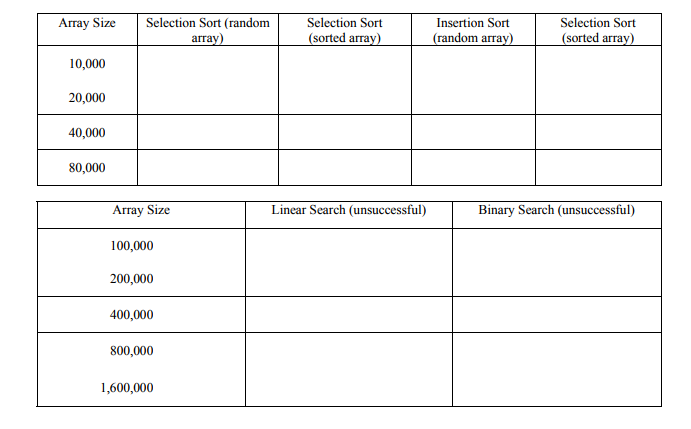
Timing Searching and Sorting Algorithms Chapter 10 has a brief discussion comparing sorting algorithms and searching algorithms. In this exercise you will use an IntegerList class (in the file IntegerList.java) and a driver (in the file IntegerListTest.java) to examine the runtimes of the searching and sorting algorithms. The IntegerListTest class has several options for creating a list of a given size, filling the list with random integers or with already sorted integers, and searching or sorting the list. (NOTE: You may have used a version of these classes in a previous lab.) Add the methods minIndex, swap, linearSearch, and binarySearch to the IntegerList class (see the calls to determine the parameters). Run IntegerListTest a few times to explore the options. The runtimes of the sorting and searching algorithms can be examined using the Java method System.currentTimeMillis(), which returns the current system time in milliseconds. (Note that it returns a long, not an int.) You will have to import java.util.* to have access to this method. In IntegerListTest, just get the system time immediately before and immediately after you perform any of the searches or sorts. Then subtract the first from the second, and you have the time required for the operation in milliseconds. WARNING: Be sure you are not including any input or output in your timed operations; these are very expensive and will swamp your algorithm times! Add appropriate calls to System.currentTimeMillis() to your program, run it and fill out the tables below. Note that you will use much larger arrays for the search algorithms than for the sort algorithms; do you see why? Also note that the first couple of times you run a method you might get longer runtimes as it loads the code for that method. Ignore these times and use the steady-state times you get on subsequent runs. On a separate sheet, explain the times you see in terms of the known complexities of the algorithms. Remember that the most interesting thing is not the absolute time required by the algorithms, but how the time changes as the size of the input increases (doubles here).
// ****************************************************************** // FILE: IntegerList.java // // Purpose: Define an IntegerList class with methods to create, fill, // sort, and search in a list of integers. // ****************************************************************** import java.util.Scanner; public class IntegerList { int[] list; //values in the list //------------------------------------------------------------ // Constructor -- takes an integer and creates a list of that // size. All elements default to value 0. //------------------------------------------------------------ public IntegerList(int size) { list = new int[size]; } //------------------------------------------------------------ // randomize -- fills the array with randomly generated integers // between 1 and 100, inclusive //------------------------------------------------------------ public void randomize() { int max = list.length; for (int i=0; i location = i; return location; } //------------------------------------------------------------ // sortIncreasing -- uses selection sort //------------------------------------------------------------ public void sortIncreasing() { for (int i=0; i break; case 3: list.randomize(); System.out.println("List is filled with random elements."); break; case 4: list.fillSorted() ; System.out.println("List is filled with sorted elements."); break; case 5: System.out.print("Enter the value to look for: "); val = scan.nextInt(); loc = list.linearSearch(val); if (loc != -1) System.out.println("Found at location " + loc); else System.out.println("Not in list"); break; case 6: System.out.print("Enter the value to look for: "); val = scan.nextInt(); loc = list.binarySearch(val); if (loc != -1) System.out.println("Found at location " + loc); else System.out.println("Not in list"); break; case 7: list.sortIncreasing(); System.out.println("List has been sorted."); break; case 8: list.sortDecreasing(); System.out.println("List has been sorted."); break; default: System.out.println("Sorry, invalid choice"); } } //----------------------------------------------------- // printMenu -- prints the user's choices //----------------------------------------------------- public static void printMenu() { System.out.println(" Menu "); System.out.println(" ===="); System.out.println("0: Quit"); System.out.println("1: Print the list"); System.out.println("2: Create a new list of a given size"); System.out.println("3: Fill the list with random ints in range 1-length"); System.out.println("4: Fill the list with already sorted elements"); System.out.println("5: Use linear search to find an element"); System.out.println("6: Use binary search to find an element " + "(list must be sorted in increasing order)"); System.out.println("7: Use selection sort to sort the list into " + " increasing order"); System.out.println("8: Use insertion sort to sort the list into " + " decreasing order"); System.out.print(" Enter your choice: "); }
Step by Step Solution
There are 3 Steps involved in it

Get step-by-step solutions from verified subject matter experts
 Study Help