







Question: Tips You will have to do arithmetic. Your options for arithmetic include bc (see man -s1 bc), expr (see man -s1 expr), or (( ...
Tips
-
You will have to do arithmetic. Your options for arithmetic include bc (see man -s1 bc), expr (see man -s1 expr), or (( ... )).
-
Try first writing the program in any language of your choice (like Python, C, C++, Java, etc) to iron out the logic. Then, once you've nailed that, progress to translating to Bash.
-
If you try to use a range-based for loop, remember that you cannot use variables inside of it. Statements like for i in {0..$max} do not work in Bash (but for i in {0..10} does work). How can you account for this?
-
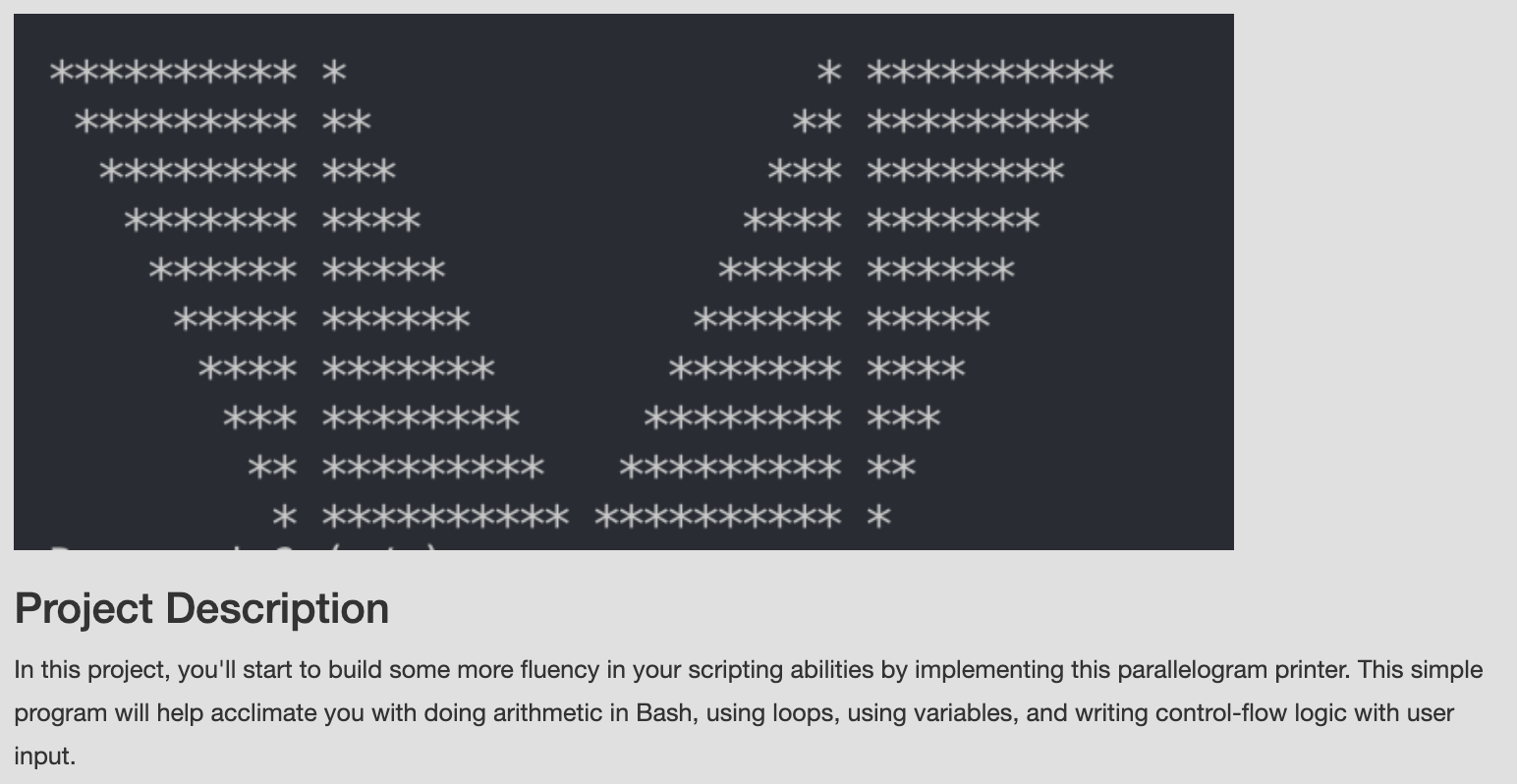
You may have already noticed this, but the parallelogram pattern is really just two triangles printed on a slant and mirrored over the y-axis. This should simplify your code! Feel free to add functions if you think it would simplify your code.
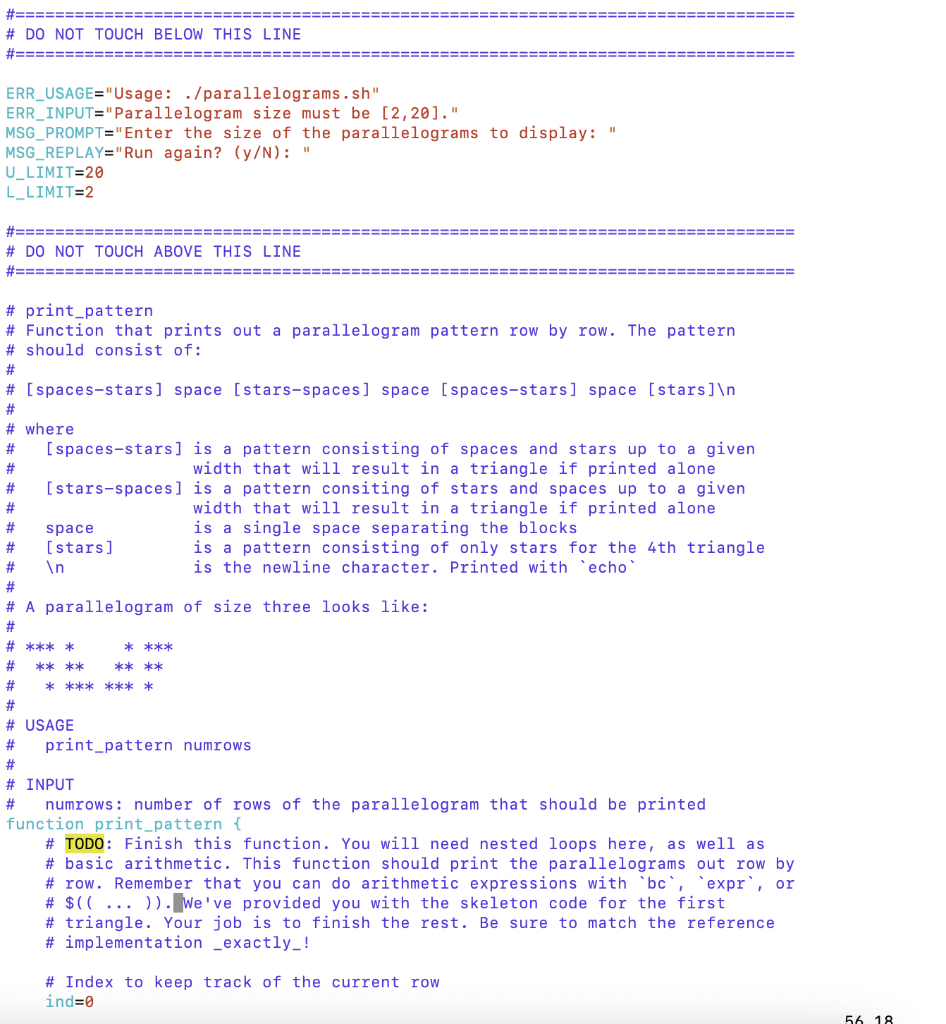
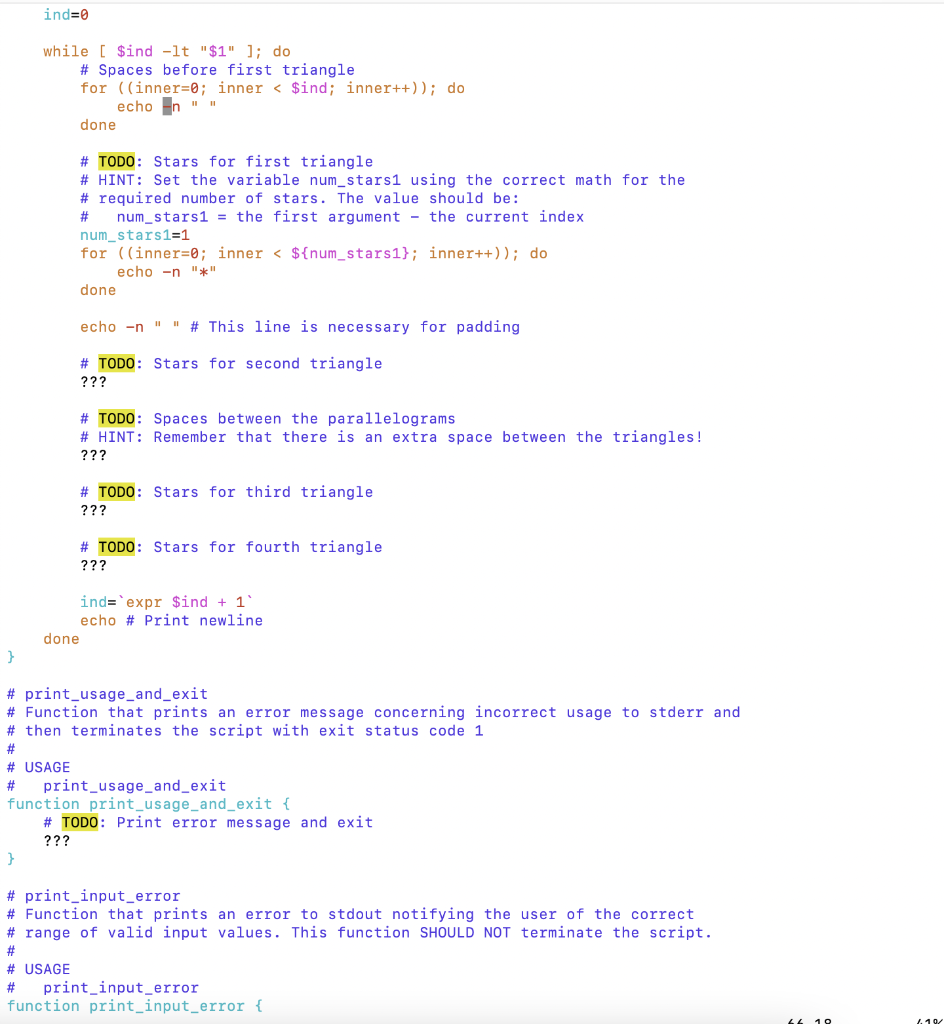
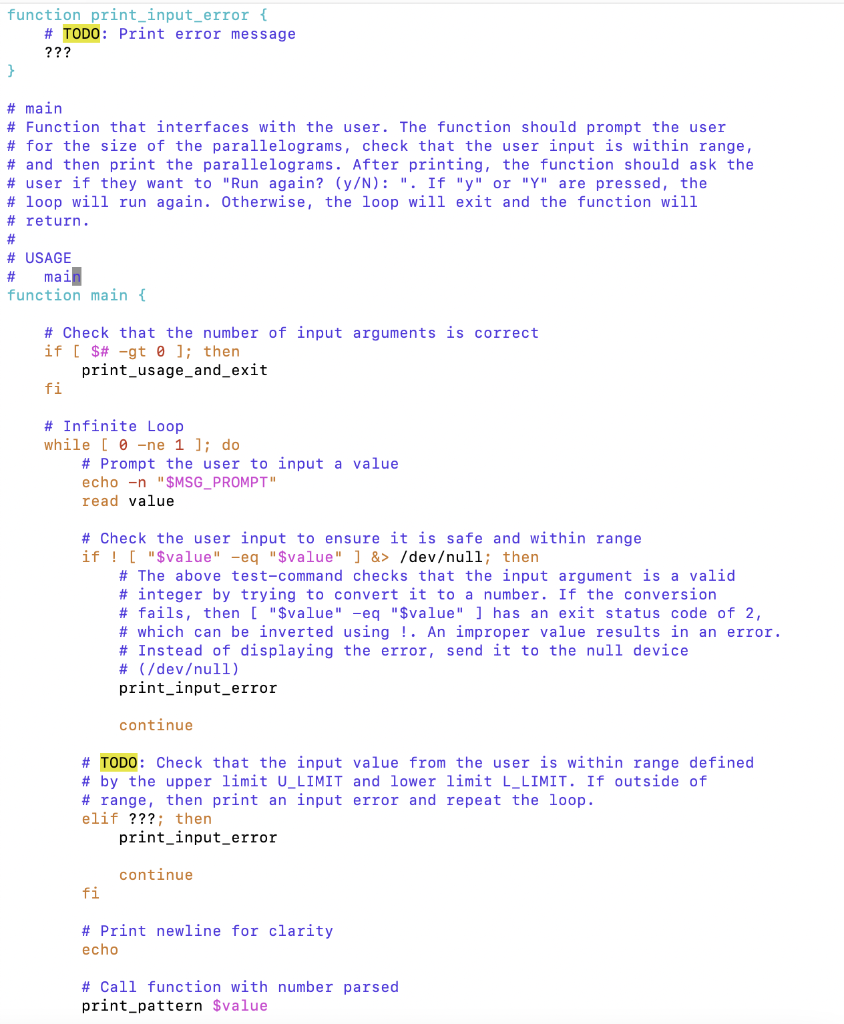
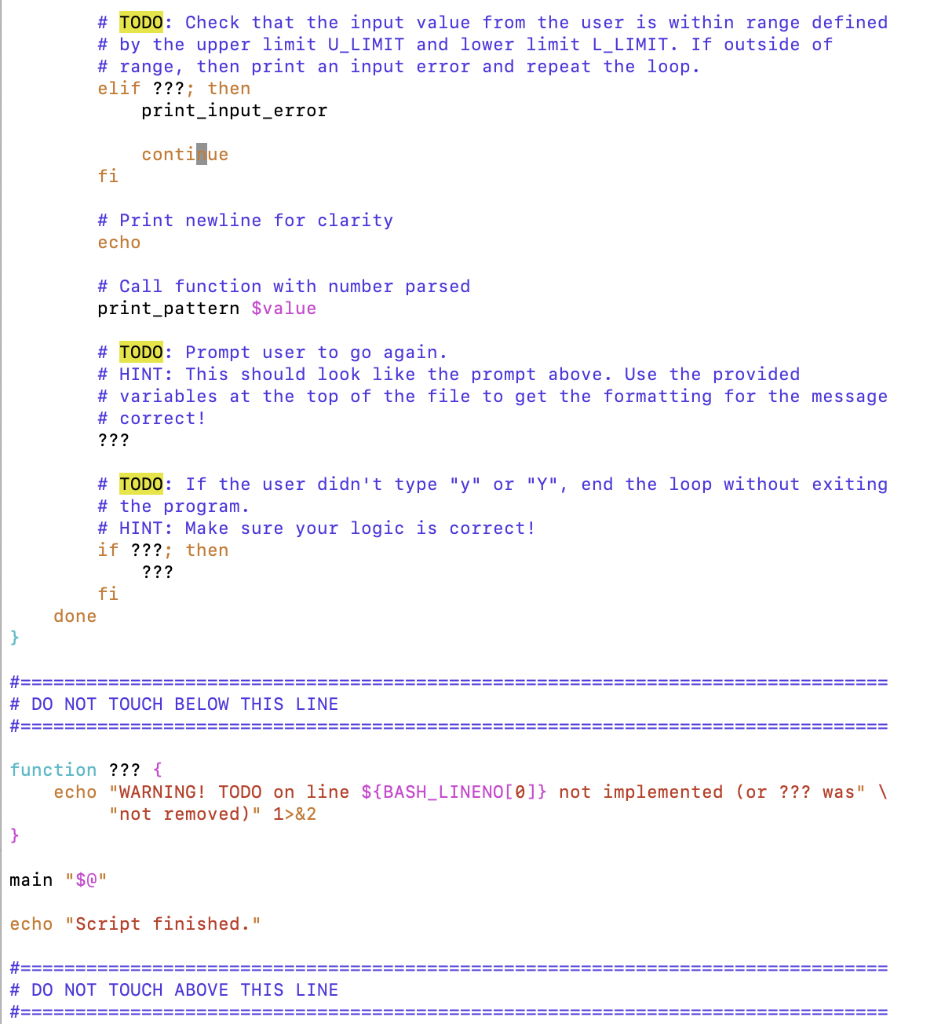
Please implement all TODO
Hint: You can use compare.sh from the first scripting project to compare your results to the reference program. Two test input files have been provided (input10.txt and input3-5.txt). You can use these files with compare.sh by running compare.sh with the -i option. For example, try:
compare.sh -i input10.txt parallelograms.sh solparallelograms
When you look at the test inputs, notice that each separate line relates to the user input that would otherwise be entered by the keyboard. Try creating your own test files, including corner cases. diff or vimdiff are also useful tools when trying to compare output from two files.
here are texts of the code
ERR_USAGE="Usage: ./parallelograms.sh"
ERR_INPUT="Parallelogram size must be [2,20]."
MSG_PROMPT="Enter the size of the parallelograms to display: "
MSG_REPLAY="Run again? (y/N): "
U_LIMIT=20
L_LIMIT=2
#===============================================================================
# DO NOT TOUCH ABOVE THIS LINE
#=============================================================================
# print_pattern
# Function that prints out a parallelogram pattern row by row. The pattern
# should consist of:
#
# [spaces-stars] space [stars-spaces] space [spaces-stars] space [stars]
#
# where
# [spaces-stars] is a pattern consisting of spaces and stars up to a given
# width that will result in a triangle if printed alone
# [stars-spaces] is a pattern consiting of stars and spaces up to a given
# width that will result in a triangle if printed alone
# space is a single space separating the blocks
# [stars] is a pattern consisting of only stars for the 4th triangle
# is the newline character. Printed with `echo`
#
# A parallelogram of size three looks like:
#
# *** * * ***
# ** ** ** **
# * *** *** *
#
# USAGE
# print_pattern numrows
#
# INPUT
# numrows: number of rows of the parallelogram that should be printed
function print_pattern {
# TODO: Finish this function. You will need nested loops here, as well as
# basic arithmetic. This function should print the parallelograms out row by
# row. Remember that you can do arithmetic expressions with `bc`, `expr`, or
# $(( ... )). We've provided you with the skeleton code for the first
# triangle. Your job is to finish the rest. Be sure to match the reference
# implementation _exactly_!
# Index to keep track of the current row
ind=0
while [ $ind -lt "$1" ]; do
# Spaces before first triangle
for ((inner=0; inner
echo -n " "
done
# TODO: Stars for first triangle
# HINT: Set the variable num_stars1 using the correct math for the
# required number of stars. The value should be:
# num_stars1 = the first argument - the current index
num_stars1=1
for ((inner=0; inner
echo -n "*"
done
echo -n " " # This line is necessary for padding
# TODO: Stars for second triangle
???
# TODO: Spaces between the parallelograms
# HINT: Remember that there is an extra space between the triangles!
???
# TODO: Stars for third triangle
???
# TODO: Stars for fourth triangle
???
ind=`expr $ind + 1`
echo # Print newline
done
}
# print_usage_and_exit
# Function that prints an error message concerning incorrect usage to stderr and
# then terminates the script with exit status code 1
#
# USAGE
# print_usage_and_exit
function print_usage_and_exit {
# TODO: Print error message and exit
???
}
# print_input_error
# Function that prints an error to stdout notifying the user of the correct
# range of valid input values. This function SHOULD NOT terminate the script.
#
# USAGE
# print_input_error
function print_input_error {
# TODO: Print error message
???
}
# main
# Function that interfaces with the user. The function should prompt the user
# for the size of the parallelograms, check that the user input is within range,
# and then print the parallelograms. After printing, the function should ask the
# user if they want to "Run again? (y/N): ". If "y" or "Y" are pressed, the
# loop will run again. Otherwise, the loop will exit and the function will
# return.
#
# USAGE
# main
function main {
# Check that the number of input arguments is correct
if [ $# -gt 0 ]; then
print_usage_and_exit
fi
# Infinite Loop
while [ 0 -ne 1 ]; do
# Prompt the user to input a value
echo -n "$MSG_PROMPT"
read value
# Check the user input to ensure it is safe and within range
if ! [ "$value" -eq "$value" ] &> /devull; then
# The above test-command checks that the input argument is a valid
# integer by trying to convert it to a number. If the conversion
# fails, then [ "$value" -eq "$value" ] has an exit status code of 2,
# which can be inverted using !. An improper value results in an error.
# Instead of displaying the error, send it to the null device
# (/devull)
print_input_error
continue
# TODO: Check that the input value from the user is within range defined
# by the upper limit U_LIMIT and lower limit L_LIMIT. If outside of
# range, then print an input error and repeat the loop.
elif ???; then
print_input_error
continue
fi
# Print newline for clarity
echo
# Call function with number parsed
print_pattern $value
# TODO: Prompt user to go again.
# HINT: This should look like the prompt above. Use the provided
# variables at the top of the file to get the formatting for the message
# correct!
???
# TODO: If the user didn't type "y" or "Y", end the loop without exiting
# the program.
# HINT: Make sure your logic is correct!
if ???; then
???
fi
done
}
#===============================================================================
# DO NOT TOUCH BELOW THIS LINE
#===============================================================================
function ??? {
echo "WARNING! TODO on line ${BASH_LINENO[0]} not implemented (or ??? was" \
"not removed)" 1>&2
}
main "$@"
echo "Script finished."
** ** *** **** ****** ***** ***** ****** **** ** K** *** ** k*** ** ** * * ** ** *** ** **** ** ***** ****** ****** ***** ******* **** *** ** K* * Project Description In this project, you'll start to build some more fluency in your scripting abilities by implementing this parallelogram printer. This simple program will help acclimate you with doing arithmetic in Bash, using loops, using variables, and writing control-flow logic with user input. ===== #===== # DO NOT TOUCH BELOW THIS LINE # ====== ERR_USAGE="Usage: ./parallelograms.sh" ERR_INPUT="Parallelogram size must be [2,20]." MSG_PROMPT="Enter the size of the parallelograms to display: MSG_REPLAY="Run again? (y/N): " U_LIMIT=20 L_LIMIT=2 =========== #=== # DO NOT TOUCH ABOVE THIS LINE #==== === # print_pattern # Function that prints out a parallelogram pattern row by row. The pattern # should consist of: # # # [spaces-stars] space (stars-spaces] space (spaces-stars] space [stars] # # where # [spaces-stars] is a pattern consisting of spaces and stars up to a given # width that will result in a triangle if printed alone [stars-spaces) is a pattern consiting of stars and spaces up to a given # width that will result in a triangle if printed alone space is a single space separating the blocks [stars] is a pattern consisting of only stars for the 4th triangle In is the newline character. Printed with echo # # A parallelogram of size three looks like: # # **** # # # * * ***** **** ****** # # **** ***** # # USAGE # print_pattern numrows # # INPUT # numrows: number of rows of the parallelogram that should be printed function print_pattern { # TODO: Finish this function. You will need nested loops here, as well as # basic arithmetic. This function should print the parallelograms out row by # row. Remember that you can do arithmetic expressions with 'bc', expr', or # $((...)). We've provided you with the skeleton code for the first # triangle. Your job is to finish the rest. Be sure to match the reference # implementation _exactly_! # Index to keep track of the current row ind=0 56 18 ind=0 while [ $ind -lt "$ 1" ]; do # Spaces before first triangle for ((inner=0; inner /devull; then # The above test-command checks that the input argument is a valid # integer by trying to convert it to a number. If the conversion # fails, then [ "$value" -eq "$value" ] has an exit status code of 2, # which can be inverted using !. An improper value results in an error. # Instead of displaying the error, send it to the null device # (/devull) print_input_error continue # TODO: Check that the input value from the user is within range defined # by the upper limit U_LIMIT and lower limit L_LIMIT. If outside of # range, then print an input error and repeat the loop. elif ???; then print_input_error continue fi # Print newline for clarity echo # Call function with number parsed print_pattern $value # TODO: Check that the input value from the user is within range defined # by the upper limit U_LIMIT and lower limit L_LIMIT. If outside of # range, then print an input error and repeat the loop. elif ???; then print_input_error conti e fi # Print newline for clarity echo # Call function with number parsed print_pattern $value # TODO: Prompt user to go again. # HINT: This should look like the prompt above. Use the provided # variables at the top of the file to get the formatting for the message # correct! ??? # TODO: If the user didn't type "y" or "Y", end the loop without exiting # the program. # HINT: Make sure your logic is correct! if ???; then ??? fi done } # DO NOT TOUCH BELOW THIS LINE EEE function ??? { echo "WARNING! TODO on line ${BASH_LINENO[0]} not implemented (or ??? was" \ "not removed)" 1>&2 } main "$0" echo "Script finished." # DO NOT TOUCH ABOVE THIS LINE ** ** *** **** ****** ***** ***** ****** **** ** K** *** ** k*** ** ** * * ** ** *** ** **** ** ***** ****** ****** ***** ******* **** *** ** K* * Project Description In this project, you'll start to build some more fluency in your scripting abilities by implementing this parallelogram printer. This simple program will help acclimate you with doing arithmetic in Bash, using loops, using variables, and writing control-flow logic with user input. ===== #===== # DO NOT TOUCH BELOW THIS LINE # ====== ERR_USAGE="Usage: ./parallelograms.sh" ERR_INPUT="Parallelogram size must be [2,20]." MSG_PROMPT="Enter the size of the parallelograms to display: MSG_REPLAY="Run again? (y/N): " U_LIMIT=20 L_LIMIT=2 =========== #=== # DO NOT TOUCH ABOVE THIS LINE #==== === # print_pattern # Function that prints out a parallelogram pattern row by row. The pattern # should consist of: # # # [spaces-stars] space (stars-spaces] space (spaces-stars] space [stars] # # where # [spaces-stars] is a pattern consisting of spaces and stars up to a given # width that will result in a triangle if printed alone [stars-spaces) is a pattern consiting of stars and spaces up to a given # width that will result in a triangle if printed alone space is a single space separating the blocks [stars] is a pattern consisting of only stars for the 4th triangle In is the newline character. Printed with echo # # A parallelogram of size three looks like: # # **** # # # * * ***** **** ****** # # **** ***** # # USAGE # print_pattern numrows # # INPUT # numrows: number of rows of the parallelogram that should be printed function print_pattern { # TODO: Finish this function. You will need nested loops here, as well as # basic arithmetic. This function should print the parallelograms out row by # row. Remember that you can do arithmetic expressions with 'bc', expr', or # $((...)). We've provided you with the skeleton code for the first # triangle. Your job is to finish the rest. Be sure to match the reference # implementation _exactly_! # Index to keep track of the current row ind=0 56 18 ind=0 while [ $ind -lt "$ 1" ]; do # Spaces before first triangle for ((inner=0; inner /devull; then # The above test-command checks that the input argument is a valid # integer by trying to convert it to a number. If the conversion # fails, then [ "$value" -eq "$value" ] has an exit status code of 2, # which can be inverted using !. An improper value results in an error. # Instead of displaying the error, send it to the null device # (/devull) print_input_error continue # TODO: Check that the input value from the user is within range defined # by the upper limit U_LIMIT and lower limit L_LIMIT. If outside of # range, then print an input error and repeat the loop. elif ???; then print_input_error continue fi # Print newline for clarity echo # Call function with number parsed print_pattern $value # TODO: Check that the input value from the user is within range defined # by the upper limit U_LIMIT and lower limit L_LIMIT. If outside of # range, then print an input error and repeat the loop. elif ???; then print_input_error conti e fi # Print newline for clarity echo # Call function with number parsed print_pattern $value # TODO: Prompt user to go again. # HINT: This should look like the prompt above. Use the provided # variables at the top of the file to get the formatting for the message # correct! ??? # TODO: If the user didn't type "y" or "Y", end the loop without exiting # the program. # HINT: Make sure your logic is correct! if ???; then ??? fi done } # DO NOT TOUCH BELOW THIS LINE EEE function ??? { echo "WARNING! TODO on line ${BASH_LINENO[0]} not implemented (or ??? was" \ "not removed)" 1>&2 } main "$0" echo "Script finished." # DO NOT TOUCH ABOVE THIS LINE
Step by Step Solution
There are 3 Steps involved in it

Get step-by-step solutions from verified subject matter experts
 Study Help