







Question: Title : Booklet Printing (Use C Programming Languange Only) When printing a document, usually the first page is printed first, then the second, third, and
Title : Booklet Printing
(Use C Programming Languange Only)
When printing a document, usually the first page is printed first, then the second, third, and so on until the last page. However, when printing booklets (folding books), the printing order must be changed so that after folding the paper, the booklet will have correct page order. In printing booklets, each paper is used to print 4 pages: 2 pages on the front side and 2 pages on the back side. The following steps will show you how to make a booklet so that the order is in the same order as a normal book:
1. Sort the papers according to the correct order.
2. For all papers, make sure that the front side is pointing towards the reader's eye.
3. Fold the papers horizontally downward, so that half of the left sheets will be below the right sheets.
4. Keep the shape of the book by stapling or binding it.
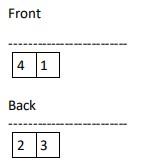
If all these papers are stacked in the right order and the front side of the first sheet is pointing towards the readers eyes, then it can be guaranteed that the booklet will have the correct page order as the normal book. For example, a 4-page booklet requires 1 sheet of paper: the front contains the 4th and 1st pages, then the back contains the 2nd and 3rd pages. When the papers are folded, the 1st page becomes the front cover of the book, then the 2nd and 3rd pages are inside, and finally the 4th page becomes the back cover.
It is known that the number of pages you want to print as a booklet is . Your task is to create a program that can produce a print order with the minimum possible number of sheets.
Input Format
The first line consists of an integer , which represents the number of test cases. For each test case, there is an integer which represents the number of pages to be printed.
Output Format
For each test case, start with the format Case #X: where X is the test case number started from 1. The next few lines contain the requested booklet printing order, in the format "Sheet P, Q: R, S" where P is the sheet number, Q is the paper part, R and S are the page numbers printed on the paper on the left right in a row.
For P, the sheet number starts at 1.
For Q, print front if it is the front of the paper, and print back if it is the back of the paper.
For R and S, page numbers start from 1. If the page has run out and there are still sheets left, print Blank.
Sort out from the smallest sheet number of papers. For each sheet of paper, remove the front first, then the back.
Read the sample output for more details.
Constraints
1 10
1 100
Notes
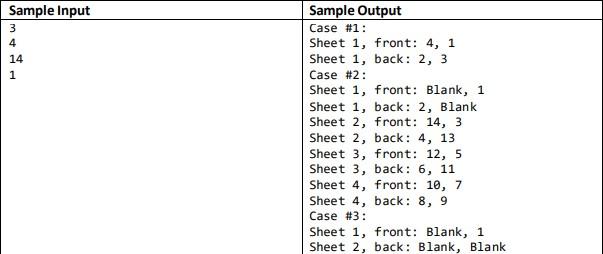
The first test case is an example described in the description. For the second and third test cases, note that the back cover does not contain a page, so print "Blank".
Front 4 1 Back 2 3 3 Sample Input 3 4 14 1 Sample Output Case #1: Sheet 1, front: 4, 1 Sheet 1, back: 2, 3 Case #2: Sheet 1, front: Blank, 1 Sheet 1, back: 2, Blank Sheet 2, front: 14, 3 Sheet 2, back: 4, 13 Sheet 3, front: 12,5 Sheet 3, back: 6, 11 Sheet 4, front: 10, 7 Sheet 4, back: 8, 9 Case #3: Sheet 1, front: Blank, 1 Sheet 2, back: Blank, Blank
Step by Step Solution
There are 3 Steps involved in it

Get step-by-step solutions from verified subject matter experts
 Study Help