







Question: To complete the program, follow the steps: (1) Prompt the user to input 3 student scores, then output them. (from 0 - 100). Note, the
To complete the program, follow the steps: (1) Prompt the user to input 3 student scores, then output them. (from 0 - 100). Note, the format of the scores, use %0.2f.(Submit for 2 points) Enter the 1st score: 92.5 Enter the 2nd score: 87.3 Enter the 3rd score: 83.4 The scores entered are: 92.50, 87.30 and 83.40 (2) Extend the program to output the average of the 3 scores entered in step 1. Note, use %0.2f for the format of the average. (Submit for 3 points, so 5 points total) Enter the 1st score: 92.5 Enter the 2nd score: 87.3 Enter the 3rd score: 83.4 The scores entered are: 92.50, 87.30 and 83.40 The average score is: 87.73 (3) Extend again to output the letter grade base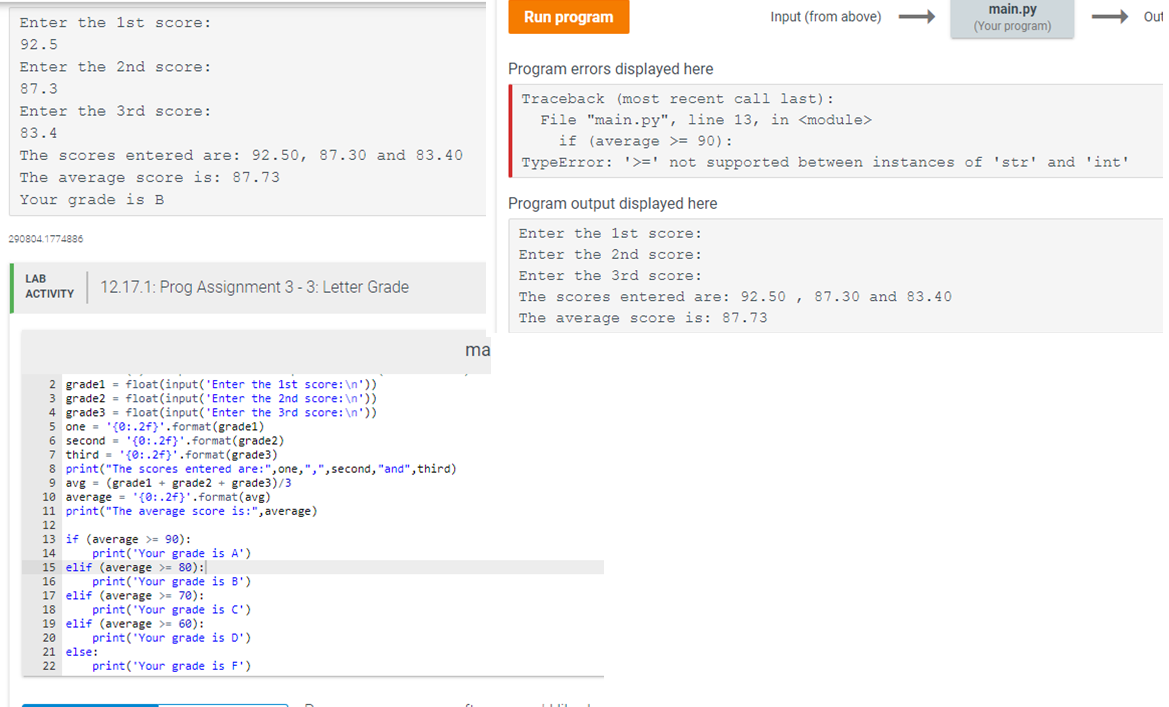 d on the result in step 2. Hint: use if statement (Submit for 5 points, so 10 points total) Enter the 1st score: 92.5 Enter the 2nd score: 87.3 Enter the 3rd score: 83.4 The scores entered are: 92.50, 87.30 and 83.40 The average score is: 87.73 Your grade is B
System keeps telling me that >= cannot be used. Also, if you know how to get the comma next to value 1 on line 8, that would be appreciated.
Thanks!
Run program Input (from above) main.py (Your program) Out Enter the 1st score: 92.5 Enter the 2nd score: 87.3 Enter the 3rd score: 83.4 The scores entered are: 92.50, 87.30 and 83.40 The average score is: 87.73 Your grade is B Program errors displayed here Traceback (most recent call last): File "main.py", line 13, in
Step by Step Solution
There are 3 Steps involved in it

Get step-by-step solutions from verified subject matter experts
 Study Help