







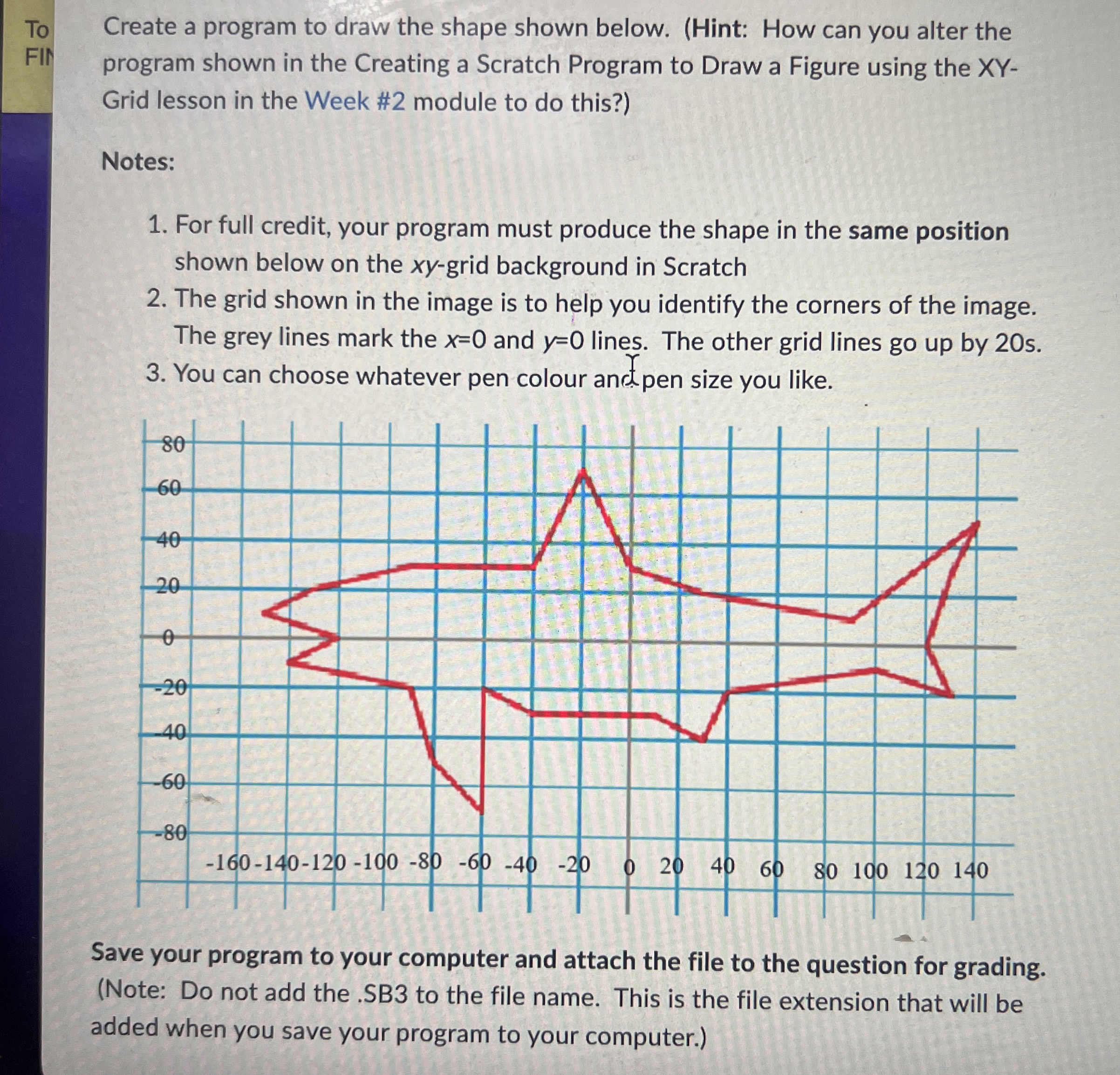
Question: To Create a program to draw the shape shown below. ( Hint: How can you alter the FII program shown in the Creating a Scratch
To Create a program to draw the shape shown below. Hint: How can you alter the
FII program shown in the Creating a Scratch Program to Draw a Figure using the XY
Grid lesson in the Week # module to do this?
Notes:
For full credit, your program must produce the shape in the same position
shown below on the grid background in Scratch
The grid shown in the image is to help you identify the corners of the image.
The grey lines mark the and lines. The other grid lines go up by s
You can choose whatever pen colour and pen size you like.
Save your program to your computer and attach the file to the question for grading.
Note: Do not add the SB to the file name. This is the file extension that will be
added when you save your program to your computer.
Step by Step Solution
There are 3 Steps involved in it
1 Expert Approved Answer
Step: 1 Unlock

Question Has Been Solved by an Expert!
Get step-by-step solutions from verified subject matter experts
Step: 2 Unlock
Step: 3 Unlock
 Study Help