







Question: To split the rate evenly between all sharing guests/Shares, select this option. O Apply Custom Split Rate O Apply Entire Rate O Apply Split
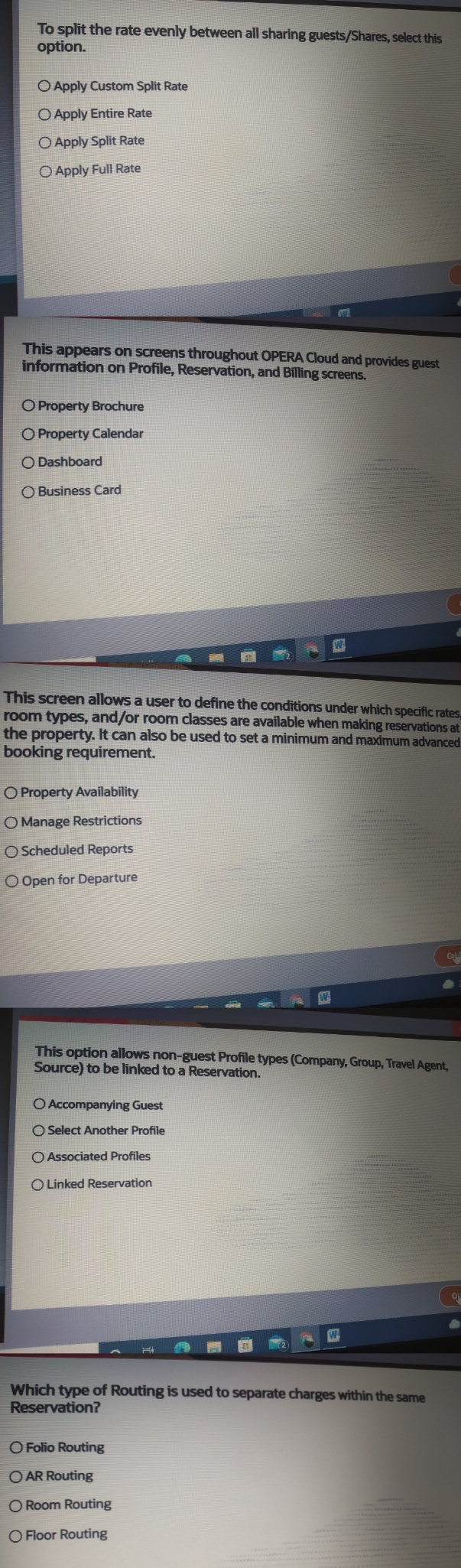
To split the rate evenly between all sharing guests/Shares, select this option. O Apply Custom Split Rate O Apply Entire Rate O Apply Split Rate Apply Full Rate This appears on screens throughout OPERA Cloud and provides guest information on Profile, Reservation, and Billing screens. O Property Brochure O Property Calendar O Dashboard O Business Card W This screen allows a user to define the conditions under which specific rates room types, and/or room classes are available when making reservations at the property. It can also be used to set a minimum and maximum advanced booking requirement. O Property Availability O Manage Restrictions O Scheduled Reports O Open for Departure Col W This option allows non-guest Profile types (Company, Group, Travel Agent, Source) to be linked to a Reservation. O Accompanying Guest O Select Another Profile O Associated Profiles O Linked Reservation W Which type of Routing is used to separate charges within the same Reservation? O Folio Routing OAR Routing O Room Routing Floor Routing
Step by Step Solution
There are 3 Steps involved in it

Get step-by-step solutions from verified subject matter experts
 Study Help