







Question: To start, you have been provided with a database the Information Technology department created. The database has one table and one form. You will be
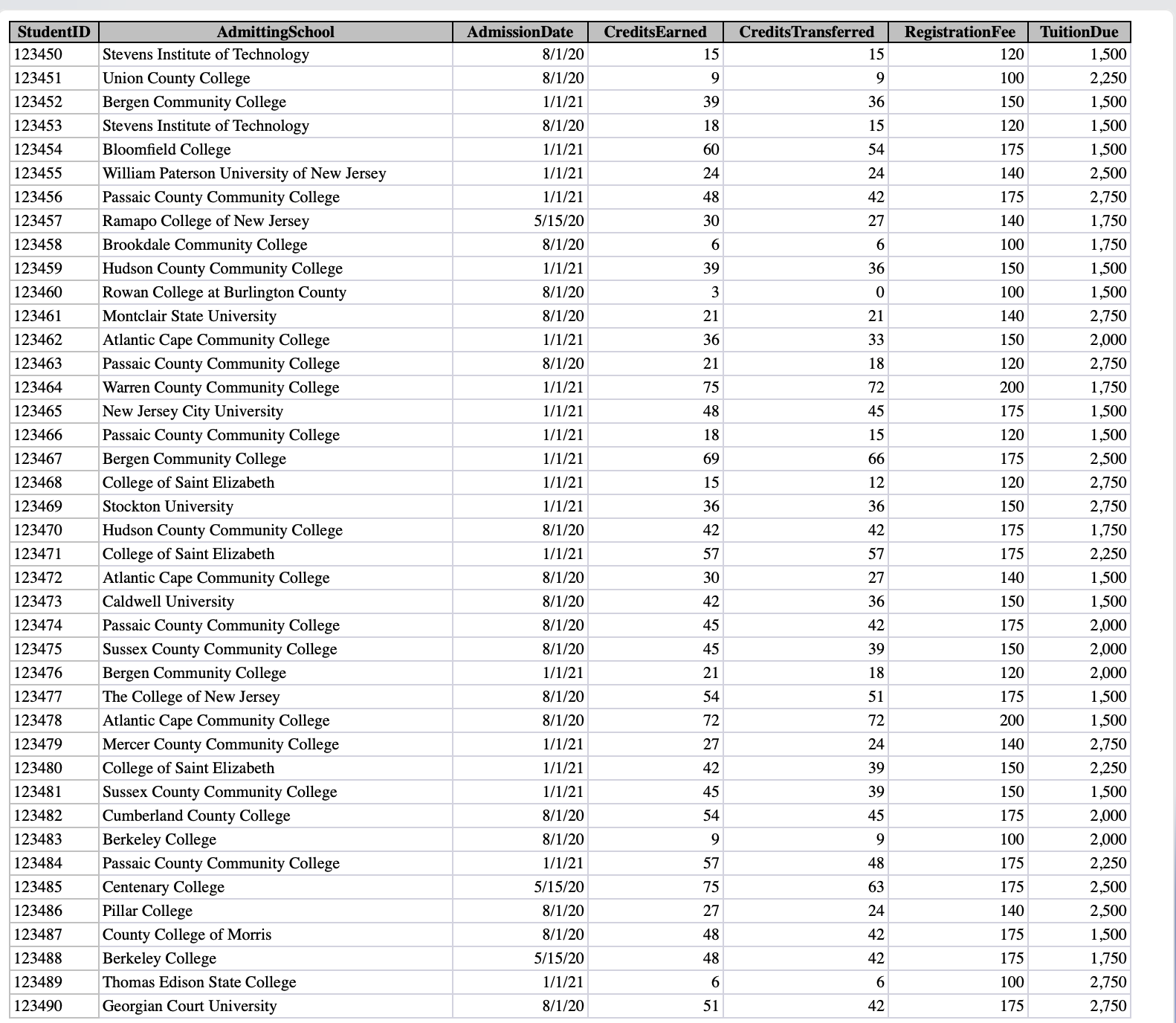
To start, you have been provided with a database the Information Technology department created. The database has one table and one form. You will be importing an Excel spreadsheet into a table and creating a primary key. Start Access. Download and open the file named aAppCapAdvising.accdb. Grader has automatically added your last name to the beginning of the filename. Import the aAppCapTransfer.xlsx Excel workbook into a new table named Transfer Schools. While importing the data, ensure that StudentID has a data type of Short Text, and select StudentID as the primary key. Now that you have imported the data from the spreadsheet, you will modify the field properties in the Transfer Schools table and demonstrate sorting. Open the Transfer Schools table in Design view. Set the StudentID field size to Remove the @ symbol from the StudentID format property. Change the AdmittingSchool field size to Change the RegistrationFee and TuitionDue fields to have decimal places. Switch to Datasheet view, saving the changes that you've made. Resize the AdmittingSchool column by doubleclicking on the border between AdmittingSchool and AdmissionDate. Sort the Transfer Schools table on the CreditsTransferred field in ascending order. Save and close the table. Now that the table is imported and modified, you will create a relationship between the Transfer Schools and Transfer Students tables. Add the Transfer Schools and Transfer Students tables to the Relationships window. Create a onetoone relationship between the StudentID field in the Transfer Students table and the StudentID field in the Transfer Schools table. Enforce referential integrity between the two tables and cascade updates and deletes. Save the changes and close the Relationships window. You will demonstrate changing information in a form. Open the Transfer Students Data Entry form. Locate the record for Ellen Sullivan and change her major to History. Close the form. Adam McChesney, an adviser in the center, would like your assistance in helping him find certain information. You will create a query for him and demonstrate how he can change information. Create a new query using Design view. This query will access fields from both the Transfer Schools and Transfer Students tables. From the Transfer Students table, add the FirstName, LastName, Major, Class, and GPA fields. From the Transfer Schools table, add the AdmissionDate, TuitionDue, CreditsEarned, and CreditsTransferred fields. Save the query as Transfer Credits. Set the criteria in the AdmissionDate field to Run the query records will display Enter the TuitionDue for Bianca Bain as $ and the GPA for Edgar Conway as Save and close the query. Now that you have created the query, you will create a second query for Adam that will calculate the number of credits students lost upon transfer, the tuition payments for which they will be responsible assuming four payments per semester and the due date of the first payment. Create a copy of the Transfer Credits query. Name the copy Transfer Calculations. Open the new query in Design view. Remove the criteria from the AdmissionDate field. Create a calculated field in the first empty field cell of the query named LostCredits that subtracts CreditsTransferred from CreditsEarned. Create another calculated field named TuitionPayments that uses the payment function and determines tuition paid in four installments. The students tuition payment and a interest rate should be used in the function. Use for the futurevalue and type arguments. Ensure that the payment appears as a positive number. Format the TuitionPayments calculated field as Currency. Create another calculated field named FirstPayment after the TuitionPayments field. To calculate the due date, add to their AdmissionDate. Run the query and verify that the three calculated fields have valid data. Add a total row to the datasheet. Sum the TuitionDue column and average the TuitionPayment column. Save and close the query. Cala Hajjar, the director of the center, needs to summarize information about the transfer students for the academic year to present to the Colleges Board of Trustees. You will create a totals query for her to summarize the number of transfer students, average number of credits earned and transferred, and total tuition earned by transfer institution. Create a new query in Design view. Add the Transfer Schools table. Add the AdmittingSchool, StudentID, CreditsEarned, CreditsTransferred, and TuitionDue fields. Sort the query by AdmittingSchool in ascending order. Show the Total row. Group by AdmittingSchool and show the count of StudentID, the average of CreditsEarned, the average of CreditsTransferred, and the sum of TuitionDue. Format both average fields as Standard. Change the caption for the StudentID field to NumStudents, the caption for the CreditsEarned average to AvgCreditsEarn N
Step by Step Solution
There are 3 Steps involved in it
1 Expert Approved Answer
Step: 1 Unlock

Question Has Been Solved by an Expert!
Get step-by-step solutions from verified subject matter experts
Step: 2 Unlock
Step: 3 Unlock
 Study Help