







Question: Tony and his team identified some risks during the first month of the Recreation and Wellness Intranet Project. However, all they did was document the
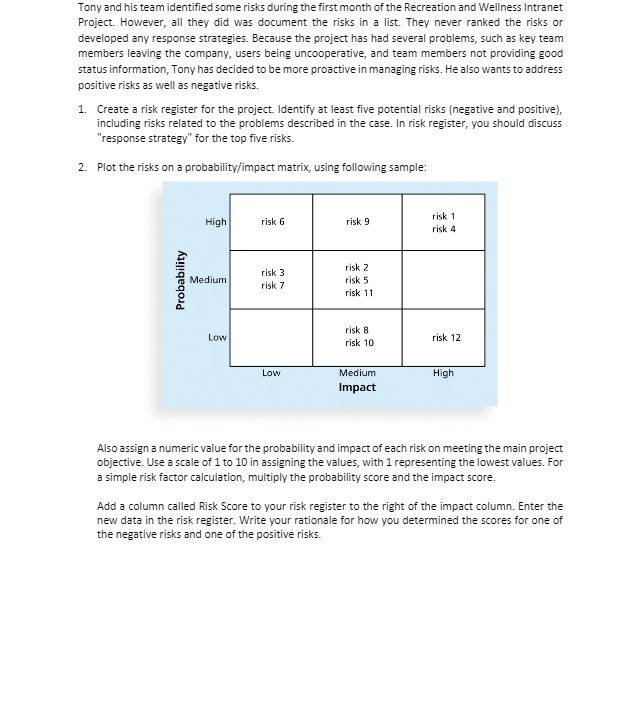
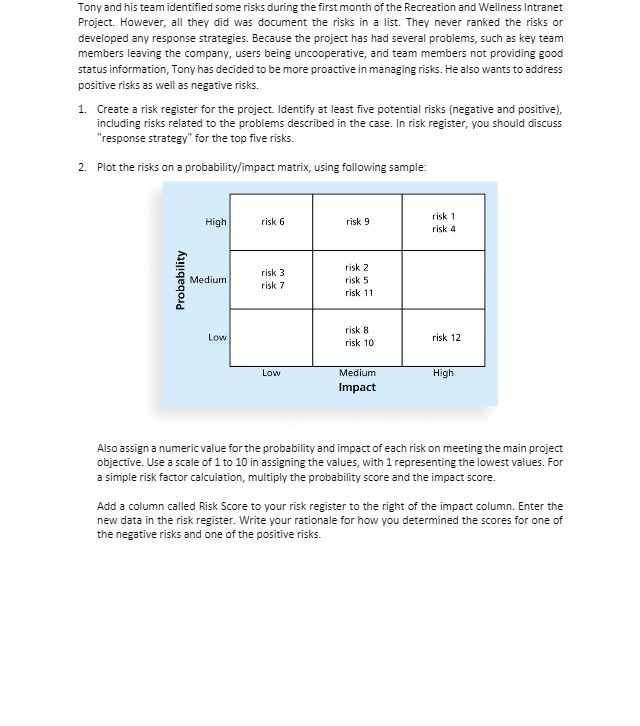
Tony and his team identified some risks during the first month of the Recreation and Wellness Intranet Project. However, all they did was document the risks in a list. They never ranked the risks or developed any response strategies. Because the project has had several problems, such as key team members leaving the company, users being uncooperative, and team members not providing good status information, Tony has decided to be more proactive in managing risks. He also wants to address positive risks as well as negative risks. 1. Create a risk register for the project. Identify at least five potential risks (negative and positive), including risks related to the problems described in the case. In risk register, you should discuss "response strategy" for the top five risks. 2. Plot the risks on a probability/impact matrix, using following sample: High risk 6 risk 9 risk 1 risk 4 risk 3 risk 2 Probability Medium risk 7 risk 5 risk 11 risk 8 Low risk 10 risk 12 Low Medium High Impact Also assign a numeric value for the probability and impact of each risk on meeting the main project objective. Use a scale of 1 to 10 in assigning the values, with 1 representing the lowest values. For a simple risk factor calculation, multiply the probability score and the impact score. Add a column called Risk Score to your risk register to the right of the impact column. Enter the new data in the risk register. Write your rationale for how you determined the scores for one of the negative risks and one of the positive risks
Step by Step Solution
There are 3 Steps involved in it

Get step-by-step solutions from verified subject matter experts
 Study Help