Question: Tools File View CSNB244-Lab4 - Structure.docx (Protected View) - Word (Product Activation Failed) o X PROTECTED VIEW Be carefulfiles from the Internet can contain viruses.
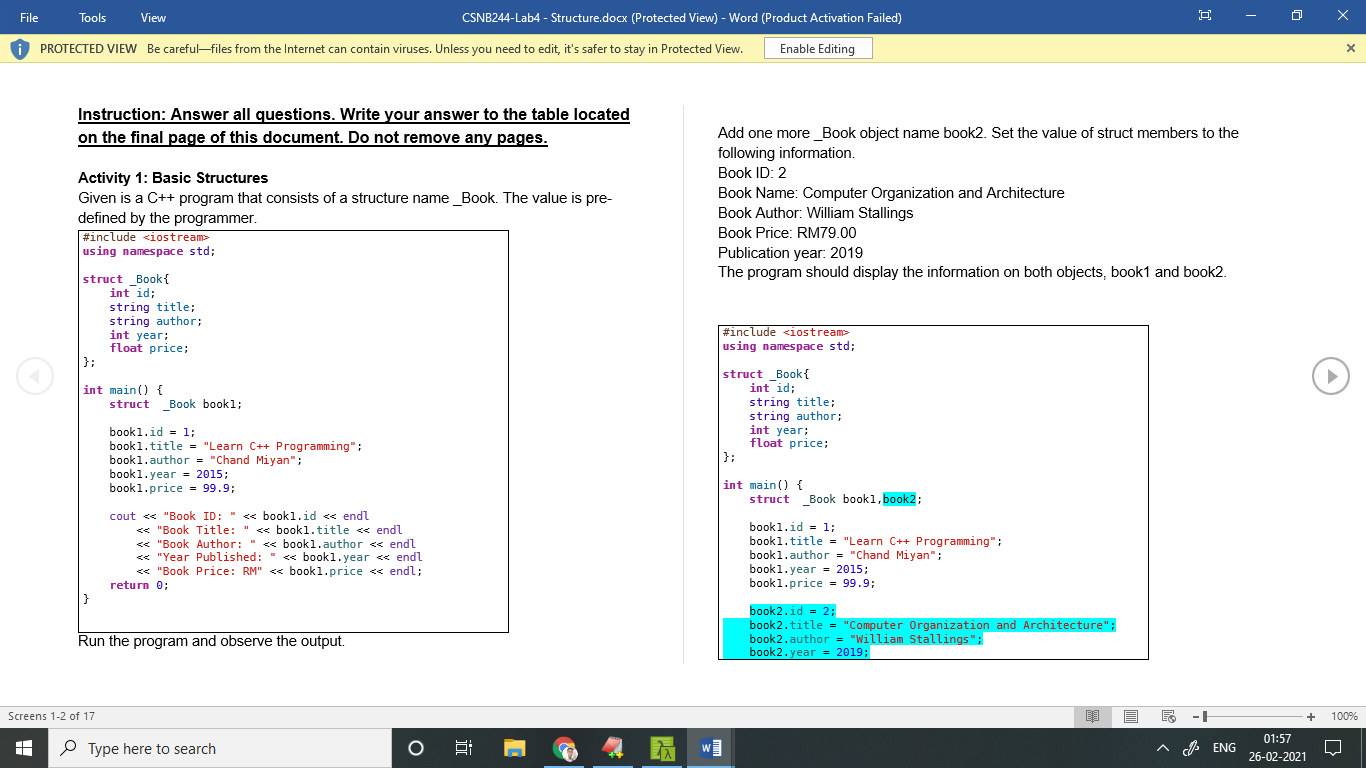
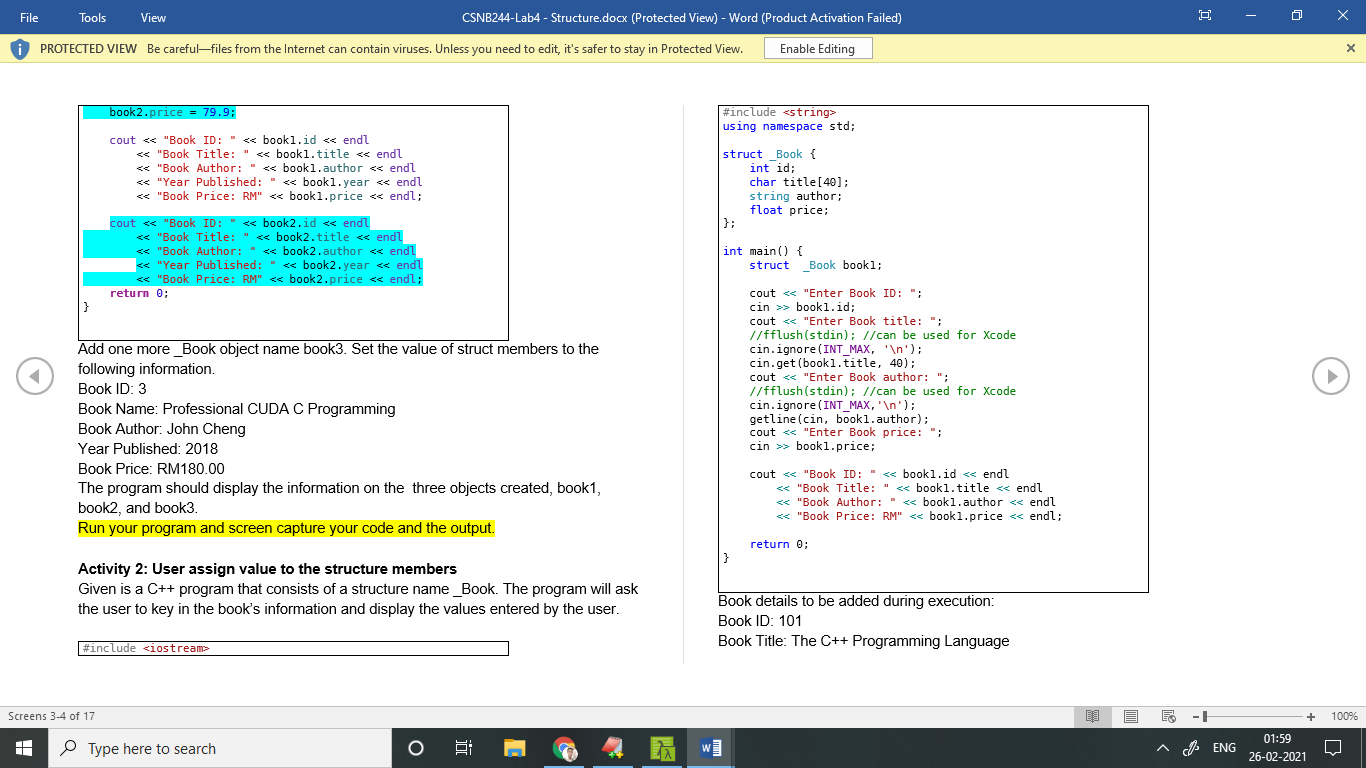
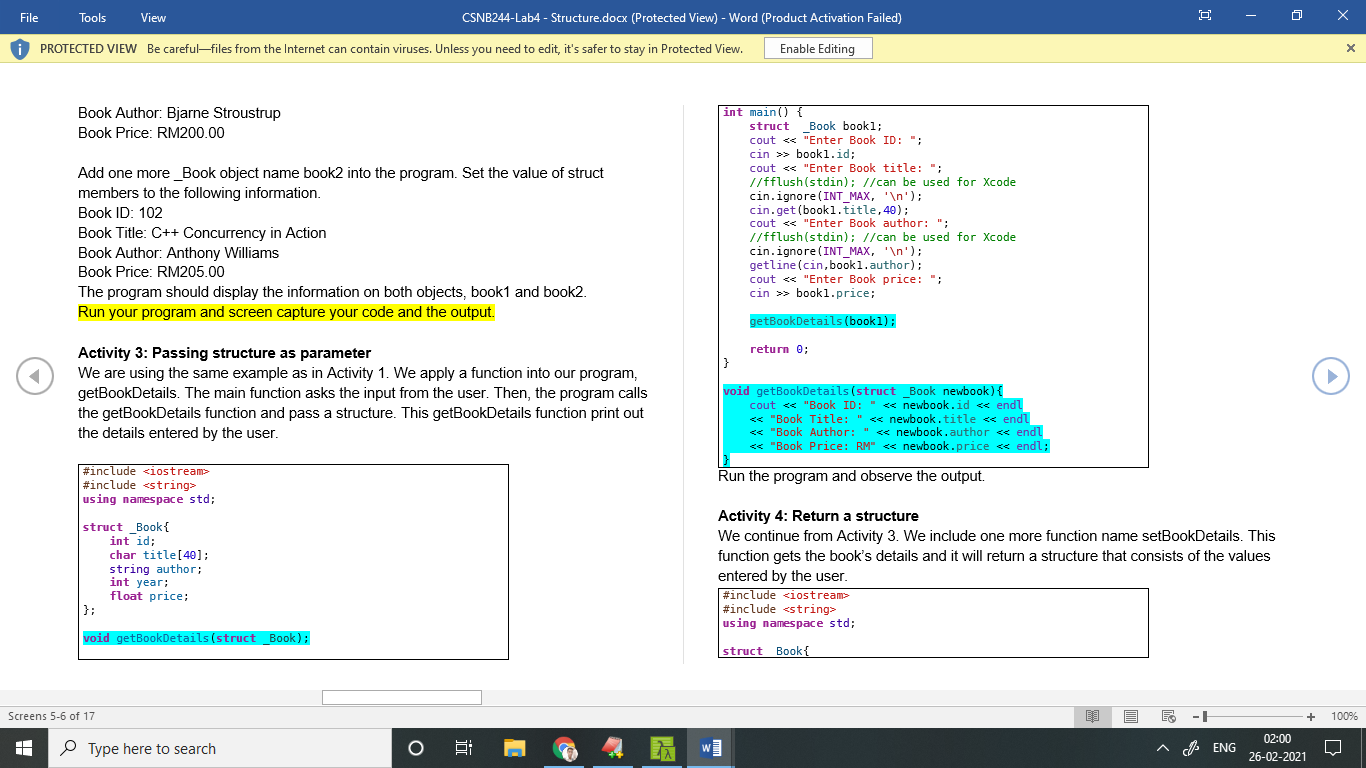
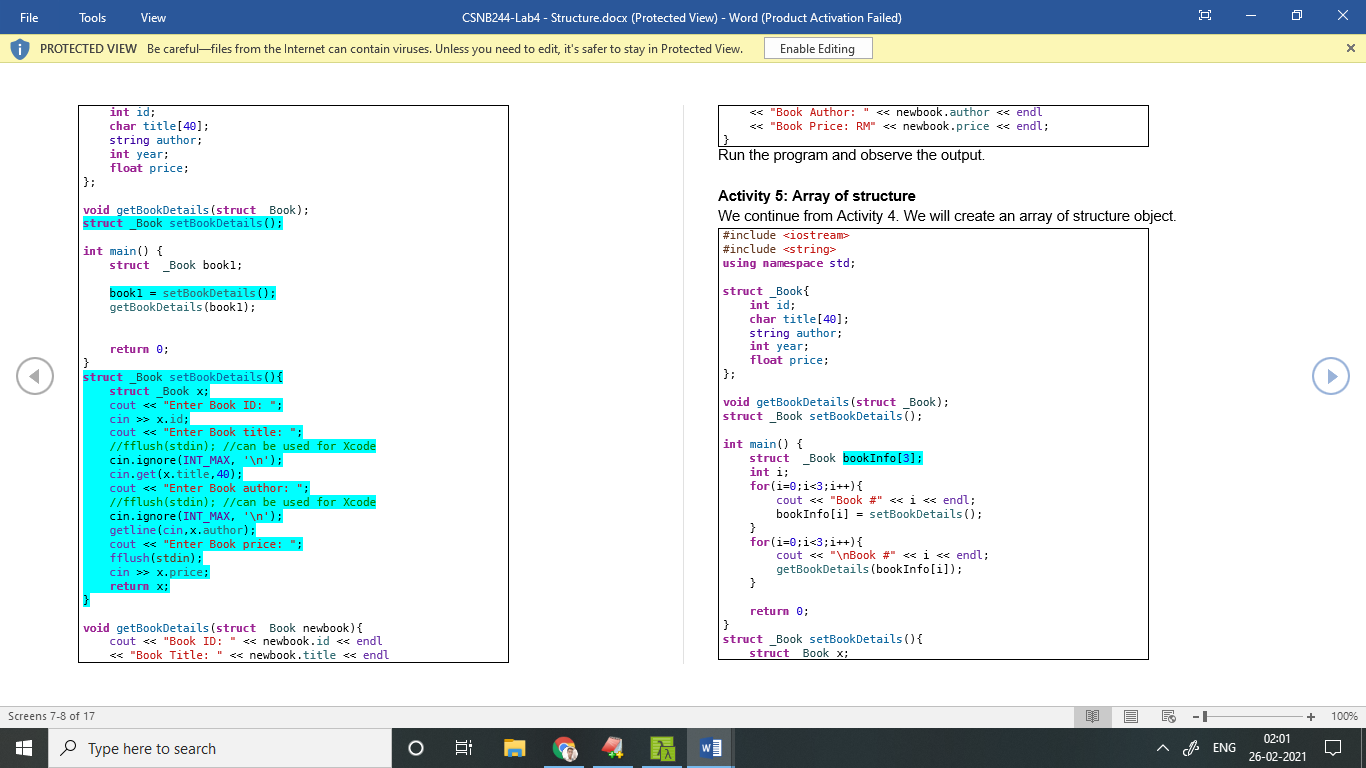
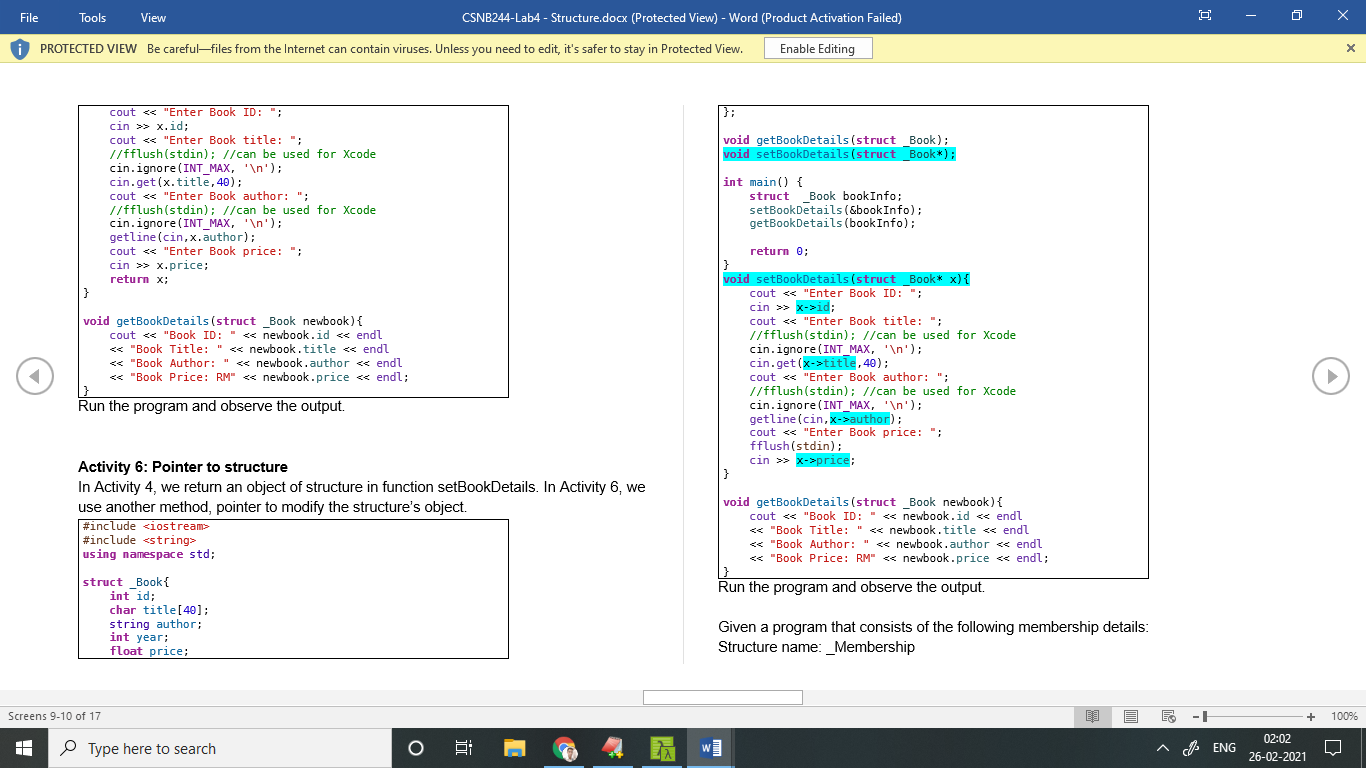
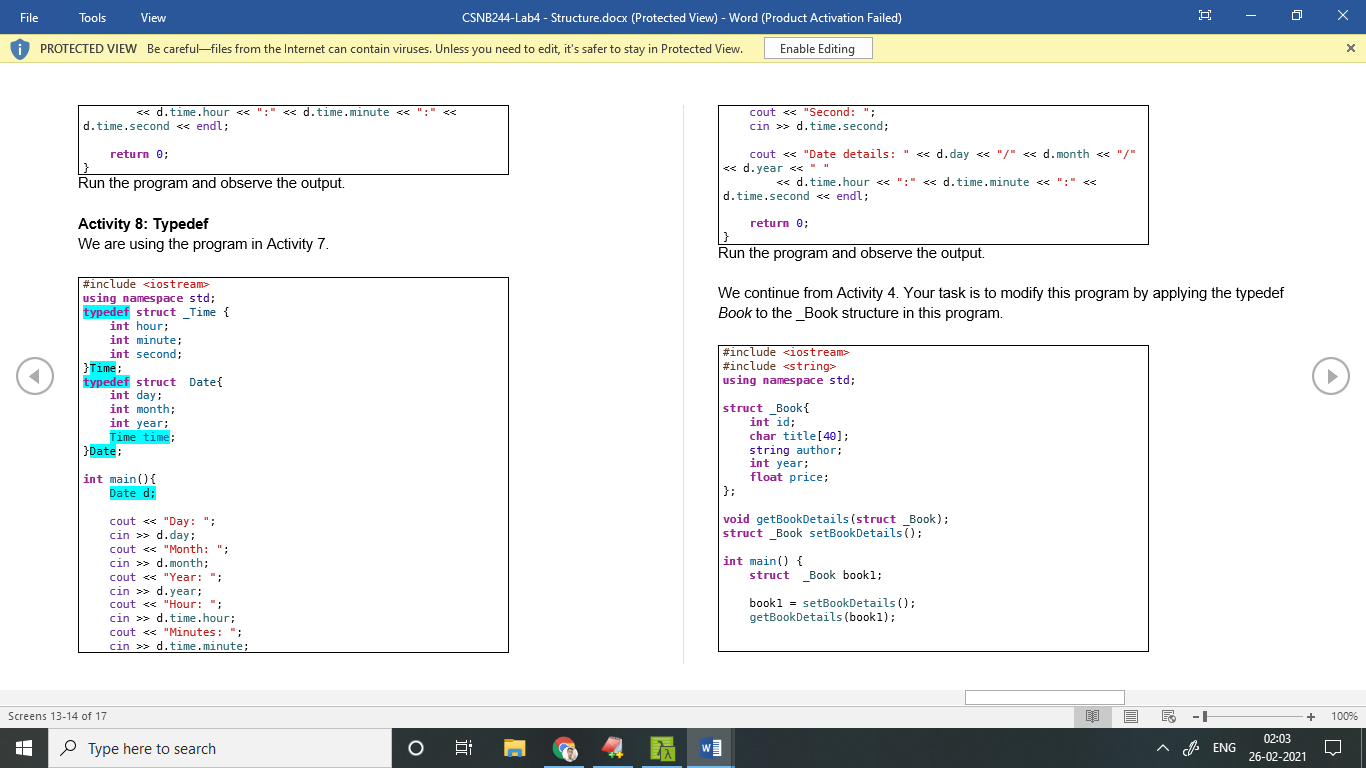
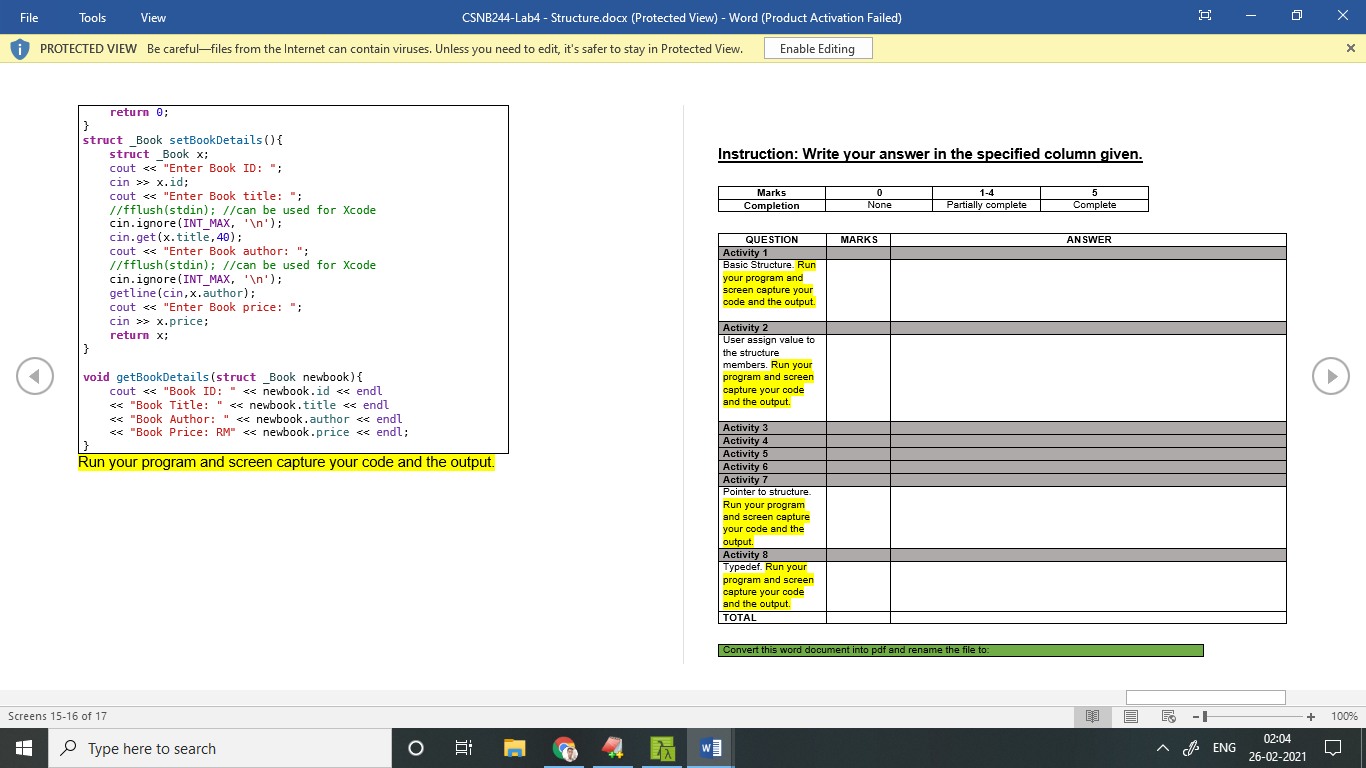
Tools File View CSNB244-Lab4 - Structure.docx (Protected View) - Word (Product Activation Failed) o X PROTECTED VIEW Be carefulfiles from the Internet can contain viruses. Unless you need to edit, it's safer to stay in Protected View. Enable Editing x Instruction: Answer all questions. Write your answer to the table located on the final page of this document. Do not remove any pages. Activity 1: Basic Structures Given is a C++ program that consists of a structure name _Book. The value is pre- defined by the programmer. #include using namespace std; Add one more _Book object name book2. Set the value of struct members to the following information Book ID: 2 Book Name: Computer Organization and Architecture Book Author: William Stallings Book Price: RM79.00 Publication year: 2019 The program should display the information on both objects, book1 and book2 struct Book int id: string title; string author; int year: float price: #include using namespace std; int main() { struct _Book bookl; struct Book int id; string title; string author; int year; float price; bookl.id = 1; booki.title = "Learn C++ Programming"; bookl. author = "Chand Miyan"; bookl. year = 2015; bookl.price = 99.9; int main() { struct _Book booki, book2; cout using namespace std; cout > bookl. id; cout > bookl.price; cout Screens 3-4 of 17 + 100% Type here to search i HENG 01:59 26-02-2021 D Tools File View CSNB244-Lab4 - Structure.docx (Protected View) - Word (Product Activation Failed) o X PROTECTED VIEW Be carefulfiles from the Internet can contain viruses. Unless you need to edit, it's safer to stay in Protected View. Enable Editing x Book Author: Bjarne Stroustrup Book Price: RM200.00 Add one more _Book object name book2 into the program. Set the value of struct members to the following information. Book ID: 102 Book Title: C++ Concurrency in Action Book Author: Anthony Williams Book Price: RM205.00 The program should display the information on both objects, book1 and book2. Run your program and screen capture your code and the output. int main() { struct Book bookl; cout > bookl. id; cout > bookl.price; getBookDetails(bookl); return 0; Activity 3: Passing structure as parameter We are using the same example as in Activity 1. We apply a function into our program, getBookDetails. The main function asks the input from the user. Then, the program calls the getBook Details function and pass a structure. This getBookDetails function print out the details entered by the user. void getBookDetails(struct _Book newbook){ cout #include using namespace std; Run the program and observe the output. struct _Book{ int id; char title [40]; string author; int year; float price; }; Activity 4: Return a structure We continue from Activity 3. We include one more function name setBookDetails. This function gets the book's details and it will return a structure that consists of the values entered by the user. #include #include using namespace std; void getBookDetails(struct _Book); struct Booki Screens 5-6 of 17 + 100% Type here to search o E HENG 02:00 26-02-2021 Tools File View CSNB244-Lab4 - Structure.docx (Protected View) - Word (Product Activation Failed) X PROTECTED VIEW Be carefulfiles from the Internet can contain viruses. Unless you need to edit, it's safer to stay in Protected View. Enable Editing x int id; char title [40]; string author; int year; float price; #include using namespace std; int main() { struct _Book bookl; bookl = setBookDetails 0); getBook Details (book 1); struct _Book int id; char title [40]; string author; int year; float price; }; void getBookDetails (struct _Book); struct _Book setBookDetails(); return 0; } struct _Book setBook Details({ struct _Book x; cout > X.id; cout > x.price; return x; int main() { struct _Book book Info[3]; int i; for(i=0;i> x.id; cout > X.price; return x; int main() { struct Book book Info; setBookDetails (Ebook Info); getBook Details (book Info); return 0; } void getBookDetails(struct _Book newbook) { cout > x->id; cout title, 40); cout author); cout > x->price: } Activity 6: Pointer to structure In Activity 4, we return an object of structure in function setBookDetails. In Activity 6, we use another method, pointer to modify the structure's object. #include #include using namespace std; struct _Book int id; char title[40]; string author; int year: float price; void getBookDetails(struct _Book newbook) { cout > d. time.second; return 0; } Run the program and observe the output. cout using namespace std; typedef struct _Time { int hour; int minute: int second; Time; typedef struct Date{ int day: int month; int year; Time time; }Date: #include #include using namespace std; struct _Book int id; char title [40]; string author; int year; float price; }; int main() { Date d; void getBookDetails (struct _Book); struct _Book setBookDetails; int main() { struct _Book bookl; cout > d. day: cout > d.month; cout > d. year; cout > d. time. hour; cout > d. time.minute; bookl = setBookDetails(); getBookDetails (bookl); Screens 13-14 of 17 O + 100% Type here to search E w HENG 02:03 26-02-2021 File Tools View CSNB244-Lab4 - Structure.docx (Protected View) - Word (Product Activation Failed) o PROTECTED VIEW Be carefulfiles from the Internet can contain viruses. Unless you need to edit, it's safer to stay in Protected View. Enable Editing x Instruction: Write your answer in the specified column given. Marks 0 0 None 1-4 Partially complete 5 Complete Completion return 0; } struct _Book setBookDetails() { struct Book x; cout > x.id; cout > X.price; return x; } MARKS ANSWER QUESTION Activity 1 Basic Structure. Run your program and screen capture your code and the output. Activity 2 User assign value to the structure members. Run your program and screen capture your code and the output void getBookDetails(struct _Book newbook) { cout using namespace std; Add one more _Book object name book2. Set the value of struct members to the following information Book ID: 2 Book Name: Computer Organization and Architecture Book Author: William Stallings Book Price: RM79.00 Publication year: 2019 The program should display the information on both objects, book1 and book2 struct Book int id: string title; string author; int year: float price: #include using namespace std; int main() { struct _Book bookl; struct Book int id; string title; string author; int year; float price; bookl.id = 1; booki.title = "Learn C++ Programming"; bookl. author = "Chand Miyan"; bookl. year = 2015; bookl.price = 99.9; int main() { struct _Book booki, book2; cout using namespace std; cout > bookl. id; cout > bookl.price; cout Screens 3-4 of 17 + 100% Type here to search i HENG 01:59 26-02-2021 D Tools File View CSNB244-Lab4 - Structure.docx (Protected View) - Word (Product Activation Failed) o X PROTECTED VIEW Be carefulfiles from the Internet can contain viruses. Unless you need to edit, it's safer to stay in Protected View. Enable Editing x Book Author: Bjarne Stroustrup Book Price: RM200.00 Add one more _Book object name book2 into the program. Set the value of struct members to the following information. Book ID: 102 Book Title: C++ Concurrency in Action Book Author: Anthony Williams Book Price: RM205.00 The program should display the information on both objects, book1 and book2. Run your program and screen capture your code and the output. int main() { struct Book bookl; cout > bookl. id; cout > bookl.price; getBookDetails(bookl); return 0; Activity 3: Passing structure as parameter We are using the same example as in Activity 1. We apply a function into our program, getBookDetails. The main function asks the input from the user. Then, the program calls the getBook Details function and pass a structure. This getBookDetails function print out the details entered by the user. void getBookDetails(struct _Book newbook){ cout #include using namespace std; Run the program and observe the output. struct _Book{ int id; char title [40]; string author; int year; float price; }; Activity 4: Return a structure We continue from Activity 3. We include one more function name setBookDetails. This function gets the book's details and it will return a structure that consists of the values entered by the user. #include #include using namespace std; void getBookDetails(struct _Book); struct Booki Screens 5-6 of 17 + 100% Type here to search o E HENG 02:00 26-02-2021 Tools File View CSNB244-Lab4 - Structure.docx (Protected View) - Word (Product Activation Failed) X PROTECTED VIEW Be carefulfiles from the Internet can contain viruses. Unless you need to edit, it's safer to stay in Protected View. Enable Editing x int id; char title [40]; string author; int year; float price; #include using namespace std; int main() { struct _Book bookl; bookl = setBookDetails 0); getBook Details (book 1); struct _Book int id; char title [40]; string author; int year; float price; }; void getBookDetails (struct _Book); struct _Book setBookDetails(); return 0; } struct _Book setBook Details({ struct _Book x; cout > X.id; cout > x.price; return x; int main() { struct _Book book Info[3]; int i; for(i=0;i> x.id; cout > X.price; return x; int main() { struct Book book Info; setBookDetails (Ebook Info); getBook Details (book Info); return 0; } void getBookDetails(struct _Book newbook) { cout > x->id; cout title, 40); cout author); cout > x->price: } Activity 6: Pointer to structure In Activity 4, we return an object of structure in function setBookDetails. In Activity 6, we use another method, pointer to modify the structure's object. #include #include using namespace std; struct _Book int id; char title[40]; string author; int year: float price; void getBookDetails(struct _Book newbook) { cout > d. time.second; return 0; } Run the program and observe the output. cout using namespace std; typedef struct _Time { int hour; int minute: int second; Time; typedef struct Date{ int day: int month; int year; Time time; }Date: #include #include using namespace std; struct _Book int id; char title [40]; string author; int year; float price; }; int main() { Date d; void getBookDetails (struct _Book); struct _Book setBookDetails; int main() { struct _Book bookl; cout > d. day: cout > d.month; cout > d. year; cout > d. time. hour; cout > d. time.minute; bookl = setBookDetails(); getBookDetails (bookl); Screens 13-14 of 17 O + 100% Type here to search E w HENG 02:03 26-02-2021 File Tools View CSNB244-Lab4 - Structure.docx (Protected View) - Word (Product Activation Failed) o PROTECTED VIEW Be carefulfiles from the Internet can contain viruses. Unless you need to edit, it's safer to stay in Protected View. Enable Editing x Instruction: Write your answer in the specified column given. Marks 0 0 None 1-4 Partially complete 5 Complete Completion return 0; } struct _Book setBookDetails() { struct Book x; cout > x.id; cout > X.price; return x; } MARKS ANSWER QUESTION Activity 1 Basic Structure. Run your program and screen capture your code and the output. Activity 2 User assign value to the structure members. Run your program and screen capture your code and the output void getBookDetails(struct _Book newbook) { cout









 Study Help