







Question: Topic: Programming, Java, Net Beans IDE Use the NETBEANS IDE to complete the following Java Program: Create a new NetBeans Java Web Application project that
Topic: Programming, Java, Net Beans IDE
Use the NETBEANS IDE to complete the following Java Program:
Create a new NetBeans Java Web Application project that enables a applicant to apply for a job by sending information to the employer.
1. The Display a page must allow the user to provide personal information. (The design does not necessarily have to be the same as the example). However, the page must use four different input types to get inputs from the user, including text box, checkbox, radio button, and drop-down list.
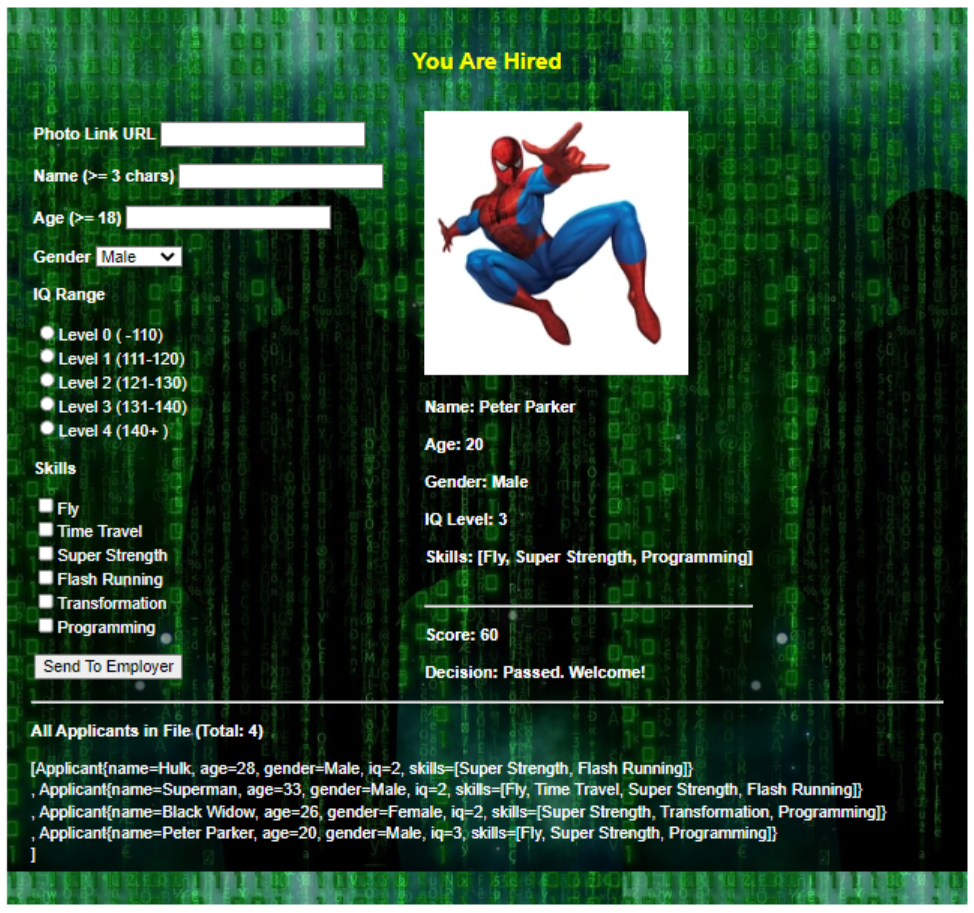
2. When the applicant enters all inputs and clicks a button, the application must display all entered inputs, the photo image, and show the applicants score and employers decision. Score is calculated by add IQ score and Skill score. IQ score is the level times ten (e.g. Level 2 gets 20). Skill score is the number of skills times ten (e.g. three skills gets 30). Decision can be Passed or Failed, depending on the score to be greater than 40 or not. Finally, all applicants data must be stored into a file in CSV format.
3. Server-side validation must be employed so that, when there is any error in the applicants input, an error message will display. Those errors may be for example any field is empty, name is less than 3 characters, or age is younger than 18.
Example Image Attached Bellow:
Important Notes:
4. You will need one view (a JSP page), one controller (a servlet), and two models (Applicant and Applicant File IO). The Avenger class is used to represent an applicant. The ApplicantFileIO class has methods for working with the file. Store the CSV file in your WEB-INF folder.
5. The servlet will get all parameters from request and validate them When there is any error, display an error message at the JSP page to notify the applicant. If all data are valid, use the data to create an applicant object, write it to file, and set attributes then forward request to the JSP page.
Please follow all instructions and include notes where nessisary to help me better understand your code. I truly appriciate your help and i hope it goes well.
Photo Link URL You Are Hired Name (x=3 chars ) Age (>=18) Gender Male IQ Range Level 0(110) Level 1 (111-120) Level 2 (121-130) Level 3 (131-140) Name: Peter Parker Level 4(140+) Skills Age: 20 Gender: Male IQ Level: 3 Super Strength Skills: [Fly, Super Strength, Programming] Flash Running Transformation Programming Send To Employer Decision: Passed. Welcome! All Applicants in File. (Total: 4) [Applicant\{name=Hulk, age=28, gender=Male, iq=2, skills=[Super Strength, Flash Running]\} , Applicant\{name=Superman, age=33, gender=Male, iq=2, skills=[Fly, Time Travel, Super Strength, Flash Running]\} , Applicant\{name=Black Widow, age=26, gender=Female, iq=2, skills=[Super Strength, Transformation, Programming]\} , Applicant\{name=Peter Parker, age=20, gender=Male, i =3, skills=[Fly, Super Strength, Programming]\} ]
Step by Step Solution
There are 3 Steps involved in it

Get step-by-step solutions from verified subject matter experts
 Study Help