







Question: Topic: Stepper Motor Programming Language: Arduino Details:I have problems with the void loop, it only catches the first case and does not do what is
Topic: Stepper Motor
Programming Language: Arduino
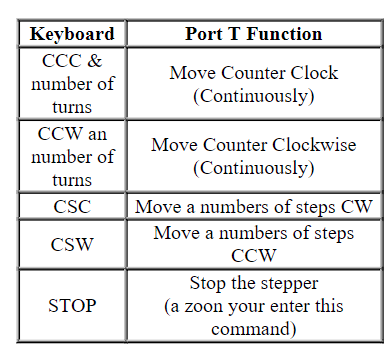
Details:I have problems with the void loop, it only catches the first case and does not do what is inside it. I include an image of what the switch/case statement should have and what to do.
Code:
#include
void setup() { Serial.begin(9600); myStepper.setSpeed(90); }
void loop () { if (Serial.available()>0) { char commandChar = Serial.read(); int Steps = Serial.parseInt(); switch (commandChar){
case 'a': //CCC Serial.print(" Enter turns:"); int Steps = Serial.read(); myStepper.step(stepsPerRevolution*Steps); break; case 'b': //CCW Serial.print("Enter turns:"); int steps = Serial.read(); myStepper.step(-Steps); break; case 'c': //CSC myStepper.step(stepsPerRevolution); break;
case 'd': //CSW myStepper.step(-stepsPerRevolution); break;
case 'f': //STOP myStepper.setSpeed(0); break;
default: Serial.println("Invalid Command"); }}}
DO NOT COPY OTHER ANSWER
\begin{tabular}{|c|c|} \hline Keyboard & Port T Function \\ \hline CCC \& number of turns & Move Counter Clock (Continuously) \\ \hline CCW an number of turns & Move Counter Clockwise (Continuously) \\ \hline CSC & Move a numbers of steps CW \\ \hline CSW & Move a numbers of steps \\ CCW \end{tabular}
Step by Step Solution
There are 3 Steps involved in it

Get step-by-step solutions from verified subject matter experts
 Study Help