







Question: Topic: Using cout, variables, output formatting (iomanip in chapter 3) Create a new C++ project titled Lab 3B in the CodeBlocks IDE. Use the Console
Topic: Using "cout", variables, output formatting (iomanip in chapter 3)
Create a new C++ project titled Lab 3B in the CodeBlocks IDE. Use the Console Application project option.
You are given the following variables to use:
string col1 = "Column 1",
col2 = "Column 2",
col3 = "Column 3";
double d1 = 1.2,
d2 = 3454.456,
d3 = 456.6,
d4 = 23,
d5 = 89569.84,
d6 = 4.454,
d7 = 676.5,
d8 = 334.1,
d9 = 34.4544;
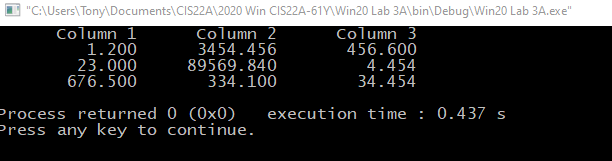
Display the above numbers with exactly 3 decimal digits after the decimal point in a nicely aligned table with 3 rows and 3 columns. Do not use any extra string or spaces for the 'cout' display! There is no need for extra variables beside the given above.
Submit your code file main.cpp in Canvas before the due time. Submit only the CPP file, and nothing else.
How do I upload a file as an assignment submission in Canvas?
"C:\Users\Tony\Documents\CIS22A\2020 Win CIS22A-617 Win20 Lab 3A\bin\ Debug\Win20 Lab 3A.exe" Column 1 Column 2 Column 3 1.200 3454.456 456.600 23.000 89569.840 4.454 676.500 334.100 34.454 Process returned 0 (0x0) Press any key to continue. execution time: 0.437 S
Step by Step Solution
There are 3 Steps involved in it

Get step-by-step solutions from verified subject matter experts
 Study Help