Question: Toshiba's Notebook Computer Assembly Line Toshihiro Nakamura, manufocturing engineering section manager, is examining the prototype assembly process sheet (shown in Exhibit 6.8 ) for the
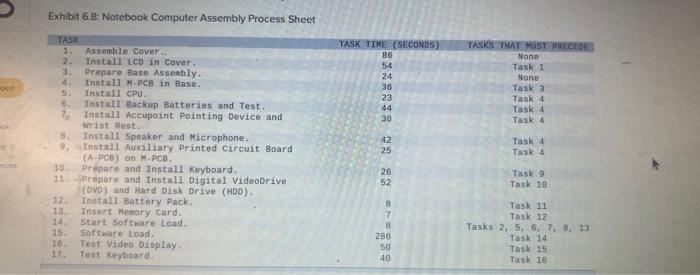
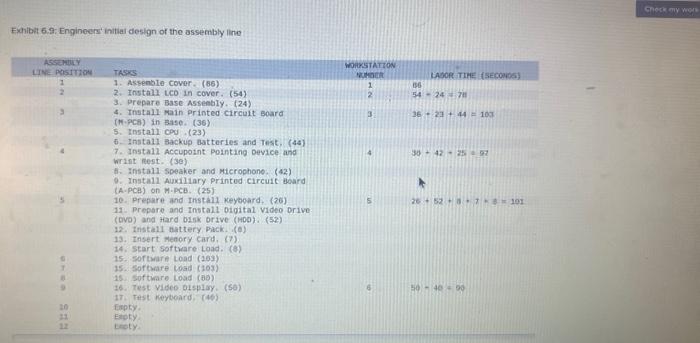
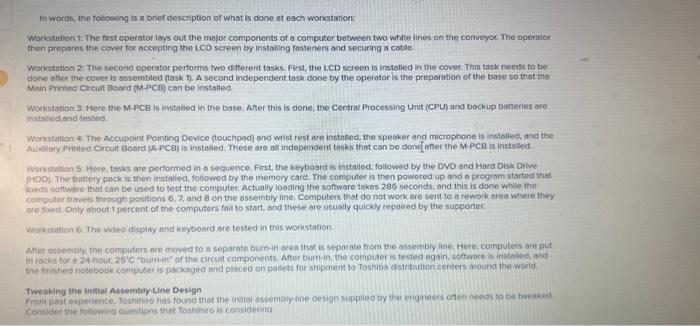
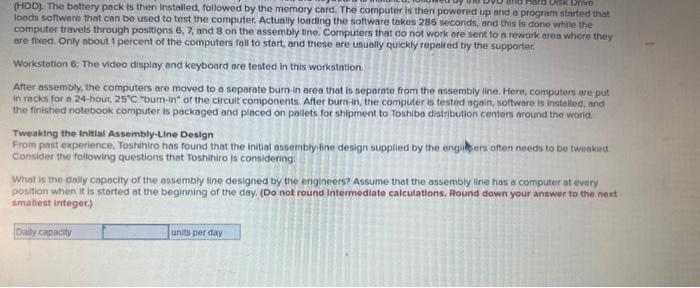
Toshiba's Notebook Computer Assembly Line Toshihiro Nakamura, manufocturing engineering section manager, is examining the prototype assembly process sheet (shown in Exhibit 6.8 ) for the newest subnotebook computer model. With every new model introduced, management feit that the assembly line had to increase productivity and lower costs, usually resulting in changes to the assembly process. When a new medel is designed. considerable attention is directed toward reducing the number of components and simplifying parts production and assembly tequirements. This new computer was a marvel of high-tech, low-cost innovation ond should give Toshibe an advantage during the upcoming fallwinter selling season. - Production of the subnotebook is scheduled to begin in 10 days, initiel production for the new model is to be 150 units per day. increasing to 220 units per day the following week (management thought that eventually production would reach 300 units per dim Assembly lines at the plant normally are staffed by 10 operators who work ot a 14.4 meter-tong assembly line. The line is organized in a straight line with workers shoulder to shoulder on one side. The line can accommodate up to 12 operators if there is a need. The line nommally operates for 7.5 hours n doy femployees work from 8.15A.M, to 5.00PM, and regular hours include one hour of unpaid lunch and 15 minutes of scheduled breaks), it is possible to run one, two, or three hours of overtme, but employees need at least thuee dinys' natice for planning puposes. The Assembly Line. At the head of the astembly line, a computer displays the doily production scheduie, consisting of a list of model types and corresponding lot sizes scheduled to be assembled on the line. The models are simple variations of hord diak size. memory, and battery powes. A typical production schedule includes seven or eight model types in lot sizes varying from 10 to 100 units. The models are assembled sequentally. All the units of the first model are assembled, followed by alt the units of the second, and so on. This computer scieen atso indicates how far along the assembly line is in completing its daily schedule, which serves as a guide for the material handlers who supply parts to the assembly lines Exhibit 6.8: Notebook Computer Assembly Process Sheet The daily schedules are shared with the nearby Fujihashi Parts Collection and Distribution Center. Parts are brought from Fujhashi to the plant within two hours of when they are needed. The material supply system is very tightly coordinated and works well. The assembly line consists of a 14.4-meter conveyor belt that carries the computers, separated at 1.2-meter intervals by white stripes on the belt. Workers stand shoulder to shoulder on one side of the conveyor and work on the units as they move by. In addition to the assembly workers, a highly skilled worker, called a "supporter." is assigned to each line. The supporter moves along the line, assisting workers who are falling behind and replacing workers who need to take a break, Supporters also make decisions about what to da when problems are encountered during the assembly process (such as a defective part). The line speed and the number of workers vary from day to day, depending on production demand and the workers' skills and availability. Although the assembly line has 12 positions, often they are not all used; Exhibit 6.9 provides details of how the engineers who designed the new subnotebook computer felt that the new line should be organized. Fxhibit 6.9: Enginess' initial design of the assembly line It words, the roecwing is o brief deschiption of whot is dome at each workstatione: Workstetion t: The first operator tays out the mojor components of a computer between two whate iines on the corruyor. The operater then prepores the cover for accepting thin LCo screen by instailing fasteners and securing a coble. Worictintion 2. The second operator pertosms two ef fferent tasks. Fust, the LCD screen is instelled in the cover Thig task needs to be done affer the cover is assermbled ftask. t. A second independent task done by the operator is the preporation of the base iso that the. Main Printed cltcialt Bobra (M-PCFj can be installed. Workstation 3. Here the M-FCE is installed in the base. After this is done, the Contrat Processing Unit (CPU) and beckup batteries are : inhitalled and tested. Woricstation 4: The Accupoirt Pointing. Device fouchpod) and wrist rest are instaliod, the speoker and microphohe is instatied, and the Auwiliary Printed Circuit Board (A.PCE) is installed. These are all indopendent tasks that can be donc anter the M.PCe is insta ileed Workstation 5 . Heee, tasks are performed in o sequence. First. the kthyoard is installed. foilowed by the DVD and Hasd Disk Drive 9HDD). The battery pock is then installed, followed by the memory card. The computer is then powered up ond o program started that loods poftware Ithis can be used fo test the computet, Actually looding the soffware takes 286 seconds, and this is done. while the compuler travels through positions 6.7, and B on the assembly line. Computess that do not work are sent to a rework area where thiky. me foxed. Drily about 1 percent of the computers fau to start, and these are usually quickly repaiced by the supporter. Workstation 6 . The video disploy and keyboard are tested in this workstation. After astemtaty, whe computers ore moyed to a seporote butn-in area that is separate from the assaimbly ine. Here, computers are put Ve ferisfied notebock comiputer is packoged and placed on pallets for shipanent to Toshiba cistribution centers around the World Tweaking the Iruitial Assembly.Line Design consider the forlowing thuestipns 1aph Toshiniro is considering (HDD). The battery pack is then installed, followed by the memory card. The computer is then powered up and a prograrn started that loads soffware that can be used to test the computer. Actually loading the software tokes 286 seconds, and this is done while the computer travets through positions 6,7 , and 8 on the assembly tine. Computers that do not work are sent to a rework area wirere they are fbed. Only about 1 percent of the computers fall to start, and these are usuolly quickly repaired by the supporter. Workstation 6: The video display and keyboard are tested in this workstation. After assembly, the computers are moved to a separate burn-in area that is separate from the assembly line. Here, computers are put in racks for a 24-hour, 25C "burn-in" of the circuit components. After burn-in, the computer is tested again, soltware is instelled, and the finishied notebook computer is packaged and placed on pollets for thipment to Toshibo distribution centers around the worid. Tweaking the inttlal Assembly-Line Design From past experience. Toshihiro has found that the initial ossembly fine design supplied by the engilders often needs to be tweaked. Consider the following questions that Toshihiro is considering: What is the dilly capocity of the assembly line designed by the engineers? Assume that the assembly line has a computer at every position when it is started at the beginning of the day, (Do not round intermediate calculations. Round down your answer to the next smailest integer.)









 Study Help