







Question: Traffic Lights in Python 3 Write a program that simulates a traffic light. The program lets the user select one of three lights: red, yellow,
Traffic Lights in Python 3
Write a program that simulates a traffic light. The program lets the user select one of three lights: red, yellow, or green. When a radio button is selected, the light is turned on, and only one light can be on at a time. No lights is on when the program starts. See example:
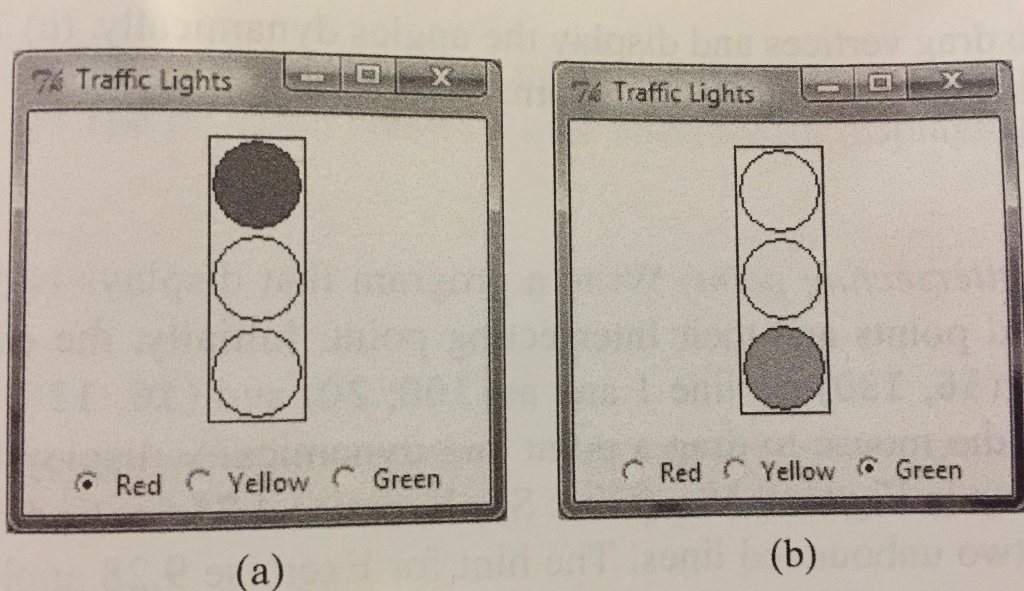
Here is where I am now but it is not working:
from tkinter import *
wide=200 high=400
class TrafficLights: def init(self): window=Tk() window.title("Traffic Light") frame=Frame(window) frame.pack() self.color=StringVar() self.color.set("B") rdRed=Radiobutton(frame, text="Red", variable=self.color, value="R", command=self.processRodio) rdRed.grid(row=10, column=1) rdYellow=Radiobutton(frame, text="Yellow", variable=self.color, value="Y", command=self.processRadio) rdYellow.grid(row=10, column=2) rdGreen=Radiobutton(frame, text="Green", variable=self.color, value="G", command=self.procesRadio) rdGreen.grid(row=10, column=3) self.canvas=Canvas(window, width=wide, height=high) self.canvas.pack() self.oRed=self.canvas.create_oval(30,10,140,110) self.oYel=self.canvas.create_oval(30,110,140,210) self.oGr=self.canvas.create_oval(30,210,140,310) self.canvas.create_rectangle(30,10,140,310) window.mainloop() def processRadio(self): color=self.color.get() if color=="R": self.canvas.itemconfig(self.oRed, fill="red") self.canvas.itemconfig(self.oYel, fill="white") self.canvas.itemconfig(self.oGr, fill="white") elif color=="Y": self.canvas.itemconfig(self.oRed, fill="white") self.canvas.itemconfig(self.oYel, fill="yellow") self.canvas.itemconfig(self.oGr, fill="white") elif color=="G": self.canvas.itemconfig(self.oRed, fill="white") self.canvas.itemconfig(self.oYel, fill="white") self.canvas.itemconfig(self.oGr, fill="green") TrafficLights()
74 Traffic Lights0 Traffic Lights Red Yellow Green Red Yellow Green
Step by Step Solution
There are 3 Steps involved in it

Get step-by-step solutions from verified subject matter experts
 Study Help