







Question: TRANSACTIONAL APPLICATION-DATABASE Students will create a simple Point-of-Sale application using Microsoft Access. The application will demonstrate the ability of an application to capture, store,
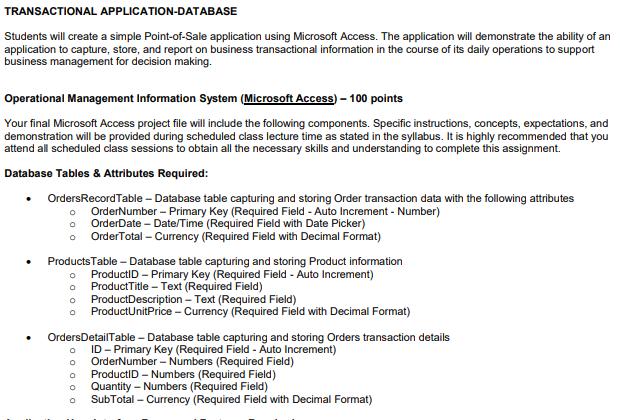
TRANSACTIONAL APPLICATION-DATABASE Students will create a simple Point-of-Sale application using Microsoft Access. The application will demonstrate the ability of an application to capture, store, and report on business transactional information in the course of its daily operations to support business management for decision making. Operational Management Information System (Microsoft Access) - 100 points Your final Microsoft Access project file will include the following components. Specific instructions, concepts, expectations, and demonstration will be provided during scheduled class lecture time as stated in the syllabus. It is highly recommended that you attend all scheduled class sessions to obtain all the necessary skills and understanding to complete this assignment. Database Tables & Attributes Required: OrdersRecord Table - Database table capturing and storing Order transaction data with the following attributes o OrderNumber - Primary Key (Required Field - Auto Increment - Number) 0 OrderDate - Date/Time (Required Field with Date Picker) 0 OrderTotal - Currency (Required Field with Decimal Format) Products Table - Database table capturing and storing Product information 0 ProductID - Primary Key (Required Field - Auto Increment) Product Title - Text (Required Field) 0 o Product Description - Text (Required Field) 0 ProductUnitPrice - Currency (Required Field with Decimal Format) 0 OrdersDetailTable - Database table capturing and storing Orders transaction details ID - Primary Key (Required Field - Auto Increment) OrderNumber - Numbers (Required Field) ProductID-Numbers (Required Field) Quantity - Numbers (Required Field) SubTotal - Currency (Required Field with Decimal Format) DODO
Step by Step Solution
There are 3 Steps involved in it
Course No Location Instructor ID Class Size Seminar End Date Question 1 PS Attendance Question 2 Att... View full answer

Get step-by-step solutions from verified subject matter experts
Document Format (1 attachment)

628c6d75de8b3_19184.xlsx
300 KBs Excel File
 Study Help