







Question: Translating text into Matlab Code clear set epoch counter to zeno set mse to a high number set learning rate Input patterns 1 0 01
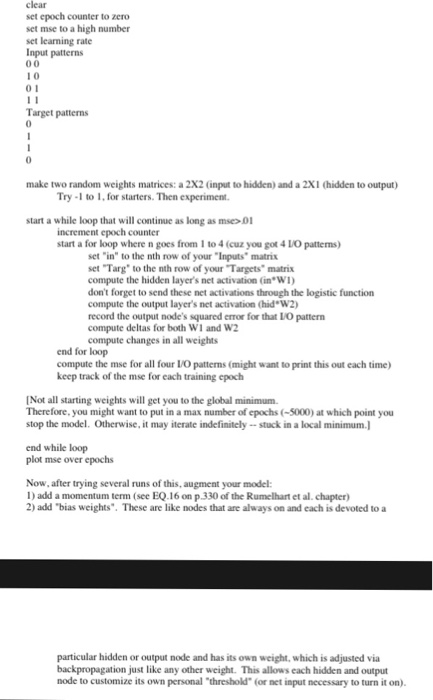
clear set epoch counter to zeno set mse to a high number set learning rate Input patterns 1 0 01 Target patterns make two random weights matrices: a 2X2 (input to hidden) and a 2X1 (hidden to output Try- to , for starters. Then experiment start a while loop that will continue as long as ms 0 increment epoch counter start a for loop where n goes from 1 to 4 (cuz you got 4 LO patterns) set "in" to the nth row of your "Inputs matrix set Targ" to the nth row of your "Targets" matrix compute the hidden layer's net activation (in WI don't forget to send these net activations through the logistic function compute the output layer's net activation (hid W2) record the output node's squared error for that LO pattern compute deltas for both W1 and W2 compute changes in all weights end for loop compute the mse for all four I/O patterns (might want to print this out each time keep track of the mse for each training epoch Not all starting weights will get you to the global minimum. Therefore, you might want to put in a max number of epochs (-5000) at which point you stop the model. Otherwise, it may iterate indefinitely -stuck in a local minimum.J end while loop plot mse over epochs Now, after trying several runs of this, augment your model: 1) add a momentum term (see EQ.16 on p 330 of the Rumelhart et al. chapter) 2) add "bias weights". These are like nodes that are always on and each is devoted to a particular hidden or output node and has its own weight, which is adjusted via backpropagation just like any other weight. This allows each hidden and output node to customize its own personal "threshold" (or net input necessary to turn it on)
Step by Step Solution
There are 3 Steps involved in it

Get step-by-step solutions from verified subject matter experts
 Study Help