







Question: True/False O True D False 1. Electronic components in computers process data using instructions which are the steps that tell the computer how to perform
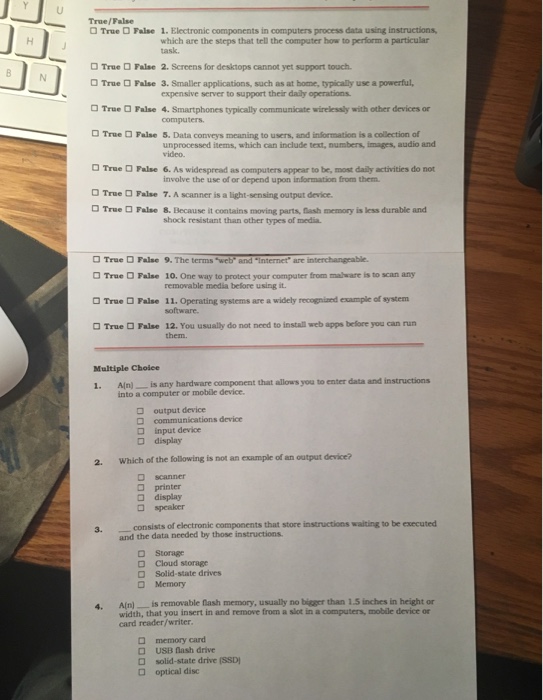
True/False O True D False 1. Electronic components in computers process data using instructions which are the steps that tell the computer how to perform a particular task. True False 2. Screens fr desktopscannot yet support touch. True False 3. Smaller applications, such as at home, typically use a powerful, expensive server to support their daily operations computers unprocessed items, which can include text, numbers, images, audio and True O False 4. Smartphones typically communicate wirelessly with other devices or True Fulse 5. Data conveys meaning to users, and information is a collection of video. True Palse 6. As widespread as computers appear to be, most daily activities do not involve the use of or depend upon information from them. True O False 7. A scanner is a light-sensing output device True False 8. Because it contains moving parts, tash memory is less durable and shock resistant than other types of media True DFalse 9. The terms "wet sand-internet' are interchangeable. True False 10, One way to protect your computer from mal e istoscan any True D Palse 11. Operating systems are a widely recognisnd example of system True Dalse 12, You usually do not need to instan web apps before you can run removable media before using it them. Multiple Choice 1. Aln)- is any hardware component that allows you to enter data and instructions into a computer or mobile device. output device communications device input device display 2. Which of the folowing is not an example of an output device? printer display speaker consists of electronic components that store instructions walting to be executed and the data needed by those instructions. 3. D Storage Cloud storage Solid-state drives Memory 4. A(n)is removable nash memory, usually no bigger than 1.5 inches in height or width, that you insert in and remove from a sot in a computers, mobiale device or card reader/writer D memory card USB nash drive solid-state drive (SSD) optical disc
Step by Step Solution
There are 3 Steps involved in it

Get step-by-step solutions from verified subject matter experts
 Study Help