







Question: Trying to create the following sales tax program in Microsoft Visual REQUIREMENTS DOCUMENT Purpose: This Windows Desktop application will compute the sales tax and final
Trying to create the following sales tax program in Microsoft Visual
REQUIREMENTS DOCUMENT
Purpose:
This Windows Desktop application will compute the sales tax and final cost of a purchased item.
Program Procedures:
From a window on the screen, the user enters the item name and cost of the item purchased. The program calculates the tax for the item and the final total and then displays these values.
Algorithms, Processing, and Conditions:
- 1. The user must be able to enter the name of the item purchased and the cost of the item before tax.
- 2. A store name and store picture will be displayed throughout the entire process.
- 3. After the user enters the item name and the cost of the item, she taps or clicks the Display Cost button.
- 4. The program displays the item name with the cost, tax, and final total.
- 5. The cost, tax, and final total should appear in currency format.
- 6. The tax rate for all items is 8.75%.
- 7. The final total is calculated by adding the cost and the tax.
Notes and Restrictions:
- 1. The user can clear the item name, cost, tax, and final total with a Clear button.
- 2. The user can tap or click an Exit button to close the application.
Comments:
The store picture shown in the window should be selected from pictures available on the web.
Code i have so far doesn't work. Code shown below. Also still need to enter the picture and store name but ill get to that if i ever figure this code out
Public Class frmSalesTaxCalculator
Private Sub btnExit_Click(sender As Object, e As EventArgs) Handles btnExit.Click Me.Close() ' exits app or window End Sub
Private Sub btnClear_Click(sender As Object, e As EventArgs) Handles btnClear.Click txtCostEnter.Clear() 'clears text from Cost txtNameEnter.Clear() 'clears text from Name enter LblSalesTaxTotal.Text="" ' clears text from Total cost lblTotalCostTotal.Text = "" ' clears text from Sales tax txtCostEnter.Focus() End Sub
Private Sub btnDisplayCost_Click(sender As Object, e As EventArgs) Handles btnDisplayCost.Click Dim CostEnter As Decimal Dim SalesTaxTotal As Decimal Dim TotalCostTotal As Decimal Decimal.TryParse(txtCostEnter.Text, CostEnter) SalesTaxTotal = CostEnter * 0.0875 TotalCostTotal = SalesTaxTotal + CostEnter LblSalesTaxTotal = SalesTaxTotal.ToString("C2") lblTotalCostTotal = TotalCostTotal.ToString("C2")
End Sub End Class
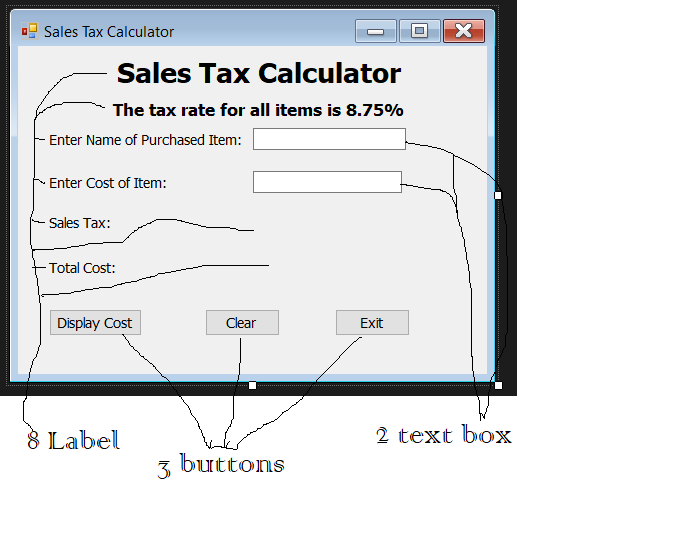
Sales Tax Calculator O x Sales Tax Calculator The tax rate for all items is 8.75% Enter Name of Purchased Item: Enter Cost of Item: Sales Tax: Total Cost: Display Cost Clear Exit 8 Label 2 text box 3 buttons Sales Tax Calculator O x Sales Tax Calculator The tax rate for all items is 8.75% Enter Name of Purchased Item: Enter Cost of Item: Sales Tax: Total Cost: Display Cost Clear Exit 8 Label 2 text box 3 buttons
Step by Step Solution
There are 3 Steps involved in it

Get step-by-step solutions from verified subject matter experts
 Study Help