







Question: uestion02 ating and using stati thods with input and output In this exercise, we will take the result of Question 4 (in lab 2), and
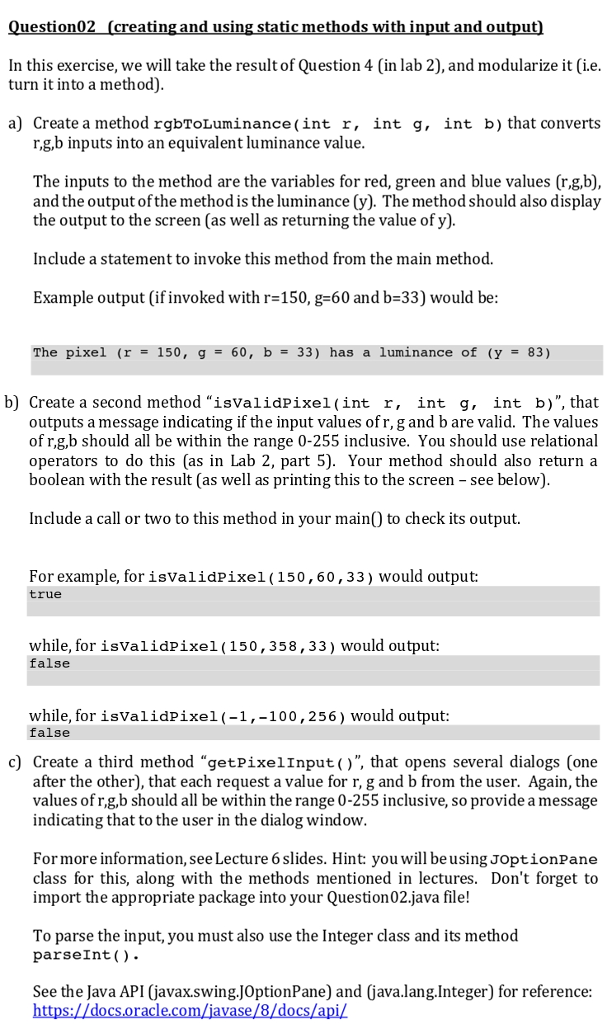
uestion02 ating and using stati thods with input and output In this exercise, we will take the result of Question 4 (in lab 2), and modularize it (i.e turn it into a method) a) Create a method rgbToLuminance(int r, int g, int b) that converts r,g,b inputs into an equivalent luminance value The inputs to the method are the variables for red, green and blue values (r.g,b), and the output of the method is the luminance (y). The method should also display the output to the screen (as well as returning the value of y). Include a statement to invoke this method from the main method. Example output (if invoked with r-150, g-60 and b-33) would be The pixel (r = 150, g- 60, b= 33) has a luminance of (y- 83) b) Create a second method "isvalidPixel(int r, int g, int b)", that outputs a message indicating if the input values ofr, g and b are valid. The values of r.g,b should all be within the range 0-255 inclusive. You should use relational operators to do this (as in Lab 2, part 5). Your method should also return a boolean with the result (as well as printing this to the screen - see below) Include a call or two to this method in your mainQ) to check its output. For example, for isvalidPixel(150,60,33) would output: true while, forisvalidPixel(150,358,33) would output false while, for isvalidPixel(-1,-100,256) would output: false c) Create a third method "getPixelInput()", that opens several dialogs (one after the other), that each request a value for r, g and b from the user. Again, the values of r,g,b should all be within the range 0-255 inclusive, so provide a message indicating that to the user in the dialog window Formore information, see Lecture 6 slides. Hint: you will be using JoptionPane class for this, along with the methods mentioned in lectures. Don't forget to import the appropriate package into your Question02.java file! To parse the input, you must also use the Integer class and its method parseInt(). See the Java API (javax.swing.JOptionPane) and (java.lang.Integer) for reference
Step by Step Solution
There are 3 Steps involved in it

Get step-by-step solutions from verified subject matter experts
 Study Help