







Question: Un t Information localhost / idd / task 0 5 / 5 . 4 d - lookup 2 . htm | # / She Q
Un Information
localhostiddtaskdlookuphtm#She Q
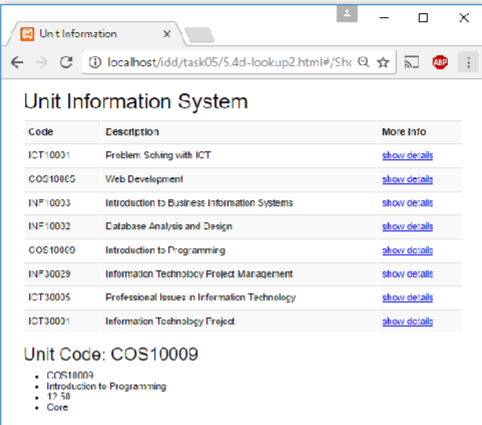
Unit Information System
tableCodeDescrirtion,More IfoFroklem Sching with ICT,show de:ailsVieb Development,show detailsInticduction to Busiress Information Systems,show derallsCatabase Analsic and Dasign,show dezailsIntroduction ts Programming,show dotailsInformasicn Technobcy Frolect Maraqernent,show derallsIETJFrofessibnal issuea Irformaticn Trehnology,show detallsICTInformasicn Technolsy Frojed,show dotall
Unit Code: COS
Cosianna
Introducion to Progranning
CoreInterface Design and Development
Credit Task : Creating Router
Overview
In this task, you will create a router that will display unit information using a view template in your
web application.
Purpose: Learn how to use component and create router.
Task: Create a web app that allows users to click of a unit to show more information.
Time: This task should be completed before the start of week but may be completed
later see following note
Resources:
Lecture notes # # and #
Submission Details
You must submit the following files:
Unit information source code html
Unit information component and router source code js
Screenshot of the web app.
Please submit the html and js files as one zip file and submit the screenshot as a
separate file.
Make sure that your task has the following in your submission:
The routing web application is HTML compliant.
Demonstrates understanding in using the VueJS framework.
Demonstrates use of VueJS component and router.
Note: If you are not currently up to date you should skip this task and return to it once you
are up to date with the Pass Tasks. Do not allow Credit Tasks to delay you in keeping up
with the unit's Pass Tasks.
Interface Design and Development Credit Task : Creating Router
Instructions
Implement the unit information web app that display detailed unit information. In this web
application, you will need to implement a route to show the detailed information of a selected unit.
Start by creating a new HTML file in an editor.
Implement the basic outline of an VueJS web app with the appropriate scripts.
Create the web application HTML file with the following:
Initialise the array of objects with the following unit information
Unit codes Units Credit points Type
ICT Problem Solving with ICT Core
COS Web Development Core
INF Introduction to Business Information Systems Core
INF Database Analysis and Design Core
COS Introduction to Programming Core
INF Information Technology Project Management Core
ICT Professional Issues in Information Technology Core
ICT Information Technology Project Core
Table : Unit Information
Display the table that list the unit information from Task Search and filter is optional
for this task.
Note: It is a good practice to write the component in a separate file.
Note: Mark up the code using Bootstrap is optional for this task.
Interface Design and Development Credit Task : Creating Router
Create the unit detail view templates that will list the unit information. We will limit the
information to unit code, description, credit point and type.
Create the component file applookupjs with the template next page
Your web app should now be complete. Make sure you test it on the browser to make sure
that it works as you expect.
Note: The unit code is used as key to retrieve detailed information from the database. For
this task, we will retrieve the unit information from the model with the unit code as filter.
Interface Design and Development Credit Task : Creating Router
Web App: applookupjs
Defining the list of units in an array
var units ;
creating a component for the units to pass in the router
const Unit
data return units
define the template for the route results
template:
computed:
filter function returns the selected unit object
filteredUnits: function
Creating the VueRouter
const router new VueRouter
routes:
path: unit:id
component: Unit
defining path and the component
creating component for the lookup table
Vue.componentapplookup
data: function
return
units
defining template for the app
template:
Creating new Vue instance
new Vue
router, passing router instance
el: #app", specifying the app
passing the data to be used in the app
data:
id:
units
;
Step by Step Solution
There are 3 Steps involved in it
1 Expert Approved Answer
Step: 1 Unlock

Question Has Been Solved by an Expert!
Get step-by-step solutions from verified subject matter experts
Step: 2 Unlock
Step: 3 Unlock
 Study Help