







Question: undefined 1. Create a standard HTML5 document named Test2.html that includes author, title: Lab Test 2 and description meta data. Your HTML document should include:
 undefined
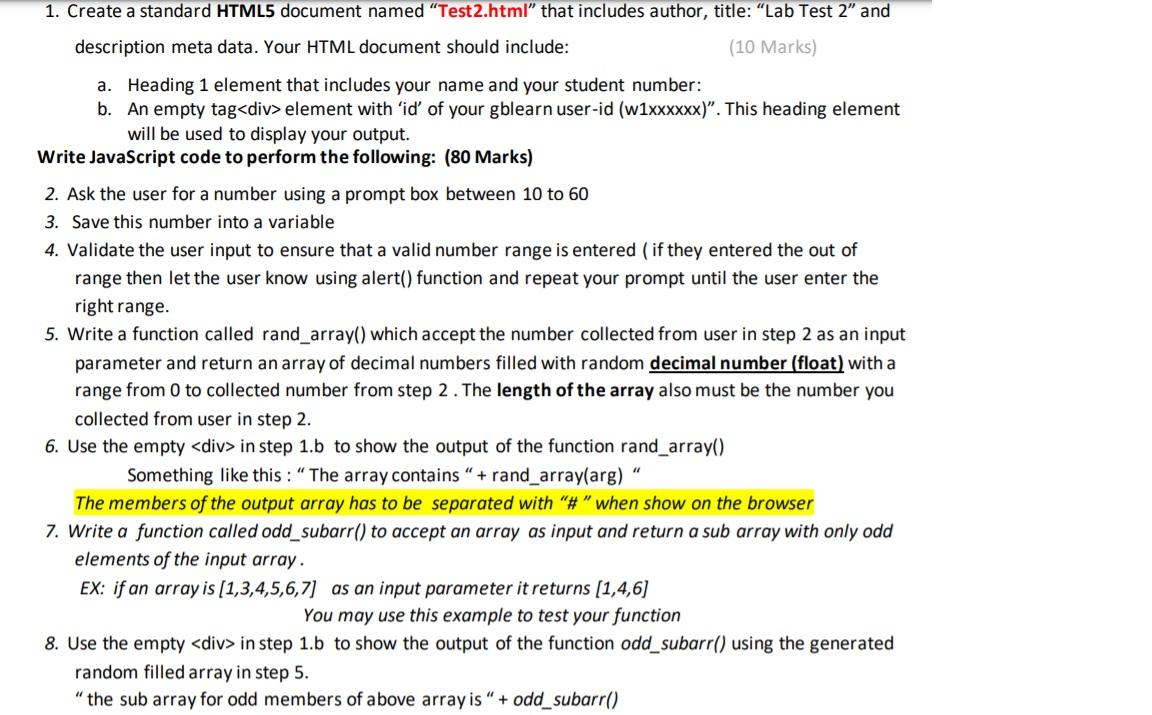
1. Create a standard HTML5 document named "Test2.html" that includes author, title: "Lab Test 2" and description meta data. Your HTML document should include: (10 Marks) a. Heading 1 element that includes your name and your student number: b. An empty tag
element with 'id' of your gblearn user-id (w1xxxxxx)". This heading element will be used to display your output. Write JavaScript code to perform the following: (80 Marks) 2. Ask the user for a number using a prompt box between 10 to 60 3. Save this number into a variable 4. Validate the user input to ensure that a valid number range is entered (if they entered the out of range then let the user know using alert() function and repeat your prompt until the user enter the right range. 5. Write a function called rand_array() which accept the number collected from user in step 2 as an input parameter and return an array of decimal numbers filled with random decimal number (float) with a range from 0 to collected number from step 2. The length of the array also must be the number you collected from user in step 2. 6. Use the empty
in step 1.b to show the output of the function rand_array() Something like this: The array contains " + rand_array(arg)" The members of the output array has to be separated with "#" when show on the browser 7. Write a function called odd_subarr() to accept an array as input and return a sub array with only odd elements of the input array. Ex: if an array is (1,3,4,5,6,7] as an input parameter it returns (1,4,6] You may use this example to test your function 8. Use the empty
in step 1.b to show the output of the function odd_subarr() using the generated random filled array in step 5. " the sub array for odd members of above array is " + odd_subarr()
Step by Step Solution
There are 3 Steps involved in it
1 Expert Approved Answer
Step: 1 Unlock

Question Has Been Solved by an Expert!
Get step-by-step solutions from verified subject matter experts
Step: 2 Unlock
Step: 3 Unlock
 Study Help