







Question: undefined 2 0.8 3 1 The data on the Video GameSales, worksheet includes sales (in millions) for several video games on various platforms and from
 undefined
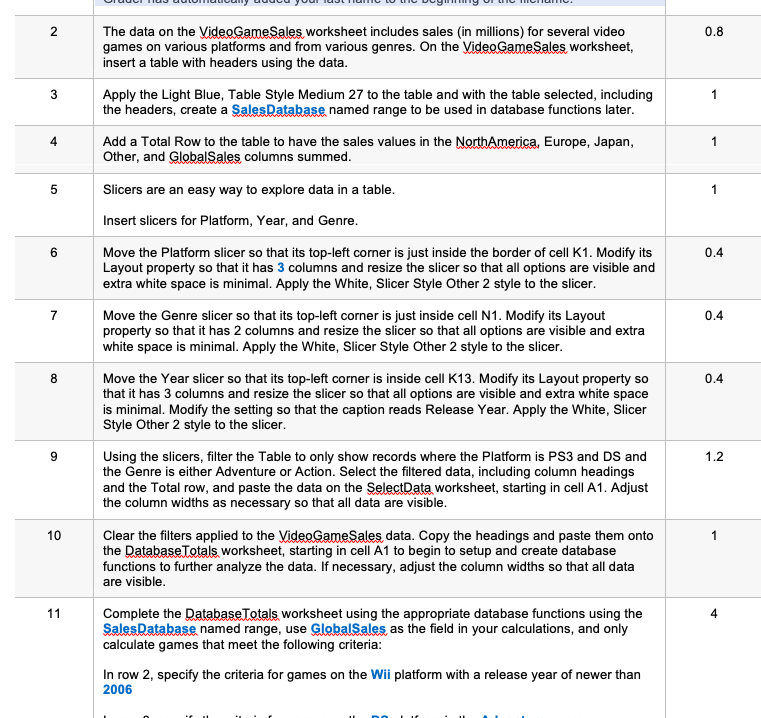
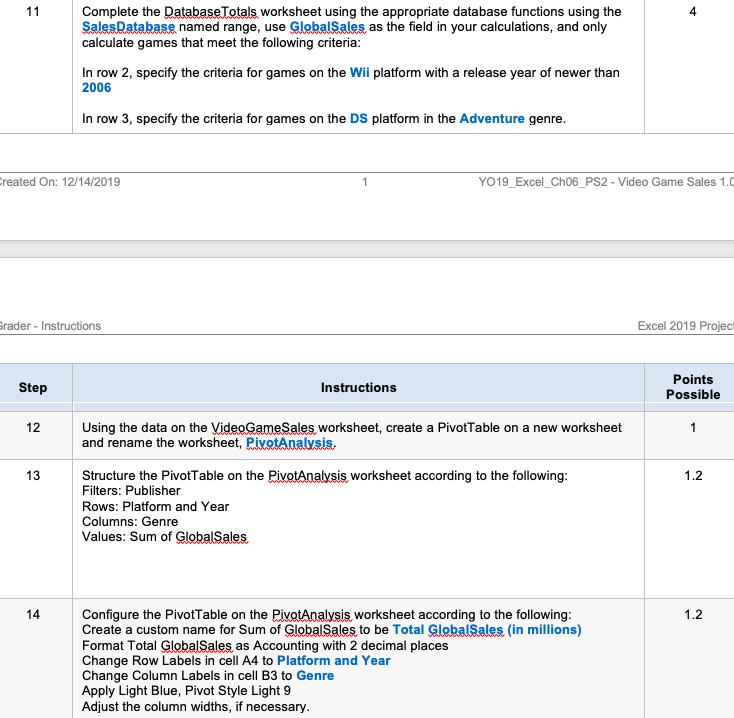
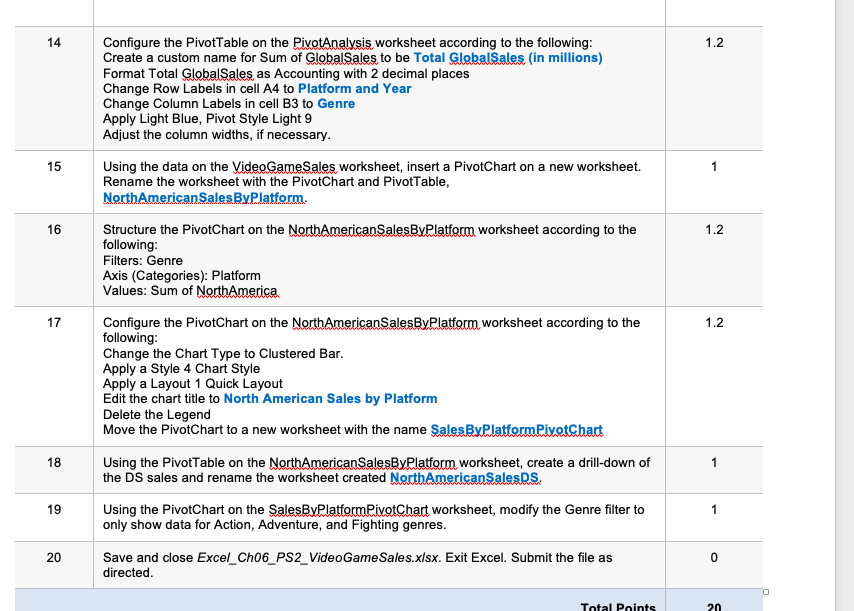
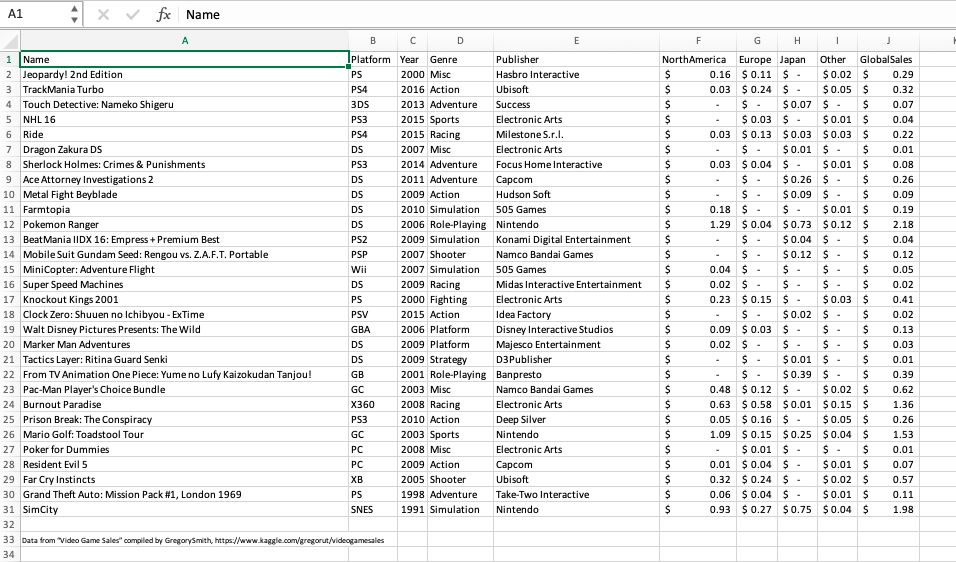
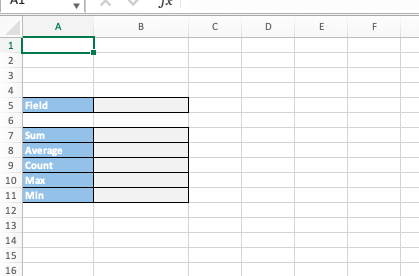
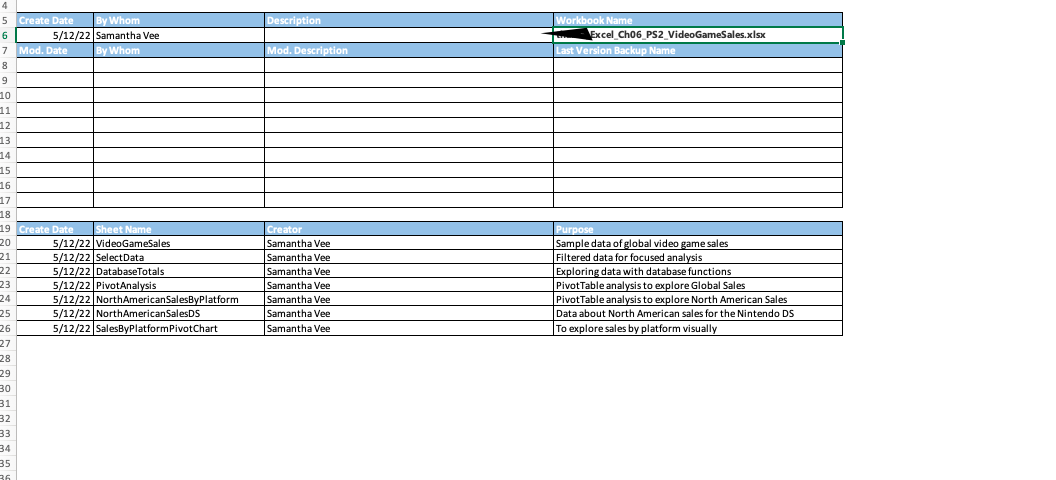
2 0.8 3 1 The data on the Video GameSales, worksheet includes sales (in millions) for several video games on various platforms and from various genres. On the Video GameSales, worksheet, insert a table with headers using the data. Apply the Light Blue, Table Style Medium 27 to the table and with the table selected, including the headers, create a SalesDatabase named range to be used in database functions later. Add a Total Row to the table to have the sales values in the North America, Europe, Japan, Other, and Global Sales columns summed. Slicers are an easy way to explore data in a table. Insert slicers for Platform, Year, and Genre. 4 1 5 1 6 0.4 7 0.4 8 8 Move the Platform slicer so that its top-left corner is just inside the border of cell K1. Modify its Layout property so that it has 3 columns and resize the slicer so that all options are visible and extra white space is minimal. Apply the White, Slicer Style Other 2 style to the slicer. Move the Genre slicer so that its top-left corner is just inside cell N1. Modify its Layout property so that it has 2 columns and resize the slicer so that all options are visible and extra white space is minimal. Apply the White, Slicer Style Other 2 style to the slicer. Move the Year slicer so that its top-left corner is inside cell K13. Modify its Layout property so that it has 3 columns and resize the slicer so that all options are visible and extra white space is minimal. Modify the setting so that the caption reads Release Year. Apply the White, Slicer Style Other 2 style to the slicer. Using the slicers, filter the Table to only show records where the Platform is PS3 and DS and the Genre is either Adventure or Action. Select the filtered data, including column headings and the Total row, and paste the data on the SelectData worksheet, starting in cell A1. Adjust the column widths as necessary so that all data are visible. 0.4 9 1.2 10 Clear the filters applied to the Video Game Sales data. Copy the headings and paste them onto the Database Totals, worksheet, starting in cell A1 to begin to setup and create database functions to further analyze the data. If necessary, adjust the column widths so that all data are visible. 11 4 Complete the Database Totals worksheet using the appropriate database functions using the Sales Database named range, use GlobalSales as the field in your calculations, and only calculate games that meet the following criteria: In row 2, specify the criteria for games on the Wii platform with a release year of newer than 2006 11 4 Complete the Database Totals worksheet using the appropriate database functions using the SalesDatabase named range, use GlobalSales as the field in your calculations, and only calculate games that meet the following criteria: In row 2, specify the criteria for games on the Wii platform with a release year of newer than 2006 In row 3, specify the criteria for games on the DS platform in the Adventure genre. created On: 12/14/2019 YO19_Excel_Ch06_PS2 - Video Game Sales 1.0 rader - Instructions Excel 2019 Projec! Step Instructions Points Possible 12 1 13 1.2 Using the data on the Video GameSales worksheet, create a PivotTable on a new worksheet and rename the worksheet, PivotAnalysis. Structure the PivotTable on the PivotAnalysis worksheet according to the following: Filters: Publisher Rows: Platform and Year Columns: Genre Values: Sum of GlobalSales 14 1.2 Configure the PivotTable on the PivotAnalysis worksheet according to the following: Create a custom name for Sum of Global Sales to be Total GlobalSales (in millions) Format Total Global Sales as Accounting with 2 decimal places Change Row Labels in cell A4 to Platform and Year Change Column Labels in cell B3 to Genre Apply Light Blue, Pivot Style Light 9 Adjust the column widths, if necessary. 14 1.2 Configure the PivotTable on the PivotAnalysis worksheet according to the following: Create a custom name for Sum of GlobalSales to be Total GlobalSales (in millions) Format Total GlobalSales as Accounting with 2 decimal places Change Row Labels in cell A4 to Platform and Year Change Column Labels in cell B3 to Genre Apply Light Blue, Pivot Style Light 9 Adjust the column widths, if necessary. Using the data on the VideoGameSales worksheet, insert a PivotChart on a new worksheet. Rename the worksheet with the PivotChart and PivotTable, North AmericanSalesBy Platform. 15 1 16 1.2 17 1.2 Structure the PivotChart on the North AmericanSalesByPlatform worksheet according to the following: Filters: Genre Axis (Categories): Platform Values: Sum of North America Configure the PivotChart on the North American SalesByPlatform worksheet according to the following: Change the Chart Type to Clustered Bar. Apply a Style 4 Chart Style Apply a Layout 1 Quick Layout Edit the chart title to North American Sales by Platform Delete the Legend Move the PivotChart to a new worksheet with the name Sales ByPlatformPixetChart Using the PivotTable on the North American SalesByPlatform worksheet, create a drill-down of the DS sales and rename the worksheet created North AmericanSalesDS. Using the PivotChart on the SalesByPlatformPivotChart worksheet, modify the Genre filter to only show data for Action, Adventure, and Fighting genres. 18 1 19 1 20 0 Save and close Excel_Ch06_PS2_VideoGameSales.xlsx. Exit Excel. Submit the file as directed Total Points 20 A1 4 x fx Name A B D E G $- $- 1 Name Iplatform Year Genre Publisher 2 Jeopardyl 2nd Edition PS 2000 Misc Hasbro Interactive 3 TrackMania Turbo PS4 2016 Action Ubisoft 4 Touch Detective: Nameko Shigeru 3DS 2013 Adventure Success 5 NHL 16 PS3 2015 Sports Electronic Arts 6 Ride PS4 2015 Racing Milestone S.r.l. 7 Dragon Zakura DS DS 2007 Misc Electronic Arts 8 Sherlock Holmes: Crimes & Punishments PS3 2014 Adventure Focus Home Interactive 9 Ace Attorney Investigations 2 DS 2011 Adventure Capcom 10 Metal Fight Beyblade DS 2009 Action Hudson Soft 11 Farmtopia DS 2010 Simulation 505 Games 12 Pokemon Ranger DS 2006 Role-Playing Nintendo 13 Beat Mania IIDX 16: Empress + Premium Best PS2 2009 Simulation Konami Digital Entertainment 14 Mobile Suit Gundam Seed: Rengou vs. Z.A.F.T. Portable PSP 2007 Shooter Namco Bandai Games 15 MiniCopter: Adventure Flight Wii 2007 Simulation 505 Games 16 Super Speed Machines DS 2009 Racing Midas Interactive Entertainment 17 Knockout Kings 2001 PS 2000 Fighting Electronic Arts 18 Clock Zero: Shuuen no Ichibyou - ExTime PSV 2015 Action Idea Factory 19 Walt Disney Pictures Presents: The Wild GBA 2006 Platform Disney Interactive Studios 20 Marker Man Adventures DS 2009 Platform Majesco Entertainment 21 Tactics Layer: Ritina Guard Senki DS 2009 Strategy D3Publisher 22 From TV Animation One Piece: Yume no Lufy Kaizokudan Tanjou! GB 2001 Role-Playing Banpresto 23 Pac-Man Player's Choice Bundle GC 2003 Misc Namco Bandai Games 24 Burnout Paradise X360 2008 Racing Electronic Arts 25 Prison Break: The Conspiracy PS3 2010 Action Deep Silver 26 Mario Golf: Toadstool Tour GC 2003 Sports Nintendo 27 Poker for Dummies PC 2008 Misc Electronic Arts 28 Resident Evil 5 PC 2009 Action Capcom 29 Far Cry Instincts XB 2005 Shooter Ubisoft 30 Grand Theft Auto: Mission Pack #1, London 1969 PS 1998 Adventure Take-Two Interactive 31 SimCity SNES 1991 Simulation Nintendo 32 33 Data from "Video Game Sales" compiled by GregorySmith, http://www.kaggle.com/gregorut/videogamesales 34 . 1 North America Europe Japan Other GlobalSales $ 0.16 $ 0.11 $. $ 0.02 $ 0.29 $ 0.03 $ 0.24 $ - $ 0.05 $ 0.32 $ $- $ 0.07 $ - $ 0.07 $ $ 0.03 $. $ 0.01 $ 0.04 $ 0.03 $ 0.13 $ 0.03 $0.03 $ 0.22 $ $ - $ 0.01 $. $ 0.01 $ 0.03 $ 0.04 $. $ 0.01 $ 0.08 $ $. $ 0.26 $. $ 0.26 $ $ - $ 0.09 $ - $ 0.09 $ 0.18 $ - $ 0.01 $ 0.19 $ 1.29 $ 0.04 $0.73 $0.12 $ 2.18 $ $ 0.04 $ - $ 0.04 $ $- $0.12 $ - $ 0.12 $ 0.04 $ - $. $. $ 0.05 $ 0.02 $ - $- $ - $ 0.02 $ 0.23 $ 0.15 $. $ 0.03 $ 0.41 $ $- $ 0.02 $ - $ 0.02 $ 0.09 $ 0.03 $. $ - $ 0.13 $ 0.02 $ - $ - $ - $ 0.03 $ $- $ 0.01 $ - $ 0.01 $ $- $ 0.39 $ . $ 0.39 $ 0.48 $ 0.12 $ - $ 0.02 $ 0.62 $ 0.63 $ 0.58 $ 0.01 $0.15 $ 1.36 $ 0.05 $ 0.16 $ . $ 0.05 $ 0.26 $ 1.09 $ 0.15 $ 0.25 $ 0.04 $ 1.53 $ $ 0.01 $ - $ 0.01 $ 0.01 $ 0.04 $. $ 0.01 $ 0.07 $ 0.32 $ 0.24 $ - $ 0.02 $ 0.57 $ 0.06 $ 0.04 $ 0.01 $ 0.11 $ 0.93 $ 0.27 $ 0.75 $ 0.04 $ 1.98 $- $- A1 4 X fx A B D E F G H 1 L M 1 2 3 4 5 6 7 8 9 10 11 12 13 14 15 16 17 18 19 20 21 22 23 24 25 26 27 28 29 30 31 32 33 34 35 36 37 38 39 40 41 42 43 44 VideoGameSales SelectData Database Totals Documentation + A B D E F 1 2 3 4 5 Field 6 7 Sum 8 Average 9 Count 10 Max 11 Min 12 13 14 15 16 Description Workbook Name Excel Ch06 PS2 VideoGameSales.xlsx Last Version Backup Name Mod. Description 4 5 Create Date By Whom 6 5/12/22 Samantha Vee 7 Mod. Date By Whom 8 8 9 10 11 12 13 14 15 16 17 18 19 Create Date Sheet Name 20 5/12/22 Video GameSales 21 5/12/22 SelectData 22 5/12/22 Database Totals 23 5/12/22 PivotAnalysis 24 5/12/22 North American Sales ByPlatform 25 5/12/22 NorthAmericanSalesDS 26 5/12/22 Sales ByPlatformPivotChart 27 28 29 30 31 32 33 34 35 36 Creator Samantha Vee Samantha Vee Samantha Vee Samantha Vee Samantha Vee Samantha Vee Samantha Vee Purpose Sample data of global video game sales Filtered data for focused analysis Exploring data with database functions Pivot Table analysis to explore Global Sales Pivot Table analysis to explore North American Sales Data about North American sales for the Nintendo DS To explore sales by platform visually 2 0.8 3 1 The data on the Video GameSales, worksheet includes sales (in millions) for several video games on various platforms and from various genres. On the Video GameSales, worksheet, insert a table with headers using the data. Apply the Light Blue, Table Style Medium 27 to the table and with the table selected, including the headers, create a SalesDatabase named range to be used in database functions later. Add a Total Row to the table to have the sales values in the North America, Europe, Japan, Other, and Global Sales columns summed. Slicers are an easy way to explore data in a table. Insert slicers for Platform, Year, and Genre. 4 1 5 1 6 0.4 7 0.4 8 8 Move the Platform slicer so that its top-left corner is just inside the border of cell K1. Modify its Layout property so that it has 3 columns and resize the slicer so that all options are visible and extra white space is minimal. Apply the White, Slicer Style Other 2 style to the slicer. Move the Genre slicer so that its top-left corner is just inside cell N1. Modify its Layout property so that it has 2 columns and resize the slicer so that all options are visible and extra white space is minimal. Apply the White, Slicer Style Other 2 style to the slicer. Move the Year slicer so that its top-left corner is inside cell K13. Modify its Layout property so that it has 3 columns and resize the slicer so that all options are visible and extra white space is minimal. Modify the setting so that the caption reads Release Year. Apply the White, Slicer Style Other 2 style to the slicer. Using the slicers, filter the Table to only show records where the Platform is PS3 and DS and the Genre is either Adventure or Action. Select the filtered data, including column headings and the Total row, and paste the data on the SelectData worksheet, starting in cell A1. Adjust the column widths as necessary so that all data are visible. 0.4 9 1.2 10 Clear the filters applied to the Video Game Sales data. Copy the headings and paste them onto the Database Totals, worksheet, starting in cell A1 to begin to setup and create database functions to further analyze the data. If necessary, adjust the column widths so that all data are visible. 11 4 Complete the Database Totals worksheet using the appropriate database functions using the Sales Database named range, use GlobalSales as the field in your calculations, and only calculate games that meet the following criteria: In row 2, specify the criteria for games on the Wii platform with a release year of newer than 2006 11 4 Complete the Database Totals worksheet using the appropriate database functions using the SalesDatabase named range, use GlobalSales as the field in your calculations, and only calculate games that meet the following criteria: In row 2, specify the criteria for games on the Wii platform with a release year of newer than 2006 In row 3, specify the criteria for games on the DS platform in the Adventure genre. created On: 12/14/2019 YO19_Excel_Ch06_PS2 - Video Game Sales 1.0 rader - Instructions Excel 2019 Projec! Step Instructions Points Possible 12 1 13 1.2 Using the data on the Video GameSales worksheet, create a PivotTable on a new worksheet and rename the worksheet, PivotAnalysis. Structure the PivotTable on the PivotAnalysis worksheet according to the following: Filters: Publisher Rows: Platform and Year Columns: Genre Values: Sum of GlobalSales 14 1.2 Configure the PivotTable on the PivotAnalysis worksheet according to the following: Create a custom name for Sum of Global Sales to be Total GlobalSales (in millions) Format Total Global Sales as Accounting with 2 decimal places Change Row Labels in cell A4 to Platform and Year Change Column Labels in cell B3 to Genre Apply Light Blue, Pivot Style Light 9 Adjust the column widths, if necessary. 14 1.2 Configure the PivotTable on the PivotAnalysis worksheet according to the following: Create a custom name for Sum of GlobalSales to be Total GlobalSales (in millions) Format Total GlobalSales as Accounting with 2 decimal places Change Row Labels in cell A4 to Platform and Year Change Column Labels in cell B3 to Genre Apply Light Blue, Pivot Style Light 9 Adjust the column widths, if necessary. Using the data on the VideoGameSales worksheet, insert a PivotChart on a new worksheet. Rename the worksheet with the PivotChart and PivotTable, North AmericanSalesBy Platform. 15 1 16 1.2 17 1.2 Structure the PivotChart on the North AmericanSalesByPlatform worksheet according to the following: Filters: Genre Axis (Categories): Platform Values: Sum of North America Configure the PivotChart on the North American SalesByPlatform worksheet according to the following: Change the Chart Type to Clustered Bar. Apply a Style 4 Chart Style Apply a Layout 1 Quick Layout Edit the chart title to North American Sales by Platform Delete the Legend Move the PivotChart to a new worksheet with the name Sales ByPlatformPixetChart Using the PivotTable on the North American SalesByPlatform worksheet, create a drill-down of the DS sales and rename the worksheet created North AmericanSalesDS. Using the PivotChart on the SalesByPlatformPivotChart worksheet, modify the Genre filter to only show data for Action, Adventure, and Fighting genres. 18 1 19 1 20 0 Save and close Excel_Ch06_PS2_VideoGameSales.xlsx. Exit Excel. Submit the file as directed Total Points 20 A1 4 x fx Name A B D E G $- $- 1 Name Iplatform Year Genre Publisher 2 Jeopardyl 2nd Edition PS 2000 Misc Hasbro Interactive 3 TrackMania Turbo PS4 2016 Action Ubisoft 4 Touch Detective: Nameko Shigeru 3DS 2013 Adventure Success 5 NHL 16 PS3 2015 Sports Electronic Arts 6 Ride PS4 2015 Racing Milestone S.r.l. 7 Dragon Zakura DS DS 2007 Misc Electronic Arts 8 Sherlock Holmes: Crimes & Punishments PS3 2014 Adventure Focus Home Interactive 9 Ace Attorney Investigations 2 DS 2011 Adventure Capcom 10 Metal Fight Beyblade DS 2009 Action Hudson Soft 11 Farmtopia DS 2010 Simulation 505 Games 12 Pokemon Ranger DS 2006 Role-Playing Nintendo 13 Beat Mania IIDX 16: Empress + Premium Best PS2 2009 Simulation Konami Digital Entertainment 14 Mobile Suit Gundam Seed: Rengou vs. Z.A.F.T. Portable PSP 2007 Shooter Namco Bandai Games 15 MiniCopter: Adventure Flight Wii 2007 Simulation 505 Games 16 Super Speed Machines DS 2009 Racing Midas Interactive Entertainment 17 Knockout Kings 2001 PS 2000 Fighting Electronic Arts 18 Clock Zero: Shuuen no Ichibyou - ExTime PSV 2015 Action Idea Factory 19 Walt Disney Pictures Presents: The Wild GBA 2006 Platform Disney Interactive Studios 20 Marker Man Adventures DS 2009 Platform Majesco Entertainment 21 Tactics Layer: Ritina Guard Senki DS 2009 Strategy D3Publisher 22 From TV Animation One Piece: Yume no Lufy Kaizokudan Tanjou! GB 2001 Role-Playing Banpresto 23 Pac-Man Player's Choice Bundle GC 2003 Misc Namco Bandai Games 24 Burnout Paradise X360 2008 Racing Electronic Arts 25 Prison Break: The Conspiracy PS3 2010 Action Deep Silver 26 Mario Golf: Toadstool Tour GC 2003 Sports Nintendo 27 Poker for Dummies PC 2008 Misc Electronic Arts 28 Resident Evil 5 PC 2009 Action Capcom 29 Far Cry Instincts XB 2005 Shooter Ubisoft 30 Grand Theft Auto: Mission Pack #1, London 1969 PS 1998 Adventure Take-Two Interactive 31 SimCity SNES 1991 Simulation Nintendo 32 33 Data from "Video Game Sales" compiled by GregorySmith, http://www.kaggle.com/gregorut/videogamesales 34 . 1 North America Europe Japan Other GlobalSales $ 0.16 $ 0.11 $. $ 0.02 $ 0.29 $ 0.03 $ 0.24 $ - $ 0.05 $ 0.32 $ $- $ 0.07 $ - $ 0.07 $ $ 0.03 $. $ 0.01 $ 0.04 $ 0.03 $ 0.13 $ 0.03 $0.03 $ 0.22 $ $ - $ 0.01 $. $ 0.01 $ 0.03 $ 0.04 $. $ 0.01 $ 0.08 $ $. $ 0.26 $. $ 0.26 $ $ - $ 0.09 $ - $ 0.09 $ 0.18 $ - $ 0.01 $ 0.19 $ 1.29 $ 0.04 $0.73 $0.12 $ 2.18 $ $ 0.04 $ - $ 0.04 $ $- $0.12 $ - $ 0.12 $ 0.04 $ - $. $. $ 0.05 $ 0.02 $ - $- $ - $ 0.02 $ 0.23 $ 0.15 $. $ 0.03 $ 0.41 $ $- $ 0.02 $ - $ 0.02 $ 0.09 $ 0.03 $. $ - $ 0.13 $ 0.02 $ - $ - $ - $ 0.03 $ $- $ 0.01 $ - $ 0.01 $ $- $ 0.39 $ . $ 0.39 $ 0.48 $ 0.12 $ - $ 0.02 $ 0.62 $ 0.63 $ 0.58 $ 0.01 $0.15 $ 1.36 $ 0.05 $ 0.16 $ . $ 0.05 $ 0.26 $ 1.09 $ 0.15 $ 0.25 $ 0.04 $ 1.53 $ $ 0.01 $ - $ 0.01 $ 0.01 $ 0.04 $. $ 0.01 $ 0.07 $ 0.32 $ 0.24 $ - $ 0.02 $ 0.57 $ 0.06 $ 0.04 $ 0.01 $ 0.11 $ 0.93 $ 0.27 $ 0.75 $ 0.04 $ 1.98 $- $- A1 4 X fx A B D E F G H 1 L M 1 2 3 4 5 6 7 8 9 10 11 12 13 14 15 16 17 18 19 20 21 22 23 24 25 26 27 28 29 30 31 32 33 34 35 36 37 38 39 40 41 42 43 44 VideoGameSales SelectData Database Totals Documentation + A B D E F 1 2 3 4 5 Field 6 7 Sum 8 Average 9 Count 10 Max 11 Min 12 13 14 15 16 Description Workbook Name Excel Ch06 PS2 VideoGameSales.xlsx Last Version Backup Name Mod. Description 4 5 Create Date By Whom 6 5/12/22 Samantha Vee 7 Mod. Date By Whom 8 8 9 10 11 12 13 14 15 16 17 18 19 Create Date Sheet Name 20 5/12/22 Video GameSales 21 5/12/22 SelectData 22 5/12/22 Database Totals 23 5/12/22 PivotAnalysis 24 5/12/22 North American Sales ByPlatform 25 5/12/22 NorthAmericanSalesDS 26 5/12/22 Sales ByPlatformPivotChart 27 28 29 30 31 32 33 34 35 36 Creator Samantha Vee Samantha Vee Samantha Vee Samantha Vee Samantha Vee Samantha Vee Samantha Vee Purpose Sample data of global video game sales Filtered data for focused analysis Exploring data with database functions Pivot Table analysis to explore Global Sales Pivot Table analysis to explore North American Sales Data about North American sales for the Nintendo DS To explore sales by platform visually
Step by Step Solution
There are 3 Steps involved in it

Get step-by-step solutions from verified subject matter experts
 Study Help