







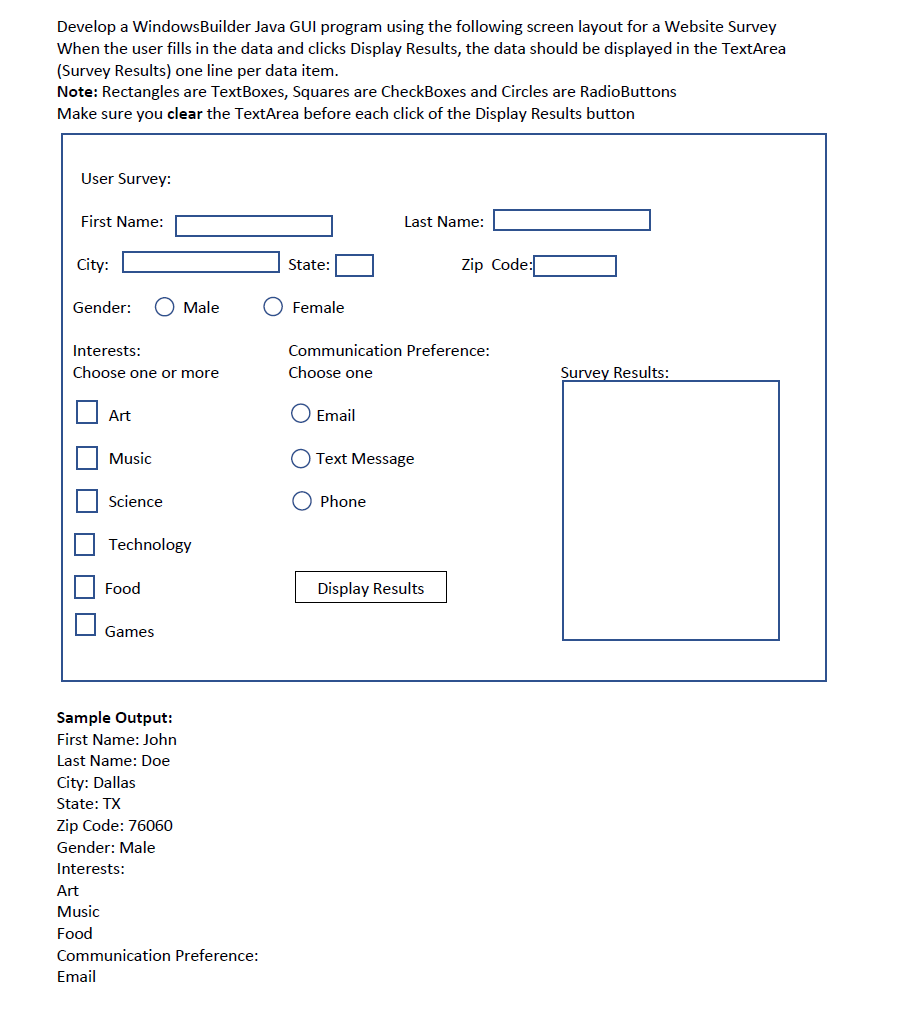
Question: undefined Develop a WindowsBuilder Java GUI program using the following screen layout for a Website Survey When the user fills in the data and clicks
 undefined
Develop a WindowsBuilder Java GUI program using the following screen layout for a Website Survey When the user fills in the data and clicks Display Results, the data should be displayed in the TextArea (Survey Results) one line per data item. Note: Rectangles are TextBoxes, Squares are CheckBoxes and Circles are RadioButtons Make sure you clear the TextArea before each click of the Display Results button User Survey: First Name: Last Name: City: State: Zip Code: Gender: O Male Female Interests: Choose one or more Communication Preference: Choose one Survey Results: Art O Email U Music O Text Message Science Phone Technology Food Display Results Games Sample Output: First Name: John Last Name: Doe City: Dallas State: TX Zip Code: 76060 Gender: Male Interests: Art Music Food Communication Preference: Email
Step by Step Solution
There are 3 Steps involved in it

Get step-by-step solutions from verified subject matter experts
 Study Help