







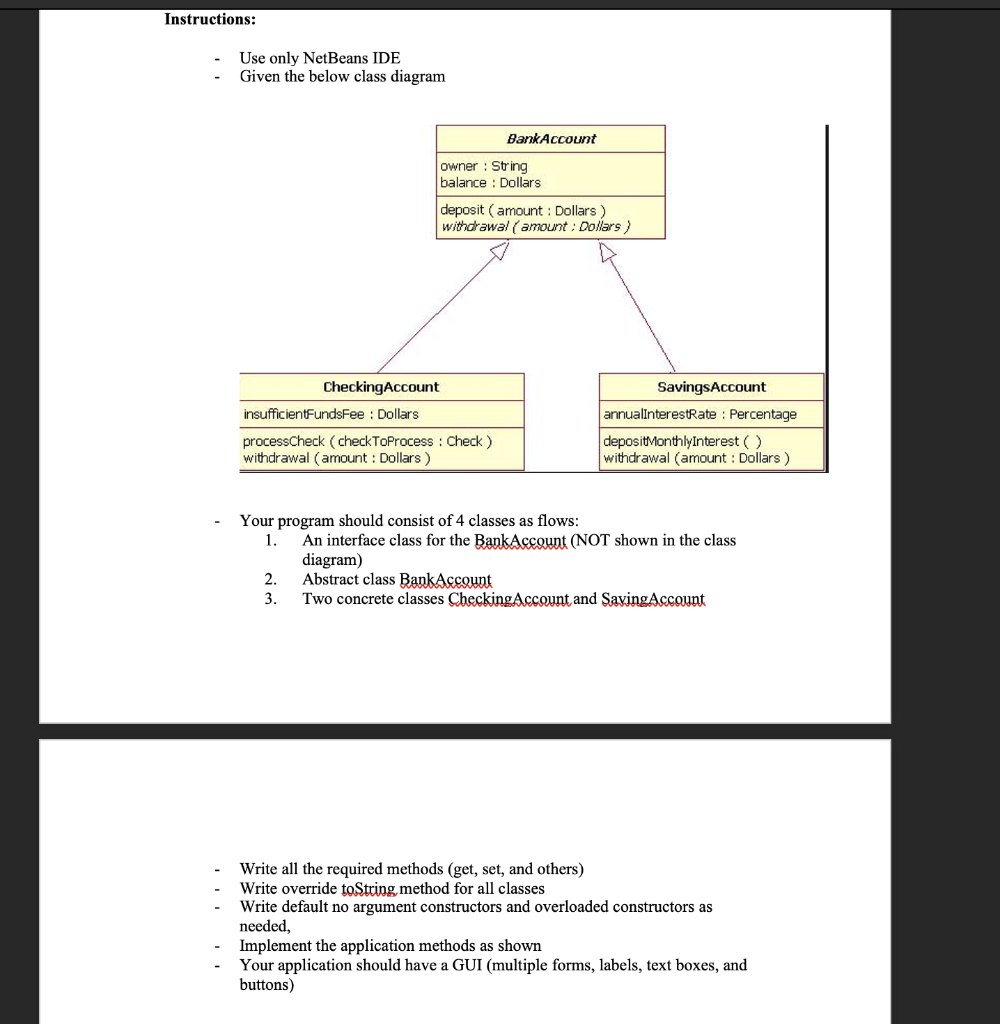
Question: undefined Instructions: Use only NetBeans IDE Given the below class diagram BankAccount owner : String balance : Dollars deposit ( amount : Dollars) withdrawal (amount
 undefined
Instructions: Use only NetBeans IDE Given the below class diagram BankAccount owner : String balance : Dollars deposit ( amount : Dollars) withdrawal (amount : Dollars) CheckingAccount insufficientFundsFee : Dollars processCheck (checkToProcess : Check ) withdrawal (amount : Dollars ) SavingsAccount annualInterestRate : Percentage depositMonthlyInterest() withdrawal (amount : Dollars ) Your program should consist of 4 classes as flows: 1. An interface class for the BankAccount (NOT shown in the class diagram) 2. Abstract class BankAccount 3. Two concrete classes Checking Account and SavingAccount Write all the required methods (get, set, and others) Write override toString method for all classes Write default no argument constructors and overloaded constructors as needed, Implement the application methods as shown Your application should have a GUI (multiple forms, labels, text boxes, and buttons) Instructions: Use only NetBeans IDE Given the below class diagram BankAccount owner : String balance : Dollars deposit ( amount : Dollars) withdrawal (amount : Dollars) CheckingAccount insufficientFundsFee : Dollars processCheck (checkToProcess : Check ) withdrawal (amount : Dollars ) SavingsAccount annualInterestRate : Percentage depositMonthlyInterest() withdrawal (amount : Dollars ) Your program should consist of 4 classes as flows: 1. An interface class for the BankAccount (NOT shown in the class diagram) 2. Abstract class BankAccount 3. Two concrete classes Checking Account and SavingAccount Write all the required methods (get, set, and others) Write override toString method for all classes Write default no argument constructors and overloaded constructors as needed, Implement the application methods as shown Your application should have a GUI (multiple forms, labels, text boxes, and buttons)
Step by Step Solution
There are 3 Steps involved in it

Get step-by-step solutions from verified subject matter experts
 Study Help