







Question: undefined Objective(s) Working with New HTML5 Controls 1 Body O format: font Arial -> Helvetic-> san-serif If a label was contained within a list item
 undefined
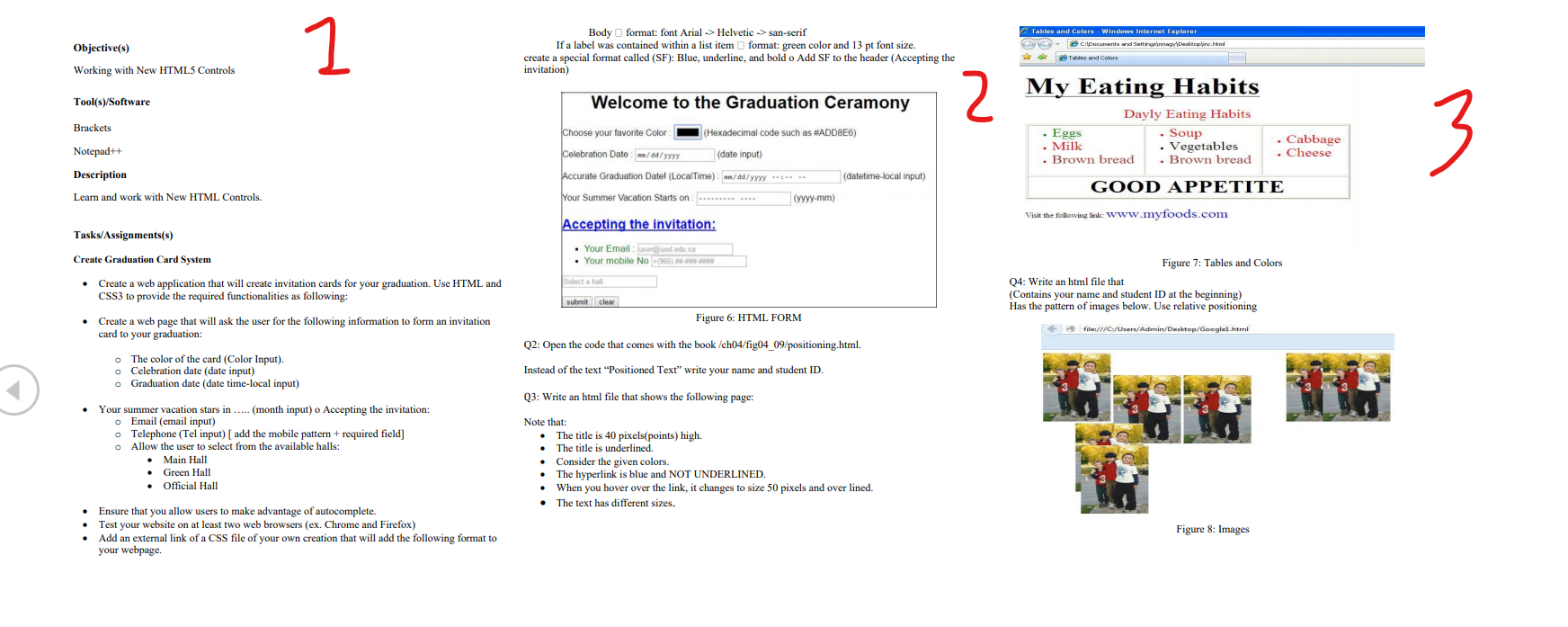
Objective(s) Working with New HTML5 Controls 1 Body O format: font Arial -> Helvetic-> san-serif If a label was contained within a list item format: green color and 13 pt font size. create a special format called (SF): Blue, underline, and bold o Add SF to the header (Accepting the invitation) Tables and Colors - Windows Internet Explorer e c:\Documents and Settingeinnaar Desktopline.html etables and Colors Tool(s)/Software Welcome to the Graduation Ceramony 2 Brackets My Eating Habits Dayly Eating Habits . Eggs Soup . Milk Vegetables . Brown bread . Brown bread Choose your favorite Color (Hexadecimal code such as #ADD8E6) 3 . Cabbage . Cheese Notepad++ Celebration Date: -/dd/yyyy (date input) Description Accurate Graduation Datel (LocalTime) n/dd/yyyy (datetime local input) GOOD APPETITE Learn and work with New HTML Controls. Your Summer Vacation Starts on yyyy-mm) Visit the following link: www.myfoods.com Accepting the invitation: Tasks/Assignments(s) Create Graduation Card System Your Email: useruod.edusa . Your mobile No (966) Selecta Create a web application that will create invitation cards for your graduation. Use HTML and CSS3 to provide the required functionalities as following: Figure 7: Tables and Colors Q4: Write an html file that (Contains your name and student ID at the beginning) Has the pattern of images below. Use relative positioning submit clear Figure 6: HTML FORM Create a web page that will ask the user for the following information to form an invitation card to your graduation: file:///C:/Users/Admin/Desktop/Google.html Q2: Open the code that comes with the book /ch04/fig04_09/positioning.html. o The color of the card (Color Input). o Celebration date (date input) o Graduation date (date time-local input) Instead of the text Positioned Text" write your name and student ID Q3: Write an html file that shows the following page: Your summer vacation stars in .... (month input) o Accepting the invitation: o Email (email input) Telephone (Tel input) ( add the mobile pattern + required field] O Allow the user to select from the available halls: Main Hall Green Hall Official Hall Note that: . The title is 40 pixels(points) high. The title is underlined. Consider the given colors. The hyperlink is blue and NOT UNDERLINED. When you hover over the link, it changes to size 50 pixels and over lined. The text has different sizes. Ensure that you allow users to make advantage of autocomplete. Test your website on at least two web browsers (ex. Chrome and Firefox) Add an external link of a CSS file of your own creation that will add the following format to your webpage. Figure 8: Images Objective(s) Working with New HTML5 Controls 1 Body O format: font Arial -> Helvetic-> san-serif If a label was contained within a list item format: green color and 13 pt font size. create a special format called (SF): Blue, underline, and bold o Add SF to the header (Accepting the invitation) Tables and Colors - Windows Internet Explorer e c:\Documents and Settingeinnaar Desktopline.html etables and Colors Tool(s)/Software Welcome to the Graduation Ceramony 2 Brackets My Eating Habits Dayly Eating Habits . Eggs Soup . Milk Vegetables . Brown bread . Brown bread Choose your favorite Color (Hexadecimal code such as #ADD8E6) 3 . Cabbage . Cheese Notepad++ Celebration Date: -/dd/yyyy (date input) Description Accurate Graduation Datel (LocalTime) n/dd/yyyy (datetime local input) GOOD APPETITE Learn and work with New HTML Controls. Your Summer Vacation Starts on yyyy-mm) Visit the following link: www.myfoods.com Accepting the invitation: Tasks/Assignments(s) Create Graduation Card System Your Email: useruod.edusa . Your mobile No (966) Selecta Create a web application that will create invitation cards for your graduation. Use HTML and CSS3 to provide the required functionalities as following: Figure 7: Tables and Colors Q4: Write an html file that (Contains your name and student ID at the beginning) Has the pattern of images below. Use relative positioning submit clear Figure 6: HTML FORM Create a web page that will ask the user for the following information to form an invitation card to your graduation: file:///C:/Users/Admin/Desktop/Google.html Q2: Open the code that comes with the book /ch04/fig04_09/positioning.html. o The color of the card (Color Input). o Celebration date (date input) o Graduation date (date time-local input) Instead of the text Positioned Text" write your name and student ID Q3: Write an html file that shows the following page: Your summer vacation stars in .... (month input) o Accepting the invitation: o Email (email input) Telephone (Tel input) ( add the mobile pattern + required field] O Allow the user to select from the available halls: Main Hall Green Hall Official Hall Note that: . The title is 40 pixels(points) high. The title is underlined. Consider the given colors. The hyperlink is blue and NOT UNDERLINED. When you hover over the link, it changes to size 50 pixels and over lined. The text has different sizes. Ensure that you allow users to make advantage of autocomplete. Test your website on at least two web browsers (ex. Chrome and Firefox) Add an external link of a CSS file of your own creation that will add the following format to your webpage. Figure 8: Images
Step by Step Solution
There are 3 Steps involved in it

Get step-by-step solutions from verified subject matter experts
 Study Help