



Question: Underneath the problem you will see buttons to 'check' or 'clear' your answers. (These will not appear when there are no inputs in the step,

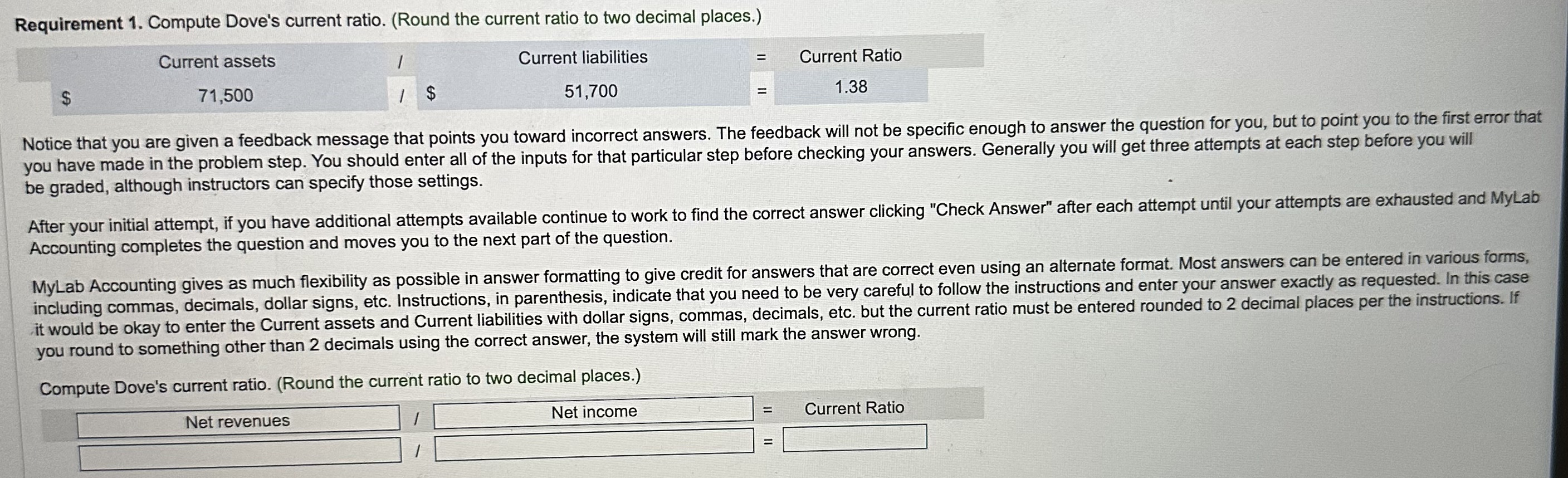
Underneath the problem you will see buttons to 'check' or 'clear' your answers. (These will not appear when there are no inputs in the step, instead you'll see the 'Continue' button to click on to move to the next portion of the exercise.) Use these carefully because 'clear" will delete all inputs in the question that haven't yet been graded. Check your answers only after entering all required inputs for that step. Buttons with the question number and the number of problems in the homework appear at the top of the screen. Use these buttons to move to other questions in the assignment. You will also see an Overview button that you can click at any time to see an Overview of how you're doing on the assignment. You can easily move back and forth between questions by clicking their name. Begin to work through Requirement 1. Click the first fill-in-the-blank and notice the dropdown list. The correct formula for this step is Current assets/Current liabilities = Current ratio. To illustate how the table will be graded, select an incorrect answer (choose Total stockholders' equity) and select the 'Check Answer' button at the bottom of the screen to see how you did: Requirement 1. Compute Dove's current ratio. (Round the current ratio to two decimal places.) Notice that you are given a feedback message that points you toward incorrect answers. The feedback will not be specific enough to answer the question for you, but to point you to the first error that you have made in the problem step. You should enter all of the inputs for that particular step before checking your answers. Generally you will get three attempts at each step before you will be graded, although instructors can specify those settings. After your initial attempt, if you have additional attempts available continue to work to find the correct answer clicking "Check Answer" after each attempt until your attempts are exhausted and MyLab Accounting completes the question and moves you to the next part of the question. MyLab Accounting gives as much flexibility as possible in answer formatting to give credit for answers that are correct even using an alternate format. Most answers can be entered in various forms, including commas, decimals, dollar signs, etc. Instructions, in parenthesis, indicate that you need to be very careful to follow the instructions and enter your answer exactly as requested. In this case it would be okay to enter the Current assets and Current liabilities with dollar signs, commas, decimals, etc. but the current ratio must be entered rounded to 2 decimal places per the instructions. If you round to something other than 2 decimals using the correct answer, the system will still mark the answer wrong. Underneath the problem you will see buttons to 'check' or 'clear' your answers. (These will not appear when there are no inputs in the step, instead you'll see the 'Continue' button to click on to move to the next portion of the exercise.) Use these carefully because 'clear" will delete all inputs in the question that haven't yet been graded. Check your answers only after entering all required inputs for that step. Buttons with the question number and the number of problems in the homework appear at the top of the screen. Use these buttons to move to other questions in the assignment. You will also see an Overview button that you can click at any time to see an Overview of how you're doing on the assignment. You can easily move back and forth between questions by clicking their name. Begin to work through Requirement 1. Click the first fill-in-the-blank and notice the dropdown list. The correct formula for this step is Current assets/Current liabilities = Current ratio. To illustate how the table will be graded, select an incorrect answer (choose Total stockholders' equity) and select the 'Check Answer' button at the bottom of the screen to see how you did: Requirement 1. Compute Dove's current ratio. (Round the current ratio to two decimal places.) Notice that you are given a feedback message that points you toward incorrect answers. The feedback will not be specific enough to answer the question for you, but to point you to the first error that you have made in the problem step. You should enter all of the inputs for that particular step before checking your answers. Generally you will get three attempts at each step before you will be graded, although instructors can specify those settings. After your initial attempt, if you have additional attempts available continue to work to find the correct answer clicking "Check Answer" after each attempt until your attempts are exhausted and MyLab Accounting completes the question and moves you to the next part of the question. MyLab Accounting gives as much flexibility as possible in answer formatting to give credit for answers that are correct even using an alternate format. Most answers can be entered in various forms, including commas, decimals, dollar signs, etc. Instructions, in parenthesis, indicate that you need to be very careful to follow the instructions and enter your answer exactly as requested. In this case it would be okay to enter the Current assets and Current liabilities with dollar signs, commas, decimals, etc. but the current ratio must be entered rounded to 2 decimal places per the instructions. If you round to something other than 2 decimals using the correct answer, the system will still mark the answer wrong
Step by Step Solution
There are 3 Steps involved in it

Get step-by-step solutions from verified subject matter experts