







Question: Unit 3 Guided Practice: Debugging Submit Assignment Due Sunday by 11:59pm Points 100 Submitting a file upload Objective : At the conclusion of this lab
Unit 3 Guided Practice: Debugging
Submit Assignment
Due Sunday by 11:59pm
Points 100
Submitting a file upload
Objective: At the conclusion of this lab the student will be able to compile a program using Visual Studio 2015 and debug coding errors.
Resources required:
Hardware: XenDesktop
Software: Visual Studio 2015
Instructions
Step 1
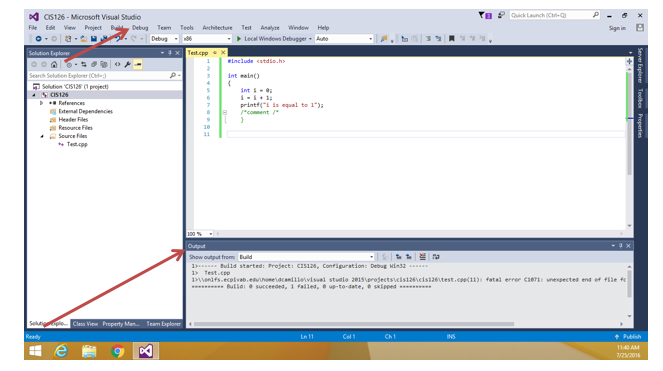
Open your Visual Studio 2015 XenDesktop image, create a new project, and type the coding segments down below into the compiler. Run the program(s) (Debug > Start without debugging). If you are asked to re-build, select yes to ensure that you are compiling the latest typed code. If you are asked to run your last successful build, check the box not to ask you again, and select No. Make sure that your output details box is open so that you can see where any errors may have occurred. See screen shot below:
Step 2
Execute the following coding segment and identify the errors in the program. Debug the program and provide the correct version of the code. Note: The errors can be syntactical or logical. 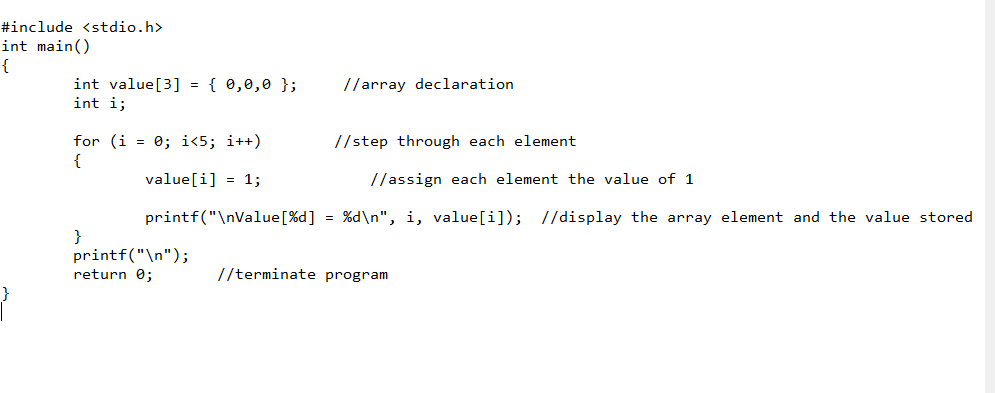
Providing the correct code from up above adjust the program to hold 10 elements in the array and store the value of 100 in each. Submit the new code for review.
ast26-Microsoft Visual Studio ile Ede View Project Debug Team Teels Aechitecture Test Analyte Windew Help rint" s equal to 1 = Renounce Fies how output from Buid Bulid started: Project: CSIM, Conrieration: Debug M32 ipienifs ecolvabesacamiilevisuai stuale ze1s erojectsicisi2sicistaeitest.cii) atai erree caerii unespectes ens o iie fe
Step by Step Solution
There are 3 Steps involved in it

Get step-by-step solutions from verified subject matter experts
 Study Help