Question: Unit Project 2: Lessons 6-10 (84 marks total) Demonstrate what you have learned in the last five (5) lessons by completing the following in QuickBooks
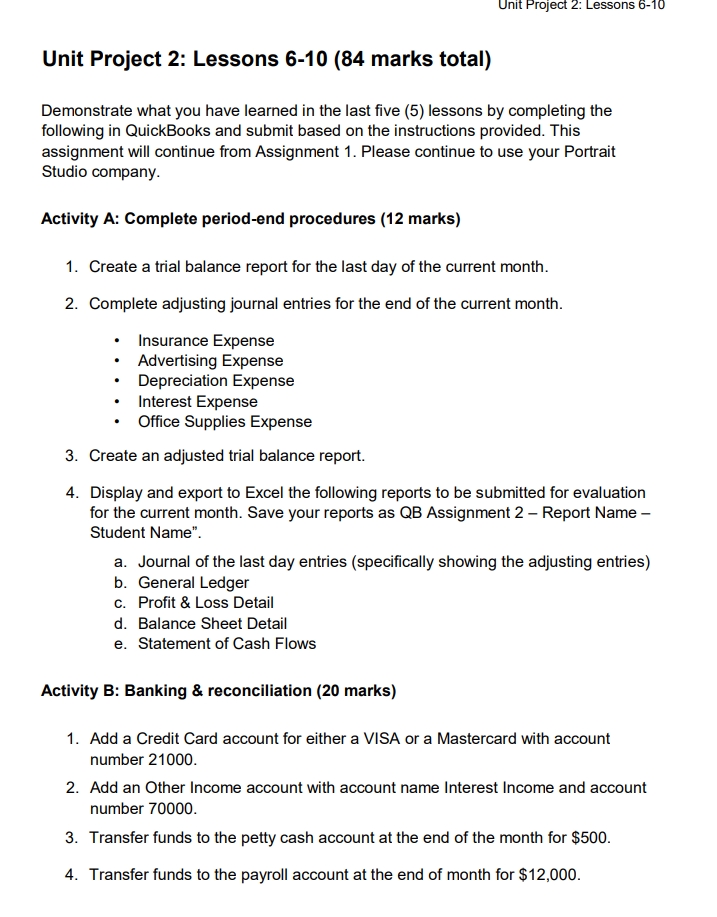
Unit Project 2: Lessons 6-10 (84 marks total) Demonstrate what you have learned in the last five (5) lessons by completing the following in QuickBooks and submit based on the instructions provided. This assignment will continue from Assignment 1. Please continue to use your Portrait Studio company. Activity A: Complete period-end procedures (12 marks) 1. Create a trial balance report for the last day of the current month. 2. Complete adjusting journal entries for the end of the current month. ? Insurance Expense ? Advertising Expense ? Depreciation Expense ? Interest Expense ? Office Supplies Expense 3. Create an adjusted trial balance report. 4. Display and export to Excel the following reports to be submitted for evaluation for the current month. Save your reports as QB Assignment 2 - Report Name - Student Name". a. Journal of the last day entries (specifically showing the adjusting entries) b. General Ledger c. Profit & Loss Detail d. Balance Sheet Detail e. Statement of Cash Flows
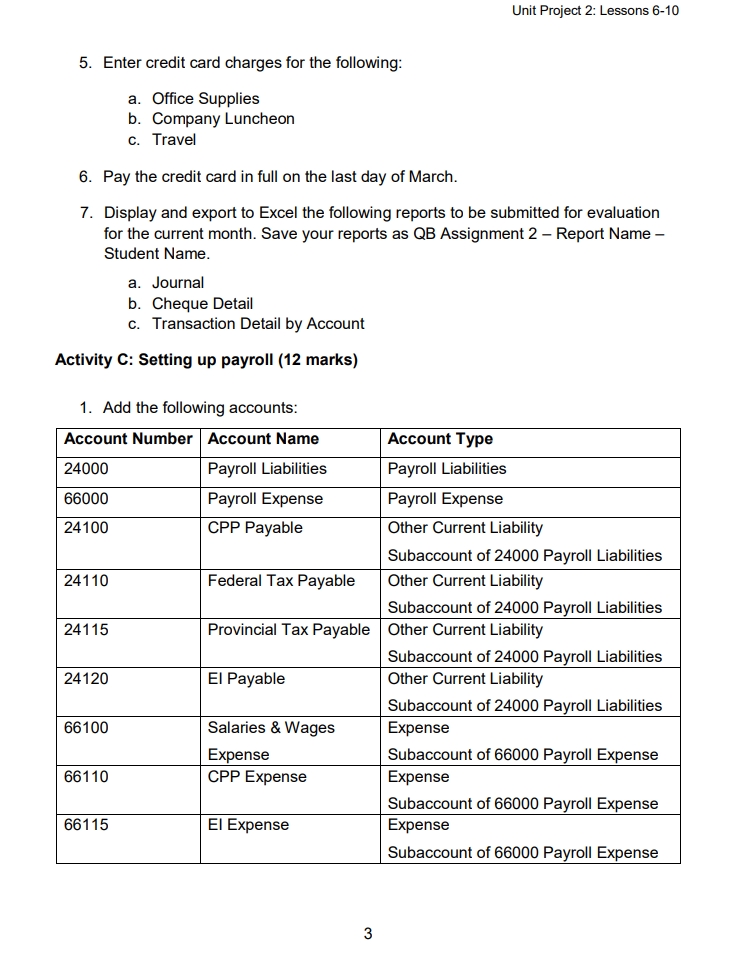
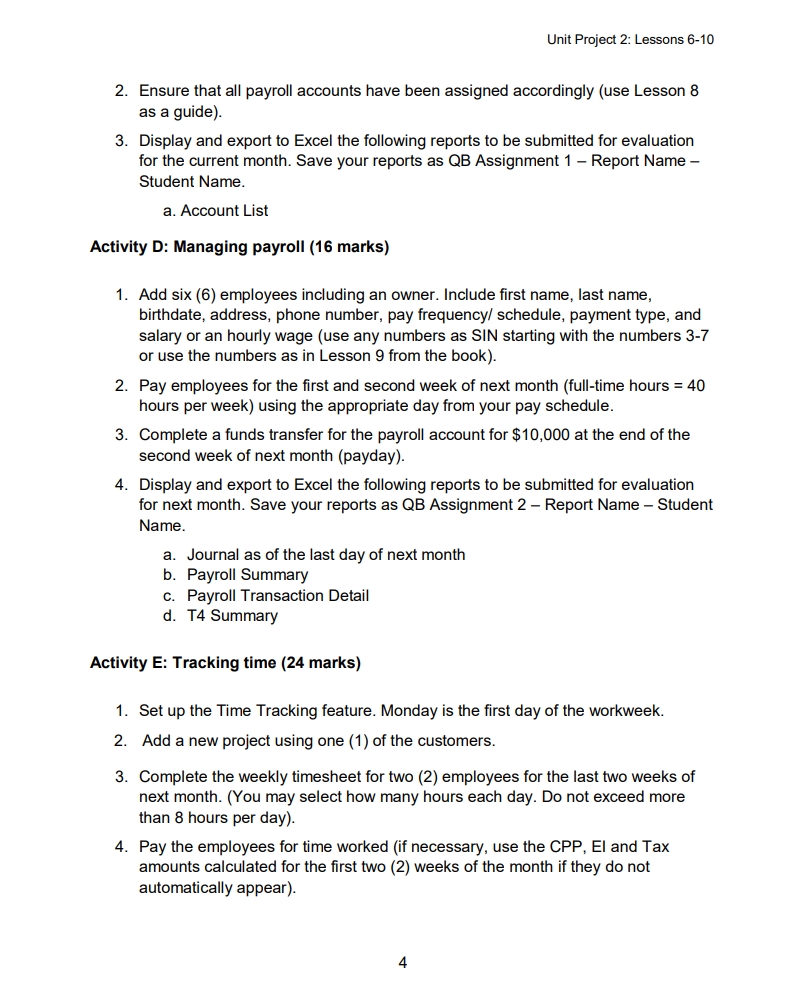
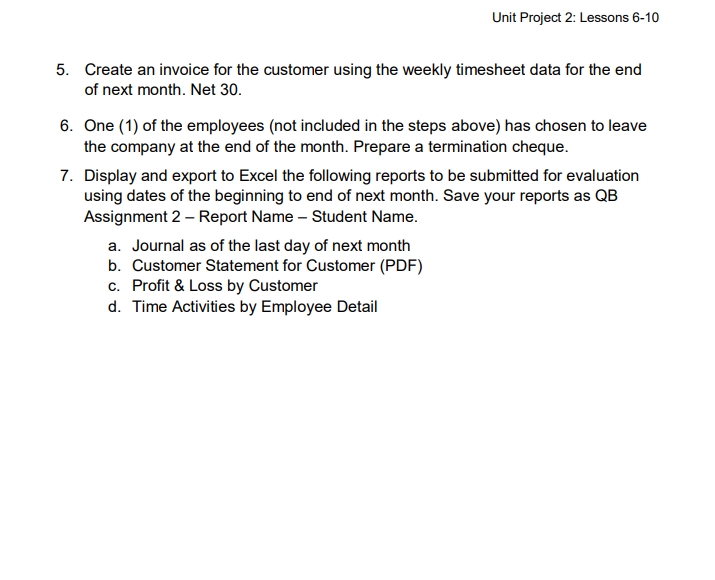
Unit Project 2: Lessons 6-10 Unit 2 Culminating Project (Following Completion of Lessons 6-10 in Quickbooks Online: A Guide for Canadian Small Business) Unit Project 2: Lessons 6-10 Unit Project 2: Lessons 6-10 (84 marks total) following in QuickBooks and submit based on the instructions provided The assignment will continue from Assignment 1. Please continue to use your Portrait Activity A: Complete period-end procedures (12 marks) 1. Create a trial balance report for the last day of the current month. 2. Complete adjusting journal entries for the end of the current month surance Expense . Depreciation Expens . Interest Expense . Office Supplies Expense Create an adjusted trial balance report. 4. Display and export to Excel the following reports to be submitted for evaluation for the current month. Save your reports as QB Assignment 2 - Report Name - Student Name". a. Journal of the last day entries (specifically showing the adjusting entries) C. Profit & Loss Detail e. Statement of Cash Flows Activity B: Banking & reconciliation (20 marks) . Add a Credit Card account for eith number 21000. 2. Add an Other Income account with account name Interest Income and account number 70000. . Transfer funds to the petty cash account at the end of the month for $500. 4. Transfer funds to the payroll account at the end of month for $12,000 Unit Project 2: Lessons 6-10 5. Enter credit card charges for the following: . Office Supplies b. Company Luncheon . Pay the credit card in full on the last day of March. - Display and export to Excel the following reports to be submitted for evaluation Student Name. a. Journal Transaction Detail by Account Activity C: Setting up payroll (12 marks) 1. Add the following accounts: Account Number Account Name Account Type 24000 Payroll Liabilities Payroll Liabilities 66000 Payroll Expense Payroll Expense 24 100 CPP Payable Other Current Liability Subaccount of 24000 Payroll Liabilities 241 10 Federal Tax Payable Other Current Liability 241 15 Provincial Tax Payable Oth baccount of 24000 Payroll Liabilities er Current Liability 24120 El Payable Subaccount of 240 Other Current Liability 66 100 Salaries & Wages Subaccount of 24000 Payroll Liabilities Expense CPP Expense Subaccount of 66000 Payroll Expense Expense 661 15 El Expense baccount of 66000 Payroll Expense Subaccount of 66000 Payroll Expense Unit Project 2: Lessons 6-10 as a guide). Ensure that all payroll accounts have been assigned accordingly (use Lesson 8 3. Display and export to Excel the following reports to be submitted for evaluation for the current month. Save your reports as QB Assignment 1 - Report Name - Student Name. a. Account List Activity D: Managing payroll (16 marks) . Add six (6) employees including an owner. Include first name, last name, splace or an hounds wane (use any numbers as SIN starting with the numbers 3-7 or use the numbers as in Lesson 9 from the book). 2. Pay employees for the first and second week of next month (full-time hours = 40 hours per week) using the appropriate day from your pay schedule. econd week of poster for the payroll account for $10,000 at the end of the . Display and export to Excel the following reports to be submitted for evaluation for next month. Save your reports as QB Assignment 2 - Report Name - Student payroll surorthe last b. Payroll Summary C. Payroll Transaction Detail d. T4 Summary Activity E: Tracking time (24 marks) 1. Set up the Time Tracking feature. Monday is the first day of the workweek. 2. Add a new project using one (1) of the customers. 3. Complete the weekly timesheet for two (2) employees for the last two weeks of next month. ( You may select how many hours each day. Do not exceed more than 8 hours per day). artists calculated for the first two (2) weeks of the month if they do no automatically appear). Unit Project 2: Lessons 6-10 5. Create an invoice for the customer of next month. Net 30. weekly timesheet data for the end roany at the end of the month prom steps above) has chosen to leave 7. Display and export to Excel the following reports to be submitted for evaluation the beginning to end of next month. Save your reports as QB Assignment 2 - Report Name - Student Name. b Customer Statement for customer (PDE C. Profit & Loss by Customer . Time Activities by Employee DetailUnit Project 2: Lessons 6-10 5. Enter credit card charges for the following: a. Office Supplies b. Company Luncheon c. Travel 6. Pay the credit card in full on the last day of March. 7. Display and export to Excel the following reports to be submitted for evaluation for the current month. Save your reports as QB Assignment 2 Report Name Student Name. a. Journal b. Cheque Detail c. Transaction Detail by Account Activity C: Setting up payroll (12 marks) 1. Add the following accounts: 24000 Payroll Liabilities Payroll Liabilities 66000 F'ayroll Expense F'aymll Expense 24100 CPP Payable Other Current Liability -_ Subaccount of 24000 Payroll Liabilities 24110 Federal Tax Payable Other Current Liability -_ Subaccount of 24000 Payroll Liabilities 24115 Provincial Tax Payable | Other Current Liability e et oo s 24120 El Payable Other Current Liability -_ Subaccount of 24000 Payroll Liabilities 66100 Salaries & Wages Expense " e | asongt CPP Expense Expense T onrag o 66115 El Expense Expense T o Unit Project 2: Lessons 6-10 2. Ensure that all payroll accounts have been assigned accordingly (use Lesson 8 as a guide). 3. Display and export to Excel the following reports to be submitted for evaluation for the current month. Save your reports as QB Assignment 1 Report Name Student Name. a. Account List Activity D: Managing payroll (16 marks) 1. Add six (6) employees including an owner. Include first name, last name, birthdate, address, phone number, pay frequency/ schedule, payment type, and salary or an hourly wage (use any numbers as SIN starting with the numbers 3-7 or use the numbers as in Lesson 9 from the book). 2. Pay employees for the first and second week of next month (full-time hours = 40 hours per week) using the appropriate day from your pay schedule. 3. Complete a funds transfer for the payroll account for $10,000 at the end of the second week of next month (payday). 4. Display and export to Excel the following reports to be submitted for evaluation for next month. Save your reports as QB Assignment 2 Report Name Student Name. a. Journal as of the last day of next month b. Payroll Summary c. Payroll Transaction Detail d. T4 Summary Activity E: Tracking time (24 marks) 1. Set up the Time Tracking feature. Monday is the first day of the workweek. 2. Add a new project using one (1) of the customers. 3. Complete the weekly timesheet for two (2) employees for the last two weeks of next month. (You may select how many hours each day. Do not exceed more than 8 hours per day). 4. Pay the employees for time worked (if necessary, use the CPP, El and Tax amounts calculated for the first two (2) weeks of the month if they do not automatically appear). Unit Project 2: Lessons 6-10 5. Create an invoice for the customer using the weekly timesheet data for the end of next month. Net 30. 6. One (1) of the employees (not included in the steps above) has chosen to leave the company at the end of the month. Prepare a termination cheque. 7. Display and export to Excel the following reports to be submitted for evaluation using dates of the beginning to end of next month. Save your reports as QB Assignment 2 Report Name Student Name. a. Journal as of the last day of next month b. Customer Statement for Customer (PDF) c. Profit & Loss by Customer d. Time Activities by Employee Detail Unit Project 2: Lessons 6-10 Unit Project 2: Lessons 6-10 (84 marks total) Demonstrate what you have learned in the last five (5) lessons by completing the following in QuickBooks and submit based on the instructions provided. This assignment will continue from Assignment 1. Please continue to use your Portrait Studio company. Activity A: Complete period-end procedures (12 marks) 1. Create a trial balance report for the last day of the current month. 2. Complete adjusting journal entries for the end of the current month. * |nsurance Expense Advertising Expense + Depreciation Expense * |nterest Expense Office Supplies Expense 3. Create an adjusted trial balance report. 4. Display and export to Excel the following reports to be submitted for evaluation for the current month. Save your reports as QB Assignment 2 Report Name Student Name\"". . Journal of the last day entries (specifically showing the adjusting entries) . General Ledger Profit & Loss Detail . Balance Sheet Detail . Statement of Cash Flows O Qa0 oo Activity B: Banking & reconciliation (20 marks) 1. Add a Credit Card account for either a VISA or a Mastercard with account number 21000. 2. Add an Other Income account with account name Interest Income and account number 70000. 3. Transfer funds to the petty cash account at the end of the month for $500. 4. Transfer funds to the payroll account at the end of month for $12,000










 Study Help