







Question: Unix 5. Write a bash shell script to make backups of files and directories. Your script should (10) accept one or more command line arguments;
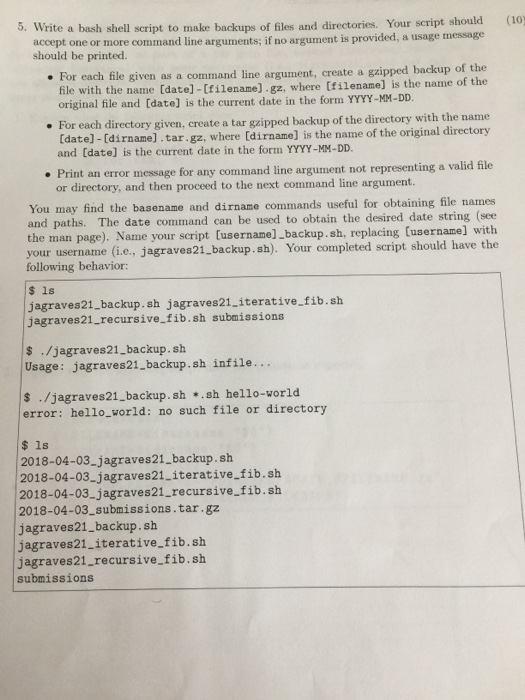
5. Write a bash shell script to make backups of files and directories. Your script should (10) accept one or more command line arguments; if no argument is provided, a usage message should be printed. For each file given as a command line argument, create a gzip file with the name [date]-[filename].gz, where (tilename] is the name of the original file and [date] is the current date in the form YYYY-MM-DD. line argument, create a gzipped backup of the up of the directory with the name For each directory given, create a tar gzipped back [date] -[dirname].tar.gz, where [dirname] is the name of the original directory and [date] is the current date in the form YYYY-MM-DD. Print an error message for any command line argument not representing a valid file or directory, and then proceed to the next command line argument. You may find the basename and dirname commands useful for obtaining file names and paths. The date command can be used to obtain the desired date string (see the man page). Name your script [username]_backup. sh, replacing (username] with r username (i.e., jagraves21 backup. sh). Your completed script should have the following behavior: $ 1s jagraves21.backup. sh jagraves21.iterative.fib.sh jagraves21_recursive fib.sh submissions s ./jagraves21_backup. sh Usage: jagraves21.backup.sh infile... s ./jagraves21_backup. sh ..sh hello-vorld error: hello_world: no such file or directory $ 1s 2018-04-03 jagraves21_backup.sh 2018-04-03.jagraves21.iterative.fib.sh 2018-04-03_jagraves21_recursive fib.sh 2018-04-03 submissions.tar.gz jagraves21_backup. sh jagraves21_iterative_fib.sh jagraves21_recursive fib.sh submissions
Step by Step Solution
There are 3 Steps involved in it

Get step-by-step solutions from verified subject matter experts
 Study Help