







Question: Update 1 0 / 1 8 / 2 4 : refer to the demonstration in lecture; instructions below updated for clarification Hello All, For this
Update : refer to the demonstration in lecture; instructions below updated for clarification
Hello All,
For this assignment, you will be debugging the the following example:
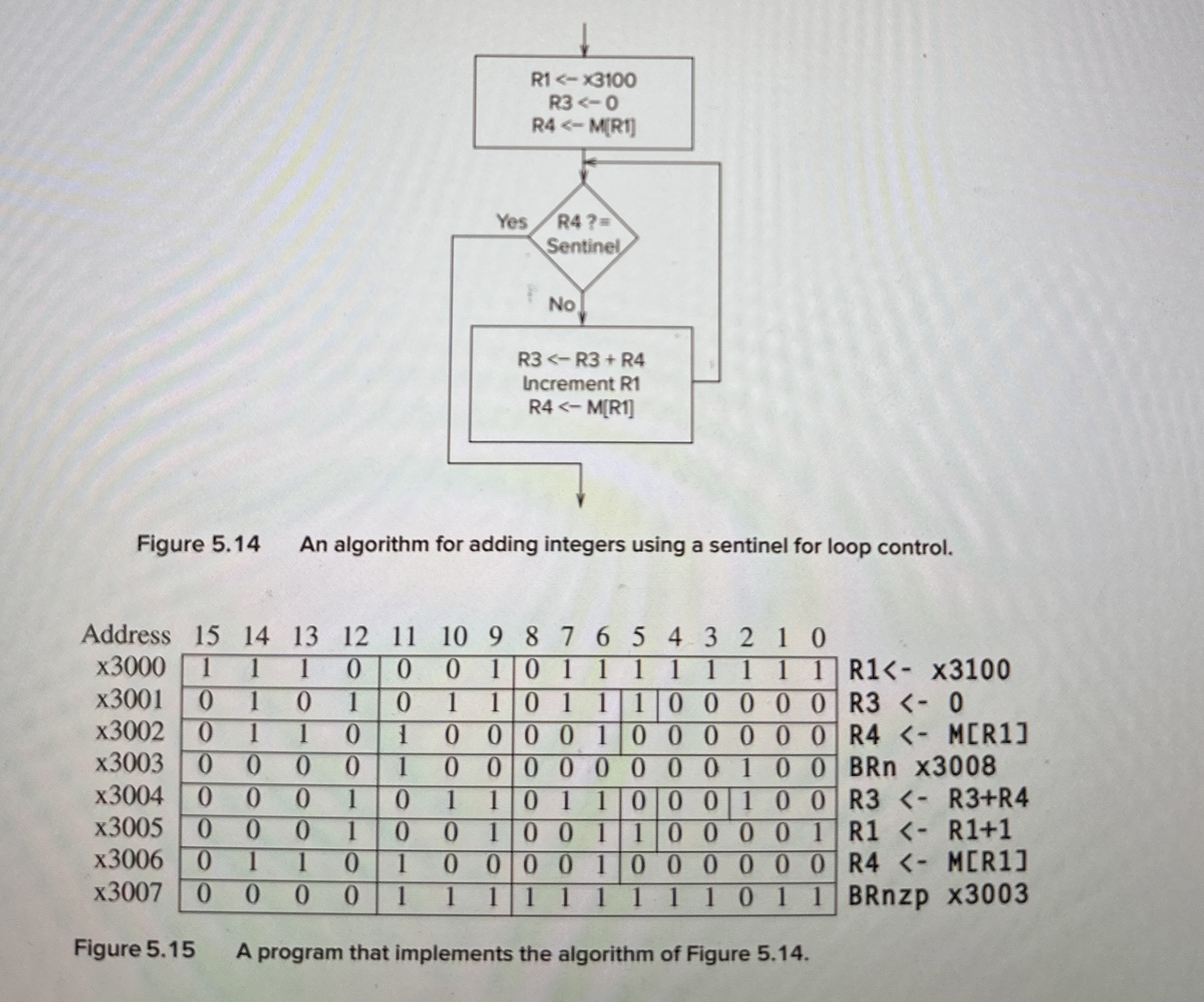
Copy machine language binary program from Figure to your LC simulator
Figure is a flowchart of the "algorithm for adding integers using a sentinel for loop control". Figure is the program you will running and testing.
Add improved comments for each line, overall program, and other important info like what each register does; if you are unsure of something, write down your questions as comments in the code or a separate doc
Create object file & load the simulator
Set values for integers as follows starting @ x:
For the first iteration, since everything is also set to the value specified in the course book
For following iterations, since we randomize the machine, let's just leave alone
Verify the initial & final values update code comments if things become more clear
Do whatever other tasks you need to in order to verify that the program works as intended.
Choose "randomize machine" and run the program again go to step ; do this several times up to times It should fail one of the times.
If it doesn't fail any of the times, consider what could happen to make the program fail
Write down any remaining questions concerns about this program either in comments in code or as a separate doc
While it seemed to be working from first simulation & possibly even after randomizing, eventually it stopped working as expected after more randomize attempts.
You are allowed to work on this assignment in groups students max please put all your names on your submission. Group submissions are enabled on Gradescope please email if there are issues submitting as a group If working on this assignment as a group, everyone on the team is responsible for making sure the submission is submitted correctly.
NOTE: each time your randomize the machine, be sure to set the integer values from to
Homework Template can submit handwritten version, make sure to include all questions in template:
Small Assignment Template docx darr pdf darr
Be sure to verifyidentify your solution location for each question in your submission
A template is available here
Recreate the problem & take a screenshot showing the simulator showing the incorrect register values Note: this may take several randomizations.
Step through the code using "step over" and identify the point where this problem occurs show the screenshot showing the incorrect register values List the line number that is being executed dots as well as any other important information maybe the value located @ x
Briefly describe what the problem is and why it only happens sometimes.
Propose a fixmodification that will guarantee that we will get the expected result regardless of how many times we randomize the machine.Figure An algorithm for adding integers using a sentinel for loop control.
R x
R
R MR
BRn x
R RR
R R
R MR
BRnzp x
Figure A program that implements the algorithm of Figure
Step by Step Solution
There are 3 Steps involved in it
1 Expert Approved Answer
Step: 1 Unlock

Question Has Been Solved by an Expert!
Get step-by-step solutions from verified subject matter experts
Step: 2 Unlock
Step: 3 Unlock
 Study Help